MENU
XSLT in JavaScript
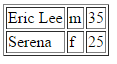
An XML document and an XSLT stylesheet can each be loaded with XMLHttpRequest, then applied in the browser. Modern browsers (Chrome, Firefox, Opera, etc.) expose the XSLTProcessor interface: importStylesheet() loads the stylesheet, and transformToFragment() applies it to the source document, returning a document fragment that can be appended to the page. Legacy Internet Explorer instead exposes a transformNode() method directly on the loaded XML document, returning the transformation result as a string that can be assigned to innerHTML.ch07-xslt-people.xml:
<?xml version="1.0" encoding="UTF-8" ?>
<!-- people.xml -->
<people>
   <person>
      <name>Eric Lee</name>
      <gender>m</gender>
      <age>35</age>
   </person>
   <person>
      <name>Serena</name>
      <gender>f</gender>
      <age>25</age>
   </person>
</people>ch07-xslt-people.xslt:
<?xml version="1.0" encoding="UTF-8"?>
<!-- people.xslt -->
<xsl:stylesheet version="3.0"
     xmlns:xsl="http://www.w3.org/1999/XSL/Transform">
   <xsl:output method="html" version="5.0"
               encoding="UTF-8" indent="yes"/>
   <xsl:template match="people">
      <table border="1">
      <xsl:for-each select="person">
         <tr>
            <td><xsl:value-of select="name"/></td>
            <td><xsl:value-of select="gender"/></td>
            <td><xsl:value-of select="age"/></td>
         </tr>
      </xsl:for-each>
      </table>
   </xsl:template>
</xsl:stylesheet>ch07-xslt-transform.html:
<!DOCTYPE html>
<html>
<head></head>
<body></body>
   <script>
      function loadXMLDoc(file){
         xhr=new XMLHttpRequest();
         xhr.open("GET",file,false);
         xhr.responseType = 'msxml-document';
         xhr.send();
         return xhr.responseXML;
      }
      XML  = loadXMLDoc("ch07-xslt-people.xml");
      XSLT = loadXMLDoc("ch07-xslt-people.xslt");
      // code for IE
      if (window.ActiveXObject || "ActiveXObject" in window){
         newXML = XML.transformNode(XSLT);
         document.getElementsByTagName("body")[0].innerHTML = newXML;
      }
      // code for Chrome, Firefox, Opera, etc.
      else if (document.implementation &&
               document.implementation.createDocument){
         xsltProcessor = new XSLTProcessor();
         xsltProcessor.importStylesheet(XSLT);
         newXML = xsltProcessor.transformToFragment(XML, document);
         document.getElementsByTagName("body")[0].appendChild(newXML);
      }
   </script>
</html>