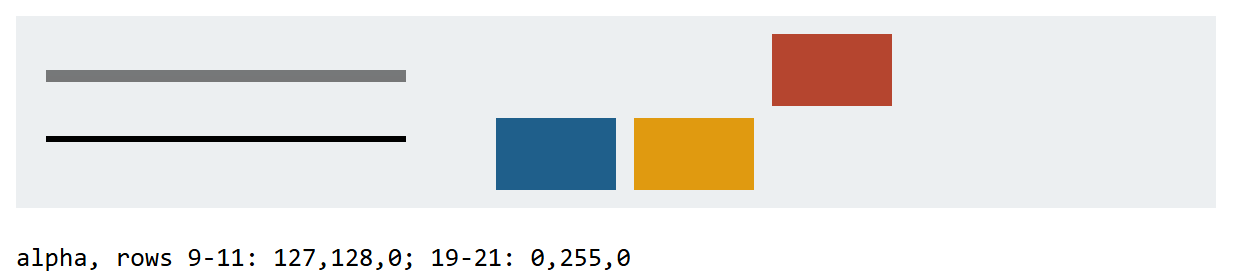
The origin is the top-left corner and y grows down. Coordinates name the lines between pixels, so a one-unit line on y = 10 half-covers rows 9 and 10 and paints both at half strength: put odd-width lines on half pixels. Styles, transform and clip form the drawing state; save() pushes a copy onto a stack and restore() pops it (the path and pixels are not saved). ctx.reset(), Baseline widely available since June 2026, clears it all.
<canvas id="c" width="200" height="32" style="width:600px; image-rendering:pixelated;
  background:#eceff1"></canvas>
<pre id="out"></pre>
<script>
  const ctx = c.getContext('2d');
  ctx.moveTo(5, 10);  ctx.lineTo(65, 10);  ctx.moveTo(5, 20.5);  ctx.lineTo(65, 20.5);
  ctx.stroke();  ctx.fillStyle = '#1f5f8b';  ctx.save();         // blue saved
  ctx.fillStyle = '#e09a10';  ctx.translate(23, 0);  ctx.save(); // orange and the move saved
  ctx.fillStyle = '#b5452f';  ctx.translate(23, 0);  ctx.fillRect(80, 3, 20, 12);
  ctx.restore();  ctx.fillRect(80, 17, 20, 12);                   // orange, still moved
  ctx.restore();  ctx.fillRect(80, 17, 20, 12);                   // blue, at the origin
  const a = y => ctx.getImageData(30, y, 1, 1).data[3];
  out.textContent = `alpha, rows 9-11: ${[9, 10, 11].map(a)}; 19-21: ${[19, 20, 21].map(a)}`;
</script>