arc(x, y, r, start, end, ccw) takes radians from the positive x axis, clockwise because y points down. ellipse() adds two radii and a rotation; arcTo() rounds a corner between two tangents. quadraticCurveTo() bends toward one control point and bezierCurveTo() toward two, like SVG's Q and C.
<canvas id="c" style="width:600px; height:126px"></canvas><script src="hidpi.js"></script>
<script>
  const ctx = hidpi(c), noon = -Math.PI / 2;                  // twelve o'clock
  ctx.lineWidth = 14;  ctx.strokeStyle = '#e09a10';  ctx.beginPath();
  ctx.arc(60, 62, 48, noon, noon + 2 * Math.PI * 4.6 / 5);  ctx.stroke();
  ctx.beginPath();  ctx.moveTo(150, 30);                     // the nest of Section 1.2.6
  ctx.quadraticCurveTo(234, 54, 318, 30);  ctx.quadraticCurveTo(310, 94, 234, 96);
  ctx.quadraticCurveTo(158, 94, 150, 30);  ctx.fillStyle = '#263238';  ctx.fill();
  const [c1, c2] = [[390, 8], [520, 118]];
  ctx.beginPath();  ctx.moveTo(360, 110);  ctx.bezierCurveTo(...c1, ...c2, 590, 20);
  ctx.lineWidth = 3;  ctx.strokeStyle = '#5b3f99';  ctx.stroke();  ctx.fillStyle = '#b5452f';
  for (const [x, y] of [c1, c2]) ctx.fillRect(x - 4, y - 4, 8, 8);    // control points
</script>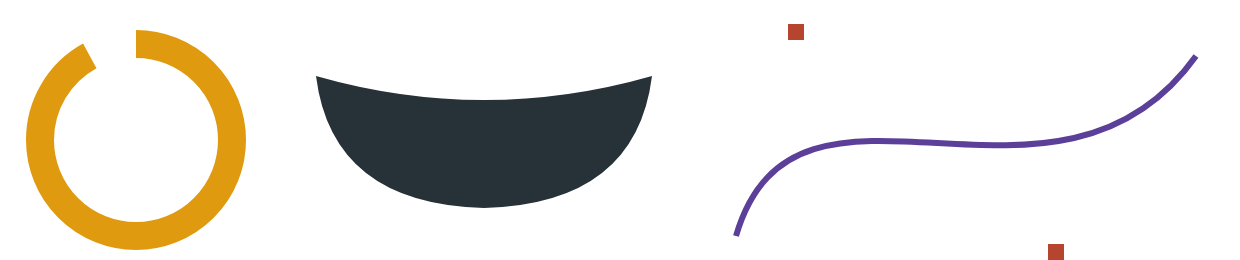
The curve heads toward its control points but touches neither. arc() joins its start to any current point with a straight line, so begin a new path first.
<!doctype html>
<style>
  body { margin: 0; padding: 8px; font: 13px system-ui, sans-serif; background: #fafaf7; }
  canvas { width: 100%; max-width: 600px; height: 160px; display: block; background: #fff; border: 1px solid #ddd; touch-action: none; }
</style>
<canvas id="c"></canvas>
<p>Drag the red control points of the Bézier curve.</p>
<script>
  function hidpi(c, r = devicePixelRatio) {
    c.width = c.clientWidth * r;  c.height = c.clientHeight * r;
    const ctx = c.getContext('2d');  ctx.scale(r, r);  return ctx;
  }
  const c = document.getElementById('c');
  const ctx = hidpi(c), noon = -Math.PI / 2;               // twelve o'clock
  const controls = [[390, 10], [520, 150]];
  let dragging = null;

  function draw() {
    ctx.clearRect(0, 0, 600, 160);
    // A rating ring: 4.6 of 5, angles in radians, clockwise from the x axis
    ctx.lineWidth = 14;  ctx.strokeStyle = '#eee';
    ctx.beginPath();  ctx.arc(70, 80, 50, 0, 2 * Math.PI);  ctx.stroke();
    ctx.strokeStyle = '#e09a10';  ctx.lineCap = 'round';
    ctx.beginPath();  ctx.arc(70, 80, 50, noon, noon + 2 * Math.PI * 4.6 / 5);  ctx.stroke();
    ctx.font = 'bold 22px Georgia';  ctx.fillStyle = '#263238';  ctx.textAlign = 'center';
    ctx.fillText('4.6', 70, 88);

    // The BookNest nest: three quadratic curves, each bending toward one control point
    ctx.beginPath();  ctx.moveTo(160, 50);
    ctx.quadraticCurveTo(244, 74, 328, 50);
    ctx.quadraticCurveTo(320, 124, 244, 126);
    ctx.quadraticCurveTo(168, 124, 160, 50);
    ctx.fillStyle = '#263238';  ctx.fill();

    // A cubic Bézier bends toward two control points but touches neither
    const [c1, c2] = controls;
    ctx.lineWidth = 1;  ctx.strokeStyle = '#bbb';  ctx.lineCap = 'butt';
    ctx.beginPath();  ctx.moveTo(360, 140);  ctx.lineTo(...c1);
    ctx.moveTo(590, 20);  ctx.lineTo(...c2);  ctx.stroke();
    ctx.beginPath();  ctx.moveTo(360, 140);  ctx.bezierCurveTo(...c1, ...c2, 590, 20);
    ctx.lineWidth = 3;  ctx.strokeStyle = '#5b3f99';  ctx.stroke();
    ctx.fillStyle = '#b5452f';
    for (const [x, y] of controls) ctx.fillRect(x - 5, y - 5, 10, 10);
  }

  const toLocal = e => { const b = c.getBoundingClientRect(); return [e.clientX - b.left, e.clientY - b.top]; };
  c.addEventListener('pointerdown', e => {
    const [x, y] = toLocal(e);
    dragging = controls.find(p => Math.hypot(p[0] - x, p[1] - y) < 12) || null;
    if (dragging) c.setPointerCapture(e.pointerId);
  });
  c.addEventListener('pointermove', e => {
    if (!dragging) return;
    const [x, y] = toLocal(e);
    dragging[0] = Math.max(0, Math.min(600, x));  dragging[1] = Math.max(0, Math.min(160, y));
    draw();
  });
  c.addEventListener('pointerup', () => dragging = null);
  draw();
</script>