MENU
Variables and Constants
All variable names are preceded by the $ symbol. Variables need not be declared before values can be assigned to them:| $a = trUE; | // boolean |
| $b = Null; | // NULL |
| $c = 033; | // octal integer |
| $d = -0x1C; | // hexadecimal integer |
| $e = 0b101; | // binary integer |
| $f = 1.331; | // float |
| $g = 1234e-3; | // exponential float |
| $h = intval(“5.7”); | # 5, integer conversion |
| $i = isset($a,$b,$c); | # false, $b is NULL |
| $j = empty($c); | #false, $c is not false |
| $k = empty($z); | # true, $z is undefined |
While the names of variables are case-sensitive, the values true, false and NULL are not. 0, the empty string””, the string “0”, an array with zero elements and NULL are considered false.
The size of an integer can be determined using PHP_INT_SIZE. The maximum allowed value of an integer can be determined using PHP_INT_MAX. If an integer overflows, it will be interpreted as a float instead.
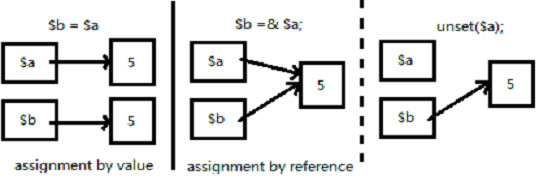
Use &$variable for assignment by reference. For example, {$a=4; $b= &$a; $a=5;} will result in $b getting a value of 5 since $a and $b now point to the same value. The bindings of variables may be broken with the unset() function, eg.: unset($a,$b). Note that unsetting $a alone will not unset $b after the assignment by reference.
Constants are identifiers with values that do not change. The names of constants do not start with $. Their values can be directly accessed anywhere, even in a function:
| define ("a",100); | // one way to define a constant |
| const b=3; | // another way to define a constant |
| echo a*b; | // one way to use a constant |
| echo constant(“b”); | //another way to use it |
| echo defined(“a”); | // true |
Since PHP 7.4, an underscore (_) can be used inside numeric literals as a visual separator between digits, making long numbers easier to read. It has no effect on the value, and is allowed in integers, floats, and in binary/octal/hexadecimal literals – as long as it sits between two digits (never leading, trailing, or doubled up).
<?php
$million = 1_000_000;
$price = 1_234.567_8;
$binary = 0b0100_1010;
$hex = 0xCAFE_F00D;

echo $million . "\n";
echo $price . "\n";
echo $binary . "\n";
echo $hex . "\n";
?>1000000
1234.5678
74
3405705229
<?php
$oldStyle = 016;
$newStyle = 0o16;

echo $oldStyle . "\n";
echo $newStyle . "\n";
var_dump($oldStyle === $newStyle);
?>14
14
bool(true)