OrbitControls keeps the camera on a sphere around controls.target: drag to orbit, wheel or pinch to dolly, right-drag to pan. Call update() after changing the target or camera by hand. A page without animation can render only on the controls' change event. This page sends itself a 25-pixel leftward drag:
<script src="three-map.js"></script>
<script type="module">
import { OrbitControls } from 'three/addons/controls/OrbitControls.js';
import { createStage, createShelf, loadCovers } from './bookshelf.js';
const { renderer, scene, camera } = createStage({ width: 640, height: 190 });
scene.add(createShelf(await loadCovers()));
const controls = new OrbitControls(camera, renderer.domElement);
controls.target.set(0, -0.1, 0);                      // orbit the shelf, not the world origin
controls.update();
const render = () => renderer.render(scene, camera);
controls.addEventListener('change', render);          // no loop: draw only when the view moves
render();
const drag = (type, x) => renderer.domElement.dispatchEvent(new PointerEvent(type, {
  pointerId: 1, pointerType: 'mouse', isPrimary: true, button: 0, buttons: 1,
  clientX: x, clientY: 95, bubbles: true }));
drag('pointerdown', 400);
drag('pointermove', 375);
drag('pointerup', 375);
requestAnimationFrame(() => { window.__done = true; });
</script>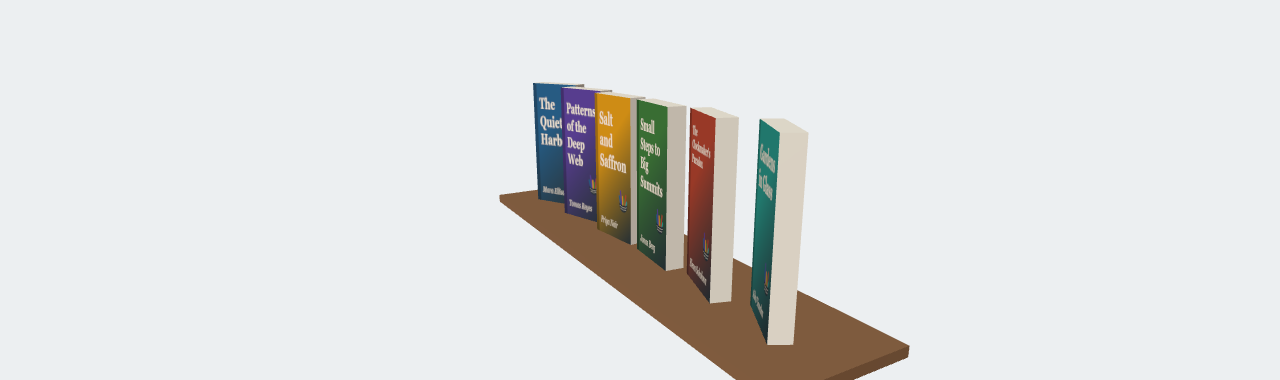
The drag swung the camera 47 degrees around the shelf (25 of the canvas's 190 pixels of height, since a full turn takes one height of dragging), and the change event drew the new view. The controls set touch-action: none on their element so touch drags do not scroll the page; call controls.dispose() to detach their listeners.
<!doctype html>
<style>
  body { margin: 0; background: #f5f1e8; font: 13px system-ui, sans-serif; color: #263238; }
  canvas { display: block; max-width: 100%; }
  p { margin: 4px 8px; }
</style>
<script type="importmap">
{ "imports": {
  "three": "https://cdn.jsdelivr.net/npm/three@0.186.1/build/three.module.js",
  "three/addons/": "https://cdn.jsdelivr.net/npm/three@0.186.1/examples/jsm/" } }
</script>
<p>Drag to orbit, wheel to dolly, right-drag to pan. <span id="n"></span></p>
<script type="module">
import * as THREE from 'three';
import { OrbitControls } from 'three/addons/controls/OrbitControls.js';

const BOOKS = [['The Quiet Harbor', '#1f5f8b'], ['Patterns of the Deep Web', '#5b3f99'], ['Salt and Saffron', '#e09a10'],
  ['Small Steps to Big Summits', '#3f7d3a'], ["The Clockmaker's Paradox", '#b5452f'], ['Gardens in Glass', '#2a9d8f']];
const renderer = new THREE.WebGLRenderer({ antialias: true });
renderer.setPixelRatio(Math.min(devicePixelRatio, 2));
renderer.setSize(600, 280);
document.body.appendChild(renderer.domElement);
const scene = new THREE.Scene();
scene.background = new THREE.Color('#fbf8f2');
const camera = new THREE.PerspectiveCamera(35, 600 / 280, 0.1, 50);
camera.position.set(0, 0.3, 3.4);
scene.add(new THREE.HemisphereLight('#ffffff', '#8d6e63', 1.2));
const sun = new THREE.DirectionalLight('#ffffff', 2.5);
sun.position.set(2, 3, 4);
scene.add(sun);
const plank = new THREE.Mesh(new THREE.BoxGeometry(3.2, 0.06, 0.4), new THREE.MeshStandardMaterial({ color: '#8d6e63' }));
plank.position.y = -0.52;
scene.add(plank);

// Cover textures drawn on canvases, on each book's +z face
BOOKS.forEach(([title, color], i) => {
  const c = Object.assign(document.createElement('canvas'), { width: 210, height: 490 });
  const g = c.getContext('2d');
  g.fillStyle = color;  g.fillRect(0, 0, 210, 490);
  g.fillStyle = '#fff3e0';  g.font = 'bold 34px Georgia';
  title.split(' ').forEach((w, k) => g.fillText(w, 18, 60 + k * 42, 180));
  const map = new THREE.CanvasTexture(c);
  map.colorSpace = THREE.SRGBColorSpace;
  const board = new THREE.MeshStandardMaterial({ color });
  const book = new THREE.Mesh(new THREE.BoxGeometry(0.42, 0.98, 0.12),
    [board, board, board, board, new THREE.MeshStandardMaterial({ map }), board]);
  book.position.x = (i - 2.5) * 0.5;
  scene.add(book);
});

const controls = new OrbitControls(camera, renderer.domElement);
controls.target.set(0, -0.1, 0);                  // orbit the shelf, not the world origin
controls.update();                                // needed after changing the target by hand

let renders = 0;
const render = () => {
  renderer.render(scene, camera);
  document.getElementById('n').textContent = `(${++renders} renders so far)`;
};
controls.addEventListener('change', render);      // no loop: draw only when the view moves
render();

// Send a 40-pixel leftward drag, as if a reader had dragged the canvas
const box = renderer.domElement.getBoundingClientRect();
const drag = (type, x) => renderer.domElement.dispatchEvent(new PointerEvent(type, {
  pointerId: 1, pointerType: 'mouse', isPrimary: true, button: 0, buttons: 1,
  clientX: box.left + x, clientY: box.top + 140, bubbles: true }));
drag('pointerdown', 340);
drag('pointermove', 320);
drag('pointermove', 300);
drag('pointerup', 300);
</script>