glTF 2.0, Khronos's "JPEG of 3D", stores meshes, PBR materials, nodes, skins and animations as JSON plus binary buffers and images; a .glb packs them into one file. Most 3D tools export it, and glTF Transform (github.com/donmccurdy/glTF-Transform (https://github.com/donmccurdy/glTF-Transform 1,976 ), npm 2,036 install --global @gltf-transform/cli) inspects and compresses it. GLTFLoader turns nodes into Object3Ds, materials into standard or physical materials and clips into AnimationClips. The Khronos sample Fox (163 KB) joins the shelf:
<script src="three-map.js"></script>
<script type="module">
import { GLTFLoader } from 'three/addons/loaders/GLTFLoader.js';
import { createStage, createShelf, loadCovers, renderFrames } from './bookshelf.js';
const { renderer, scene, camera } = createStage({ width: 640, height: 190 });
scene.add(createShelf(await loadCovers()));
const gltf = await new GLTFLoader().loadAsync('fox.glb');
const fox = gltf.scene;                               // a Group: the skinned mesh and bones
fox.scale.setScalar(0.005);                           // the file's units are centimeters
fox.position.set(0.9, -0.49, 0.35);
fox.rotation.y = -0.9;
scene.add(fox);
console.log(gltf.animations.map((clip) => `${clip.name} ${clip.duration.toFixed(2)} s`));
fox.traverse((o) => o.isSkinnedMesh && console.log(o.name, o.skeleton.bones.length, 'bones'));
renderFrames(renderer, scene, camera);
</script>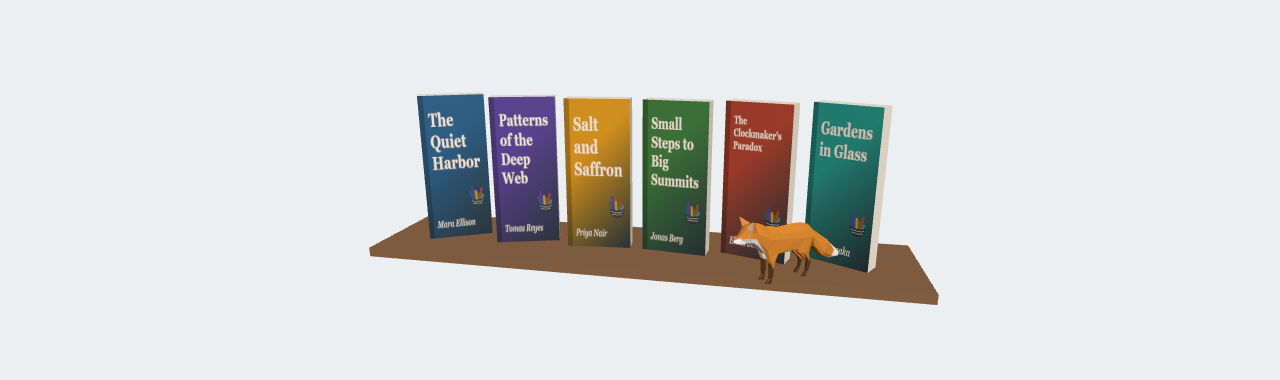
[Survey 3.42 s, Walk 0.71 s, Run 1.16 s]
fox 24 bones
gltf.scene is the object to add and gltf.animations holds the clips The Animation System plays. The file has no normals, so GLTFLoader turned on flatShading, hence the facets. glTF is meters and +y up, like Three.js 30,815 .
<!doctype html>
<style>
  body { margin: 0; background: #f5f1e8; font: 13px system-ui, sans-serif; color: #263238; }
  canvas { display: block; max-width: 100%; }
  pre { margin: 4px 8px; font-size: 12px; }
</style>
<script type="importmap">
{ "imports": {
  "three": "https://cdn.jsdelivr.net/npm/three@0.186.1/build/three.module.js",
  "three/addons/": "https://cdn.jsdelivr.net/npm/three@0.186.1/examples/jsm/" } }
</script>
<pre id="out"></pre>
<script type="module">
import * as THREE from 'three';
import { GLTFExporter } from 'three/addons/exporters/GLTFExporter.js';
import { GLTFLoader } from 'three/addons/loaders/GLTFLoader.js';

// 1. A small "asset": a group with a named plank, three books and a keyframed clip.
//    (A real app would load a .glb file; here we make one in memory, with no network.)
const asset = new THREE.Group();
asset.name = 'mini-shelf';
const plank = new THREE.Mesh(new THREE.BoxGeometry(1.6, 0.05, 0.4), new THREE.MeshStandardMaterial({ color: '#8d6e63', name: 'wood' }));
plank.name = 'plank';
plank.position.y = -0.5;
asset.add(plank);
['#1f5f8b', '#e09a10', '#b5452f'].forEach((color, i) => {
  const book = new THREE.Mesh(new THREE.BoxGeometry(0.42, 0.9, 0.12),
    new THREE.MeshStandardMaterial({ color, roughness: 0.6, name: `cover-${i}` }));
  book.name = `book-${i}`;
  book.position.set((i - 1) * 0.5, -0.03, 0);
  asset.add(book);
});
const clip = new THREE.AnimationClip('pull-out', -1, [
  new THREE.VectorKeyframeTrack('book-1.position', [0, 1, 2], [0, -0.03, 0, 0, 0.1, 0.35, 0, -0.03, 0]),
]);

// 2. Export to binary glTF (.glb): JSON plus a binary buffer in one ArrayBuffer
const glb = await new GLTFExporter().parseAsync(asset, { binary: true, animations: [clip] });

// 3. Load it back: nodes become Object3Ds, materials MeshStandardMaterials, clips AnimationClips
const gltf = await new GLTFLoader().parseAsync(glb, '');

const renderer = new THREE.WebGLRenderer({ antialias: true });
renderer.setPixelRatio(Math.min(devicePixelRatio, 2));
renderer.setSize(600, 240);
document.body.prepend(renderer.domElement);
const scene = new THREE.Scene();
scene.background = new THREE.Color('#fbf8f2');
const camera = new THREE.PerspectiveCamera(35, 600 / 240, 0.1, 50);
camera.position.set(0.6, 0.5, 2.6);
camera.lookAt(0, -0.1, 0);
scene.add(new THREE.HemisphereLight('#ffffff', '#8d6e63', 1.2));
const sun = new THREE.DirectionalLight('#ffffff', 2.5);
sun.position.set(2, 3, 4);
scene.add(sun);
scene.add(gltf.scene);                                 // gltf.scene is the object to add

const mixer = new THREE.AnimationMixer(gltf.scene);
mixer.clipAction(gltf.animations[0]).play();

const names = [];
gltf.scene.traverse((o) => o.isMesh && names.push(`${o.name} (${o.material.type})`));
document.getElementById('out').textContent =
  `.glb: ${glb.byteLength} bytes · clips: ${gltf.animations.map((c) => `${c.name} ${c.duration} s`)}\n` +
  `meshes: ${names.join(', ')}`;

const timer = new THREE.Timer();
renderer.setAnimationLoop(() => {
  timer.update();
  mixer.update(timer.getDelta());
  renderer.render(scene, camera);
});
</script>