PerspectiveCamera(fov, aspect, near, far) is Perspective Projection's frustum (fov is the vertical angle in degrees; keep near large for depth precision, Z-Fighting and Depth Precision). OrthographicCamera(left, right, top, bottom, near, far) is Orthographic Projection's box in world units, for maps, CAD and isometric views. Call updateProjectionMatrix() after changing either. This page draws the shelf through both:
<script src="three-map.js"></script>
<script type="module">
import * as THREE from 'three';
import { createStage, createShelf } from './bookshelf.js';
document.body.style.display = 'flex';                      // two canvases side by side
const left = createStage({ width: 320, height: 170 });
const right = createStage({ width: 320, height: 170 });
left.scene.add(createShelf());
right.scene.add(createShelf());
const h = 1.2, aspect = 320 / 170;                        // h: half the visible height in m
const ortho = new THREE.OrthographicCamera(-h * aspect, h * aspect, h, -h, 0.1, 50);
ortho.position.copy(left.camera.position);
ortho.quaternion.copy(left.camera.quaternion);             // same place, same direction
let frames = 0;
left.renderer.setAnimationLoop(() => {
  left.renderer.render(left.scene, left.camera);
  right.renderer.render(right.scene, ortho);
  if (++frames === 3) window.__done = true;
});
</script>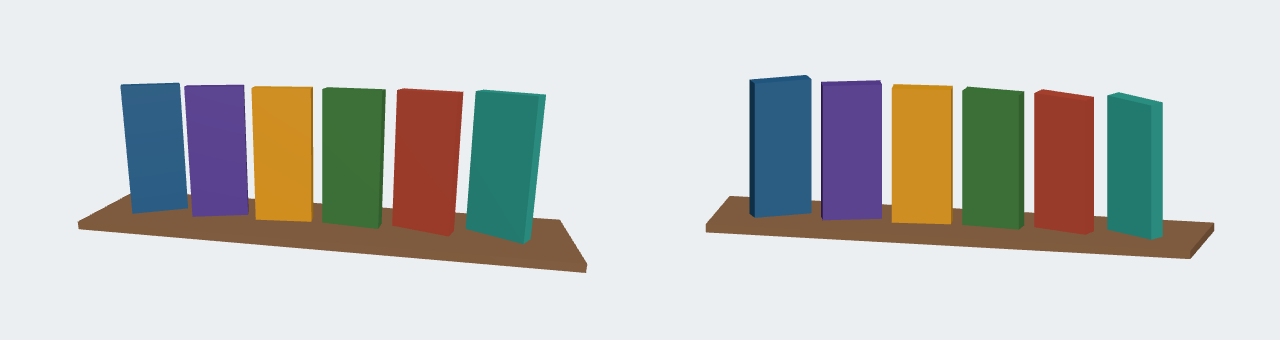
On the left, nearer books look larger and the plank's edges converge; on the right, parallels stay parallel.
<!doctype html>
<style>
  body { margin: 0; background: #f5f1e8; font: 13px system-ui, sans-serif; color: #263238; }
  .row { display: flex; gap: 8px; flex-wrap: wrap; padding: 6px; }
  figure { margin: 0; text-align: center; }
  canvas { display: block; }
</style>
<script type="importmap">
{ "imports": {
  "three": "https://cdn.jsdelivr.net/npm/three@0.186.1/build/three.module.js",
  "three/addons/": "https://cdn.jsdelivr.net/npm/three@0.186.1/examples/jsm/" } }
</script>
<div class="row">
  <figure id="left"><figcaption>PerspectiveCamera(40°)</figcaption></figure>
  <figure id="right"><figcaption>OrthographicCamera</figcaption></figure>
</div>
<div style="padding:0 8px">Field of view <input type="range" id="fov" min="10" max="90" value="40"></div>
<script type="module">
import * as THREE from 'three';

const colors = ['#1f5f8b', '#5b3f99', '#e09a10', '#3f7d3a', '#b5452f', '#2a9d8f'];
const W = 290, H = 200, aspect = W / H;

function buildScene() {
  const scene = new THREE.Scene();
  scene.background = new THREE.Color('#fbf8f2');
  scene.add(new THREE.HemisphereLight('#ffffff', '#8d6e63', 1.2));
  const sun = new THREE.DirectionalLight('#ffffff', 2.5);
  sun.position.set(2, 3, 4);
  scene.add(sun);
  const plank = new THREE.Mesh(new THREE.BoxGeometry(3.2, 0.06, 1.4),
    new THREE.MeshStandardMaterial({ color: '#8d6e63' }));
  plank.position.y = -0.52;
  scene.add(plank);
  // Books in two rows: the front row is nearer the camera
  colors.forEach((color, i) => {
    const book = new THREE.Mesh(new THREE.BoxGeometry(0.42, 0.98, 0.12),
      new THREE.MeshStandardMaterial({ color }));
    book.position.set((i - 2.5) * 0.52, 0, i % 2 ? -0.5 : 0.5);
    scene.add(book);
  });
  return scene;
}

function makeRenderer(parent) {
  const renderer = new THREE.WebGLRenderer({ antialias: true });
  renderer.setPixelRatio(Math.min(devicePixelRatio, 2));
  renderer.setSize(W, H);
  document.getElementById(parent).prepend(renderer.domElement);
  return renderer;
}
const left = makeRenderer('left'), right = makeRenderer('right');
const scene = buildScene();

// fov is the vertical angle in degrees
const persp = new THREE.PerspectiveCamera(40, aspect, 0.1, 50);
// left, right, top, bottom in world units: h is half the visible height in metres
const h = 1.2;
const ortho = new THREE.OrthographicCamera(-h * aspect, h * aspect, h, -h, 0.1, 50);

function place(camera, distance) {
  camera.position.set(1.2, 1.4, distance).setLength(distance);
  camera.lookAt(0, -0.1, 0);
}
function render(fov) {
  persp.fov = fov;
  // keep the shelf the same size: move the camera back as the angle narrows
  const distance = 1.6 / Math.tan(THREE.MathUtils.degToRad(fov / 2));
  place(persp, distance);
  persp.far = distance + 20;
  persp.updateProjectionMatrix();                  // needed after changing fov, aspect, near or far
  place(ortho, 6);
  document.querySelector('#left figcaption').textContent = `PerspectiveCamera(${fov}°)`;
  left.render(scene, persp);
  right.render(scene, ortho);
}
const slider = document.getElementById('fov');
slider.addEventListener('input', () => render(+slider.value));
render(40);
</script>