The page posts JSON to its own origin and shows the returned data URL; it never sees the key:
<!doctype html>
<title>BookNest image studio</title>
<style>body { font: 15px system-ui } input { width: 400px } img { width: 300px }</style>
<h3>BookNest image studio</h3>
<form id="f">
  <input name="prompt" value="A reading chair by a window, flat vector, blue and saffron">
  <select name="size"><option>1024x1024</option><option>1536x1024</option></select>
  <button>Generate</button>
</form>
<p id="status"></p><img id="out" alt="">
<script type="module">
  const form = document.getElementById('f'), status = document.getElementById('status');
  form.addEventListener('submit', async (event) => {
    event.preventDefault();
    status.textContent = 'Generating (about 15 seconds)...';
    const res = await fetch('/api/image', { method: 'POST', headers: { 'Content-Type':
      'application/json' }, body: JSON.stringify(Object.fromEntries(new FormData(form))) });
    const data = await res.json();
    if (!res.ok) { status.textContent = data.error; return; }
    document.getElementById('out').src = data.image;
    status.textContent = `Done: $${data.cost.toFixed(4)} for this image`;
  });
</script>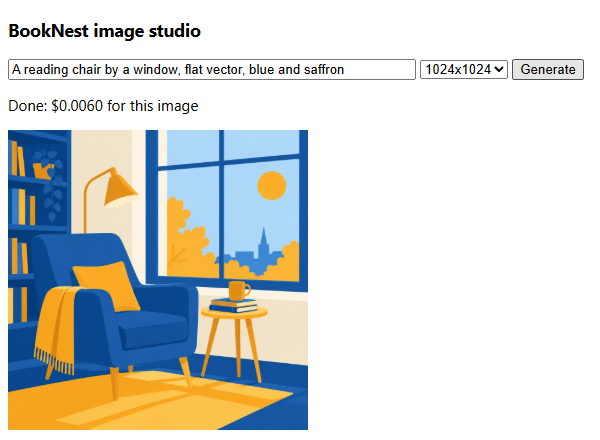
Headless Chrome recorded two requests, both to localhost:3108, and no key in the page; the server logged the call.