A Meshy 20,231 download is an ordinary glTF 2.0 binary, so GLTFLoader's GLTFLoader and Babylon.js 89,603 's glTF loader (glTF and Containers) read it like any other asset. This page loads a stand-in of the same kind, Poly Haven 82,537 's CC0 "Mantel Clock 01" (15,236 vertices, 1K PBR textures, packed into a 3.1 MB .glb with glTF Transform). It is not Meshy output; a Meshy model.glb drops in unchanged:
<div style="display: flex; gap: 8px"><div id="left"></div>
  <canvas id="right" style="width: 340px; height: 230px"></canvas></div>
<script src="three-map.js"></script>
<script src="https://cdn.jsdelivr.net/npm/babylonjs@9.28.0/babylon.js"></script>
<script src="https://cdn.jsdelivr.net/npm/babylonjs-loaders@9.28.0"></script>  <!-- glTF loader -->
<script src="bookstore.js"></script>
<script type="module">
import { GLTFLoader } from 'three/addons/loaders/GLTFLoader.js';
import { createStage, createShelf, loadCovers, addEnvironment } from './bookshelf.js';
const MODEL = 'cc0-mantel-clock.glb';           // stand-in, not Meshy output
const { renderer, scene, camera } = createStage({ width: 340, height: 230, parent: left });
addEnvironment(renderer, scene);                  // metal needs something to reflect
scene.add(createShelf(await loadCovers()));
const { scene: clock } = await new GLTFLoader().loadAsync(MODEL);
clock.scale.setScalar(2);                         // a display-size clock
clock.position.set(1.05, -0.49, 0.3);             // on the plank, in front of the books
scene.add(clock);  renderer.render(scene, camera);
const engine = new BABYLON.Engine(right, true);
const store = BookNestStore.createScene(engine);
const bookcase = BookNestStore.createBookcase(store, 'bookcaseLeft', -1.8);
BookNestStore.coverBooks(store, BookNestStore.placeBooks(store, bookcase));
store.createDefaultEnvironment({ createGround: false, createSkybox: false });
const { meshes } = await BABYLON.ImportMeshAsync(MODEL, store);
const root = meshes[0];                           // __root__ converts glTF's handedness
root.position.set(-1.25, 1.62, 2.66);             // shelf 3 of the bookcase
root.scaling.scaleInPlace(1.5);  root.rotate(BABYLON.Axis.Y, Math.PI);   // face the aisle
new BABYLON.ArcRotateCamera('look', -1.75, 1.35, 1.3,
  new BABYLON.Vector3(-1.5, 1.5, 2.6), store).minZ = 0.05;
BookNestStore.renderWhenReady(engine, store, 10);
</script>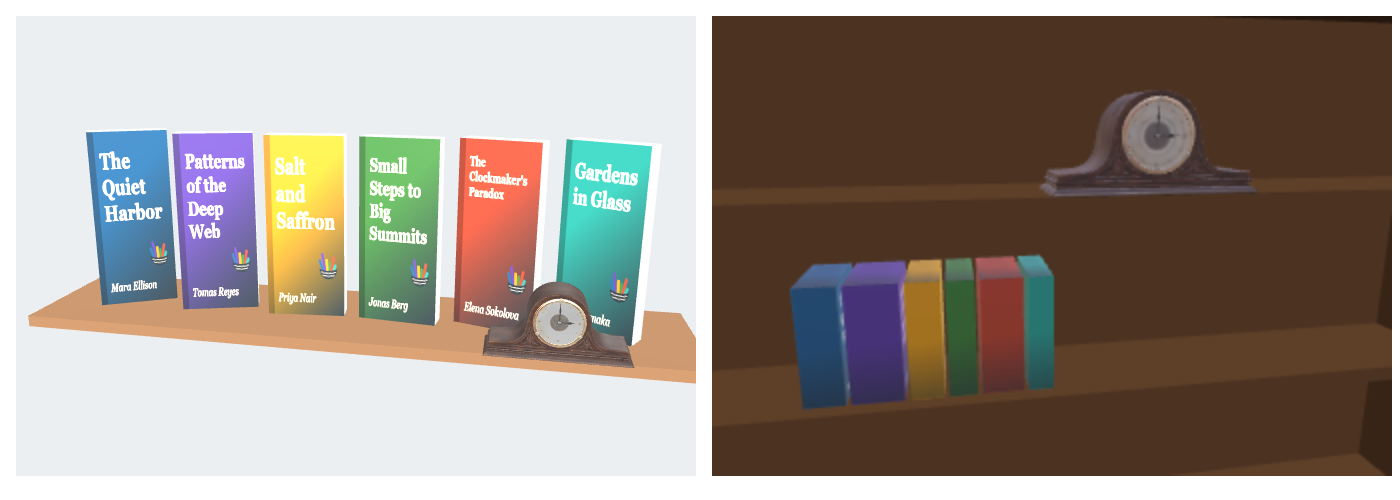
<!doctype html>
<style>
  body { margin: 0; padding: 8px; background: #fafaf7; font: 12px system-ui, sans-serif; color: #263238; }
  canvas { display: block; max-width: 100%; }
</style>
<script type="importmap">
{ "imports": {
  "three": "https://cdn.jsdelivr.net/npm/three@0.186.1/build/three.module.js",
  "three/addons/": "https://cdn.jsdelivr.net/npm/three@0.186.1/examples/jsm/" } }
</script>
<p>Clock scale <input type="range" id="s" min="1" max="4" step="0.1" value="2"> · drag to orbit</p>
<script type="module">
import * as THREE from 'three';
import { GLTFExporter } from 'three/addons/exporters/GLTFExporter.js';
import { GLTFLoader } from 'three/addons/loaders/GLTFLoader.js';
import { RoomEnvironment } from 'three/addons/environments/RoomEnvironment.js';
import { OrbitControls } from 'three/addons/controls/OrbitControls.js';

// A stand-in clock.glb (built in memory, since this page cannot download files); a Meshy model.glb drops in unchanged
async function clockGLB() {
  const g = new THREE.Group();
  const wood = new THREE.MeshStandardMaterial({ color: '#5a3522', roughness: 0.45 });
  const brass = new THREE.MeshStandardMaterial({ color: '#c9a44c', metalness: 1, roughness: 0.3 });
  const body = new THREE.Mesh(new THREE.BoxGeometry(0.12, 0.08, 0.05), wood);  body.position.y = 0.05;
  const dome = new THREE.Mesh(new THREE.CylinderGeometry(0.05, 0.05, 0.05, 40, 1, false, Math.PI / 2, Math.PI), wood);
  dome.rotation.x = Math.PI / 2;  dome.position.y = 0.09;
  const bezel = new THREE.Mesh(new THREE.TorusGeometry(0.034, 0.004, 12, 40), brass);  bezel.position.set(0, 0.085, 0.026);
  const dial = new THREE.Mesh(new THREE.CircleGeometry(0.033, 40), new THREE.MeshStandardMaterial({ color: '#fff8e8' }));
  dial.position.set(0, 0.085, 0.0255);
  const base = new THREE.Mesh(new THREE.BoxGeometry(0.135, 0.01, 0.06), wood);  base.position.y = 0.005;
  g.add(body, dome, bezel, dial, base);
  return new GLTFExporter().parseAsync(g, { binary: true });
}

const renderer = new THREE.WebGLRenderer({ antialias: true });
renderer.setPixelRatio(Math.min(devicePixelRatio, 2));
renderer.setSize(600, 260);
document.body.appendChild(renderer.domElement);
const scene = new THREE.Scene();
scene.background = new THREE.Color('#eceff1');
const pmrem = new THREE.PMREMGenerator(renderer);
scene.environment = pmrem.fromScene(new RoomEnvironment(), 0.04).texture;   // metal needs something to reflect
scene.environmentIntensity = 0.6;
const sun = new THREE.DirectionalLight('#ffffff', 2);  sun.position.set(-1.5, 3, 4);  scene.add(sun);
const camera = new THREE.PerspectiveCamera(35, 600 / 260, 0.05, 50);
camera.position.set(0.5, 0.2, 2.4);

// The shelf: a plank and five books
const plank = new THREE.Mesh(new THREE.BoxGeometry(3.2, 0.06, 0.6), new THREE.MeshStandardMaterial({ color: '#8d6e63' }));
plank.position.y = -0.52;
scene.add(plank);
['#1f5f8b', '#5b3f99', '#e09a10', '#3f7d3a', '#2a9d8f'].forEach((color, i) => {
  const book = new THREE.Mesh(new THREE.BoxGeometry(0.14, 0.9 + (i % 3) * 0.05, 0.5), new THREE.MeshStandardMaterial({ color, roughness: 0.6 }));
  book.position.set(-1.1 + i * 0.16, -0.49 + book.geometry.parameters.height / 2, 0);
  scene.add(book);
});

const { scene: clock } = await new GLTFLoader().parseAsync(await clockGLB(), '');
clock.position.set(0.8, -0.49, 0.1);             // on the plank, in front of the books
clock.rotation.y = -0.4;
scene.add(clock);
const controls = new OrbitControls(camera, renderer.domElement);
controls.target.set(0.2, -0.2, 0);
controls.update();
const slider = document.getElementById('s');
renderer.setAnimationLoop(() => {
  clock.scale.setScalar(+slider.value * 2);        // the file's units are metres: scale to display size
  renderer.render(scene, camera);
});
</script>
<p>In Babylon.js the same file loads with BABYLON.ImportMeshAsync; its __root__ node converts glTF's right-handed axes.</p>