A mask is a PNG the size of the image whose fully transparent pixels mark the area to repaint:
# make-mask.py: an alpha mask for images.edit (pip install pillow)
from PIL import Image, ImageDraw
mask = Image.new('RGBA', (1024, 1024), (255, 255, 255, 255))  # opaque white = keep
ImageDraw.Draw(mask).rectangle((30, 600, 350, 1023), fill=(0, 0, 0, 0))   # clear = repaint
mask.save('window-mask.png')
print(mask.mode, mask.size, 'transparent pixels:', mask.getchannel('A').histogram()[0])import fs from 'node:fs';
import OpenAI, { toFile } from 'openai';
const openai = new OpenAI();
const png = path => toFile(fs.createReadStream(path), path, { type: 'image/png' });
const res = await openai.images.edit({
model: 'gpt-image-2.5-sunburst', // the model for precise edits
image: await png('booknest-window.png'), // 8.2.3's image, 1024x1024
mask: await png('window-mask.png'), // same size, with an alpha channel
prompt: 'Bottom left, outside the window: replace the potted plant with a small wooden '
+ 'cart full of books, same style. Change nothing else.',
size: '1024x1024',
quality: 'low',
});
fs.writeFileSync('window-edited.png', Buffer.from(res.data[0].b64_json, 'base64'));
console.log('usage:', res.usage);Output
usage: {
  input_tokens: 1068,
  input_tokens_details: { image_tokens: 1024, text_tokens: 44 },
  output_tokens: 196,
  output_tokens_details: { image_tokens: 196, text_tokens: 0 },
  total_tokens: 1264
}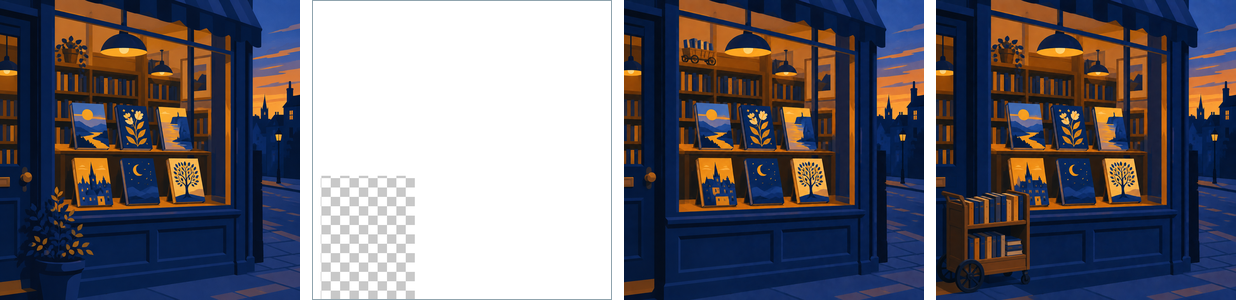
Three lessons came from real failures. The SDK needs the MIME type (toFile with type); a bare stream is rejected with 400 unsupported mimetype. A mask whose kept pixels were black returned a black hole; white kept pixels, as in OpenAI 86 's example, worked. And masking is "entirely prompt-based," in OpenAI's words: the vague prompt removed the masked plant but put the cart where the other plant stood. Naming the location fixed it.
<!doctype html>
<style>
  body { margin: 0; padding: 8px; background: #fafaf7; font: 12px system-ui, sans-serif; color: #263238; }
  .row { display: flex; gap: 8px; flex-wrap: wrap; }
  figure { margin: 0; text-align: center; }
  canvas { display: block; border: 1px solid #ddd; }
  #mask { cursor: crosshair; touch-action: none; }
</style>
<p>Drag on the mask to clear more pixels. <button id="reset">Reset mask</button> <button id="edit">Run edit</button> <span id="out"></span></p>
<div class="row">
  <figure><canvas id="orig" width="180" height="180"></canvas>original</figure>
  <figure><canvas id="mask" width="180" height="180"></canvas>mask (clear = repaint)</figure>
  <figure><canvas id="result" width="180" height="180"></canvas>result</figure>
</div>
<script>
  const S = 180;
  // The original: a bookshop window at dusk with a potted plant bottom left
  function paint(g, cart) {
    const sky = g.createLinearGradient(0, 0, 0, S);
    sky.addColorStop(0, '#1f3f66');  sky.addColorStop(1, '#e09a10');
    g.fillStyle = sky;  g.fillRect(0, 0, S, S);
    g.fillStyle = '#5b3f99';  g.fillRect(22, 30, 136, 118);
    g.fillStyle = '#fff3e0';  g.fillRect(36, 48, 108, 66);
    ['#1f5f8b', '#5b3f99', '#e09a10', '#3f7d3a', '#b5452f', '#2a9d8f'].forEach((c, i) => { g.fillStyle = c;  g.fillRect(44 + i * 16, 70, 10, 38); });
    g.fillStyle = '#6b4f3a';  g.fillRect(0, 148, S, 32);
    if (cart) {                                          // the repainted content: a cart of books
      g.fillStyle = '#8d6e63';  g.fillRect(6, 132, 50, 20);
      g.fillStyle = '#263238';  g.beginPath();  g.arc(16, 156, 6, 0, 7);  g.arc(46, 156, 6, 0, 7);  g.fill();
      ['#e09a10', '#1f5f8b', '#b5452f', '#3f7d3a'].forEach((c, i) => { g.fillStyle = c;  g.fillRect(9 + i * 11, 116, 9, 16); });
    } else {
      g.fillStyle = '#b5452f';  g.fillRect(14, 140, 22, 16);
      g.fillStyle = '#3f7d3a';  g.beginPath();  g.arc(25, 128, 16, 0, 7);  g.fill();
    }
  }
  const orig = document.getElementById('orig').getContext('2d'), mask = document.getElementById('mask').getContext('2d');
  const result = document.getElementById('result').getContext('2d');
  paint(orig, false);

  function resetMask() {
    mask.globalCompositeOperation = 'source-over';
    mask.fillStyle = '#ffffff';  mask.fillRect(0, 0, S, S);          // opaque white = keep
    mask.globalCompositeOperation = 'destination-out';               // painting erases to alpha 0
    mask.fillRect(5, 105, 60, 75);                                   // like the Pillow rectangle (30, 600, 350, 1023)
    count();
  }
  function count() {
    const a = mask.getImageData(0, 0, S, S).data;
    let clear = 0;
    for (let i = 3; i < a.length; i += 4) if (a[i] === 0) clear++;
    document.getElementById('out').textContent = `transparent pixels: ${clear} of ${S * S}`;
  }
  // Show the mask over a checkerboard (CSS background) so the cleared area is visible
  document.getElementById('mask').style.background = 'repeating-conic-gradient(#ddd 0 25%, #fff 0 50%) 0 0 / 12px 12px';

  const el = document.getElementById('mask');
  const brush = e => { const r = el.getBoundingClientRect(); mask.beginPath(); mask.arc(e.clientX - r.left, e.clientY - r.top, 10, 0, 7); mask.fill(); };
  el.addEventListener('pointerdown', e => { el.setPointerCapture(e.pointerId); brush(e); });
  el.addEventListener('pointermove', e => { if (e.buttons) brush(e); });
  el.addEventListener('pointerup', count);

  // "Edit": the model repaints only where the mask is clear; kept pixels come from the original
  function edit() {
    const repainted = document.createElement('canvas');  repainted.width = repainted.height = S;
    paint(repainted.getContext('2d'), true);
    const o = orig.getImageData(0, 0, S, S), r = repainted.getContext('2d').getImageData(0, 0, S, S), m = mask.getImageData(0, 0, S, S);
    for (let i = 0; i < o.data.length; i += 4) {
      const keep = m.data[i + 3] / 255;                           // 1 = keep original, 0 = repaint
      for (let k = 0; k < 3; k++) o.data[i + k] = o.data[i + k] * keep + r.data[i + k] * (1 - keep);
    }
    result.putImageData(o, 0, 0);
  }
  document.getElementById('reset').onclick = () => { resetMask(); edit(); };
  document.getElementById('edit').onclick = edit;
  resetMask();
  edit();
</script>