One request for a sheet of icons costs a sixth of six requests and keeps the stroke weight and colors consistent, because the model draws them together. Ask for a grid with each icon centered in its cell, so a fixed crop can cut them apart, and for background: 'transparent', which needs PNG or WebP (Background and Format):
// icons.mjs: a six-icon sheet on a transparent background (Section 8.9.2)
import fs from 'node:fs';
import OpenAI from 'openai';
const prompt = [
  'A sheet of six app icons in a 3 x 2 grid, evenly spaced, each centered in its cell:',
  'shopping cart, heart, magnifying glass, star, open book, gift box.',
  'Flat style, rounded shapes, one stroke weight, deep blue #1f5f8b with saffron #e09a10',
  'accents. Transparent background, no shadows, no text.',
].join(' ');
const res = await new OpenAI().images.generate({
  model: 'gpt-image-2.5-flare', prompt, size: '1536x1024', quality: 'low',
  background: 'transparent', output_format: 'png',
});
fs.writeFileSync('icons.png', Buffer.from(res.data[0].b64_json, 'base64'));
console.log(res.size, res.background, res.output_format, `${res.usage.output_tokens} tokens`);
Output
1536x1024 transparent png 158 tokens
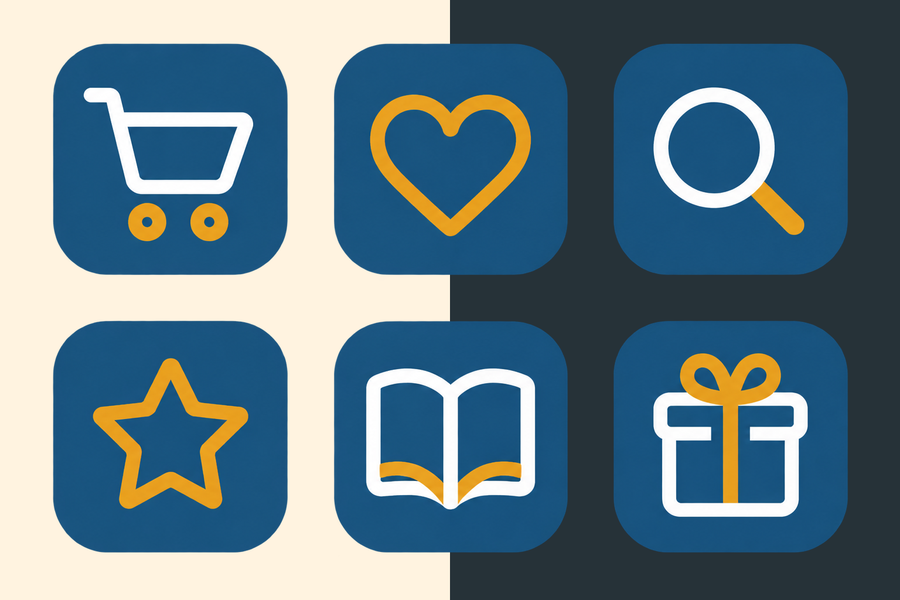
The sheet cost $0.0052, and 41% of its pixels came back fully transparent. Each icon sits on a rounded tile in a 512-pixel cell, so the nine-argument drawImage() of Drawing and Cropping Images cuts one out. For the app, trace them into SVG (SVG): a bitmap blurs on a 3x phone screen.
<!doctype html>
<style>
  body { margin: 0; padding: 8px; background: #fafaf7; font: 12px system-ui, sans-serif; color: #263238; }
  canvas { display: block; max-width: 100%; }
  .row { display: flex; gap: 10px; align-items: flex-start; flex-wrap: wrap; }
</style>
<p>Background: <label><input type="radio" name="b" value="#fff3e0" checked> cream</label> <label><input type="radio" name="b" value="#263238"> ink</label>
  · cut out icon <select id="pick"><option>0</option><option>1</option><option>2</option><option>3</option><option selected>4</option><option>5</option></select></p>
<div class="row"><canvas id="view" width="390" height="260"></canvas><canvas id="crop" width="130" height="130"></canvas></div>
<p id="out"></p>
<script>
  // The sheet as returned: 1536×1024 in 512-pixel cells (drawn here at 1/4 scale: 384×256, 128-pixel cells)
  const sheet = document.createElement('canvas');
  sheet.width = 384;  sheet.height = 256;
  const g = sheet.getContext('2d'), BLUE = '#1f5f8b', SAFF = '#e09a10';
  const icons = [
    () => { g.strokeStyle = BLUE; g.lineWidth = 7; g.beginPath(); g.moveTo(-34, -24); g.lineTo(-22, -24); g.lineTo(-10, 16); g.lineTo(26, 16); g.lineTo(34, -12); g.lineTo(-16, -12); g.stroke();
            g.fillStyle = SAFF; g.beginPath(); g.arc(-4, 30, 6, 0, 7); g.arc(20, 30, 6, 0, 7); g.fill(); },                    // cart
    () => { g.fillStyle = BLUE; g.beginPath(); g.moveTo(0, 30); g.bezierCurveTo(-50, -4, -22, -40, 0, -14); g.bezierCurveTo(22, -40, 50, -4, 0, 30); g.fill(); },  // heart
    () => { g.strokeStyle = BLUE; g.lineWidth = 8; g.beginPath(); g.arc(-6, -6, 20, 0, 7); g.stroke(); g.strokeStyle = SAFF; g.beginPath(); g.moveTo(9, 9); g.lineTo(28, 28); g.stroke(); },  // search
    () => { g.fillStyle = SAFF; g.beginPath(); for (let i = 0; i < 10; i++) { const r = i % 2 ? 14 : 34, a = -Math.PI / 2 + i * Math.PI / 5; g.lineTo(Math.cos(a) * r, Math.sin(a) * r); } g.fill(); },  // star
    () => { g.fillStyle = BLUE; g.beginPath(); g.moveTo(-36, -16); g.quadraticCurveTo(-18, -26, 0, -16); g.lineTo(0, 24); g.quadraticCurveTo(-18, 14, -36, 24); g.fill();
            g.beginPath(); g.moveTo(36, -16); g.quadraticCurveTo(18, -26, 0, -16); g.lineTo(0, 24); g.quadraticCurveTo(18, 14, 36, 24); g.fill(); g.fillStyle = SAFF; g.fillRect(-2, -18, 4, 44); },  // book
    () => { g.fillStyle = BLUE; g.fillRect(-28, -8, 56, 38); g.fillStyle = SAFF; g.fillRect(-32, -20, 64, 14); g.fillRect(-5, -20, 10, 50);
            g.strokeStyle = SAFF; g.lineWidth = 5; g.beginPath(); g.arc(-10, -26, 8, 0, 7); g.arc(10, -26, 8, 0, 7); g.stroke(); },  // gift
  ];
  icons.forEach((draw, i) => {
    g.save();  g.translate(64 + (i % 3) * 128, 64 + Math.floor(i / 3) * 128);
    g.fillStyle = 'rgba(31,95,139,0.08)';  g.beginPath();  g.roundRect(-52, -52, 104, 104, 22);  g.fill();   // a rounded tile
    draw();  g.restore();
  });
  // Share of fully transparent pixels
  const px = g.getImageData(0, 0, 384, 256).data;
  let clear = 0;
  for (let i = 3; i < px.length; i += 4) if (px[i] === 0) clear++;

  const view = document.getElementById('view').getContext('2d'), crop = document.getElementById('crop').getContext('2d');
  function draw() {
    const bg = document.querySelector('input[name=b]:checked').value, i = +document.getElementById('pick').value;
    view.fillStyle = bg;  view.fillRect(0, 0, 390, 260);
    view.drawImage(sheet, 3, 2);
    // Nine-argument drawImage: source rectangle (one 128-pixel cell) into the target
    crop.fillStyle = bg;  crop.fillRect(0, 0, 130, 130);
    crop.drawImage(sheet, (i % 3) * 128, Math.floor(i / 3) * 128, 128, 128, 1, 1, 128, 128);
    document.getElementById('out').textContent = `${Math.round(clear / (384 * 256) * 100)}% of the sheet's pixels are fully transparent. ` +
      `One request for six icons: $0.0052, about a sixth of six requests, with one stroke weight. Trace them to SVG for crisp phone screens.`;
  }
  document.querySelectorAll('input, select').forEach(e => e.addEventListener('input', draw));
  draw();
</script>