In a page, code runs from <script> elements. A classic script without defer or async blocks the HTML parser while it downloads and runs, shares one global scope with every other classic script, and runs in sloppy mode unless it starts with "use strict". A module script (type="module") is deferred until the document is parsed, runs in strict mode with its own top-level scope, can import and export, and may use await at the top level. Performance Hints in Markup covers defer, async and loading order.
<style>body { font: 18px/1.5 system-ui; }</style>
<ol id="log"></ol>
<script type="module">
  const { default: answer } = await import('data:text/javascript,export default 42');
  log(`module: this is ${this}, top-level await gave ${answer}`);
</script>
<script>
  var shared = 'a global';
  function log(msg) {
    document.querySelector('#log').insertAdjacentHTML('beforeend', `<li>${msg}</li>`);
    console.log(msg);
  }
  log(`classic 1: this is ${this}`);
</script>
<p id="late">Parsed between the classic scripts</p>
<script>log(`classic 2: sees ${shared}; #late: ${!!document.querySelector('#late')}`);</script>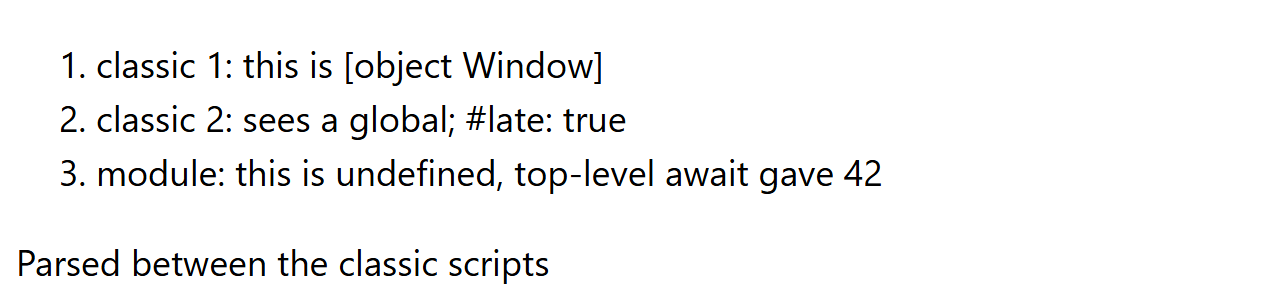
The module comes first in the source but logs last, and can call log() because classic scripts put their functions and vars on window. The same messages appear in the browser's console (Console and Sources), which also evaluates any expression you type.
Outside the browser, node app.js runs a file (.mjs files, or any .js file in a package with "type": "module", load as modules). Running node with no arguments starts the REPL (read-eval-print loop), which prints the value of each expression; _ holds the last result and dot commands control the session:
> const nums = [3, 1, 2]
undefined
> nums.toSorted()
[ 1, 2, 3 ]
> _.length
3
const declarations evaluate to undefined, which is why the REPL prints it. .editor enters multi-line mode, .exit quits, and node -p "1 + 1" evaluates one expression straight from the shell.