The Console is both a log viewer and a REPL. It collects your console.* calls along with uncaught errors, failed requests and deprecation warnings, and evaluates JavaScript in the page with autocompletion and top-level await. Press Esc in any other panel to open it in the drawer.
const users = [
  { name: 'Ada', role: 'admin' },
  { name: 'Linus', role: 'editor' },
  { name: 'Grace', role: 'viewer' }
];
console.log('%cDevTools', 'color: white; background: #1565c0; padding: 2px 6px');
console.log('Loaded %d users from %s', users.length, '/api/users');
console.warn('Field "lastLogin" is deprecated');
console.error('Could not load avatar for %o', users[1]);
console.table(users);
console.group('Roles');
users.forEach((u) => console.count(u.role === 'admin' ? 'admin' : 'other'));
console.groupEnd();
console.assert(users.length > 5, 'Expected more than 5 users');
console.time('sort');
users.sort((a, b) => a.name.localeCompare(b.name));
console.timeEnd('sort');DevTools
Loaded 3 users from /api/users
Field "lastLogin" is deprecated
Could not load avatar for {name: 'Linus', role: 'editor'}
(index) name role
0 'Ada' 'admin'
1 'Linus' 'editor'
2 'Grace' 'viewer'
Roles
admin: 1
other: 1
other: 2
Assertion failed: Expected more than 5 users
sort: 0.092041015625 msIn DevTools the first line is a blue badge (%c applies CSS), warnings and errors expand to stack traces, and the table is a sortable grid. Console Utilities work only in DevTools: $0 (selected element), $_ (last result), $(), $$() (returns an array), $x() for XPath, copy() and getEventListeners(). For example, $$('img').filter((img) => !img.alt) finds images without alt text. Firefox 555 supports $0, $(), $$(), $x() and copy() too.
Debugging in the Sources panel
Logging shows what happened; the debugger stops time so you can look around. This page prints "Total: $255" for $25 of goods plus $5 shipping.
<select id="shipping">
  <option value="0">Pickup (free)</option>
  <option value="5" selected>Standard ($5)</option>
</select>
<p id="total"></p>
<script>
  const cart = [{ price: 10, qty: 2 }, { price: 1.25, qty: 4 }];
  const subtotal = (items) => items.reduce((sum, i) => sum + i.price * i.qty, 0);
  function orderTotal(items) {
    const shipping = document.querySelector('#shipping').value;
    return subtotal(items) + shipping;
  }
  function render() {
    document.querySelector('#total').textContent = `Total: $${orderTotal(cart)}`;
  }
  document.querySelector('#shipping').addEventListener('change', render);
  render();
</script>
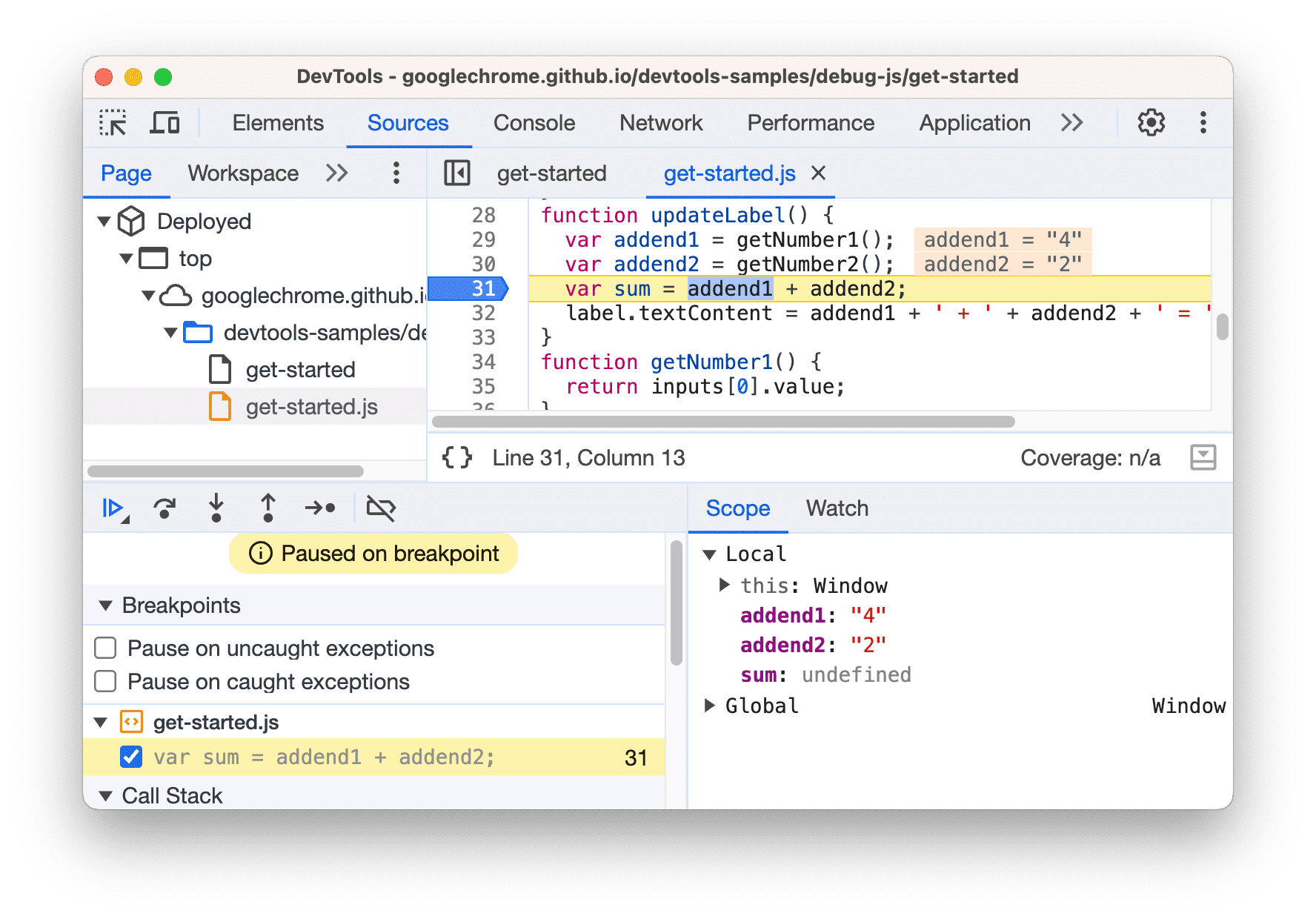
In Sources, press Ctrl+P (Cmd+P), open the page and click the line number of return subtotal(items) + shipping; to set a breakpoint. Change the shipping option; execution pauses there.
Scope shows shipping: "5", a string, because form values are always strings. Add typeof shipping and subtotal(items) to Watch: "string" and 25, so + concatenates.
Call Stack lists orderTotal, then render; click a frame to see its variables.
Change the line to subtotal(items) + Number(shipping), press Ctrl+S to apply the live edit, and F8 to resume.
| Breakpoint type | Set it with | Pauses when |
|---|---|---|
| Conditional | Right-click line > Add conditional breakpoint | An expression is truthy |
| Logpoint | Right-click line > Add logpoint | Never; it logs instead |
| DOM change | Elements: right-click node > Break on | Subtree, attribute or removal |
| Event listener | Event Listener Breakpoints pane | An event such as click fires |
| In code | A debugger; statement | Always, while DevTools is open |
Step with F10 (over), F11 (into) and Shift+F11 (out). Firefox's Debugger and Safari 10 's Sources tab offer the same breakpoint families. Chrome 1 skips /node_modules/ while stepping, and source maps map bundled or TypeScript output back to the files you wrote.