The browser's preload scanner reads ahead in your HTML and starts downloads early, but it cannot know that the hero image is named in a CSS file, that a font lives on another origin, or that most visitors click "Pricing" next. A few attributes tell it. Used sparingly, they speed up Largest Contentful Paint and can make the next navigation instant; overused, they steal bandwidth from what the page needs (Core Web Vitals measures the results).
Script loading: async and defer
A plain <script src> stops the HTML parser while the file downloads and runs. defer downloads in parallel and runs the scripts in document order after parsing finishes, just before DOMContentLoaded. async also downloads in parallel but runs each script the moment it arrives, in no guaranteed order. Module scripts (type="module") are deferred by default. Neither attribute affects inline classic scripts.
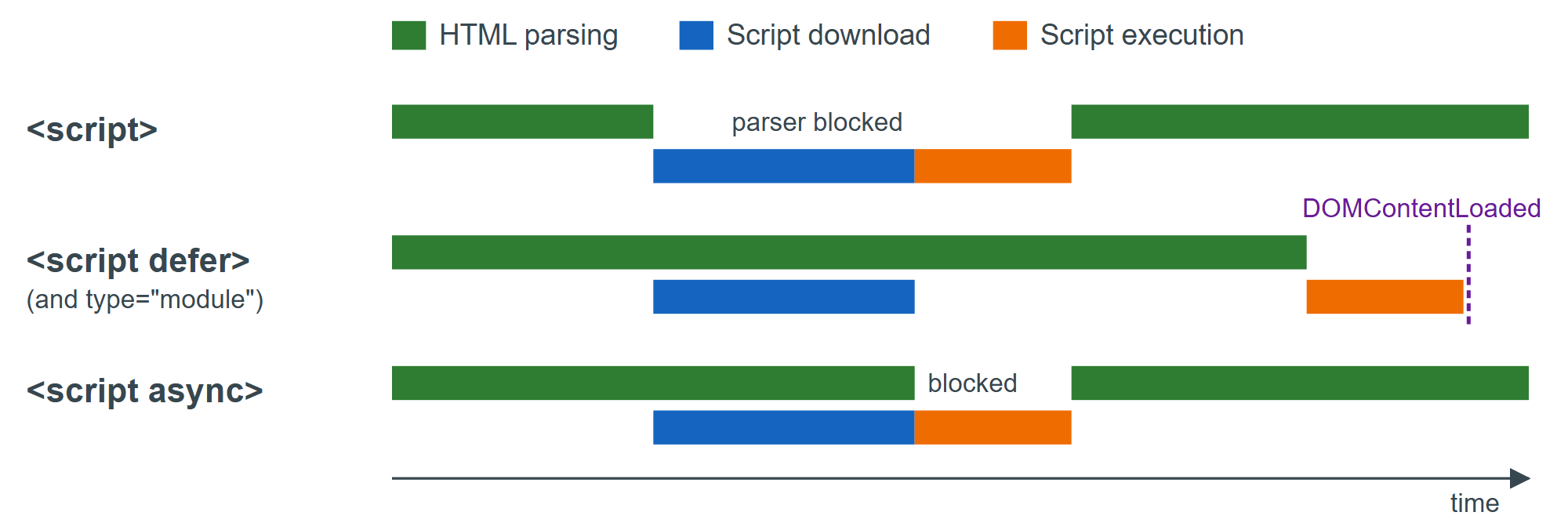
Use defer (or a module) for application code that touches the DOM, and async for independent scripts such as analytics that must not wait for, or be waited on by, anything else.
Resource hints
| Hint | What the browser does | Baseline status |
|---|---|---|
| dns-prefetch | Resolves a host name early | Newly available (2025) |
| preconnect | Opens DNS + TCP + TLS to an origin | Widely available |
| preload | Fetches a file this page needs, at high priority | Widely available |
| modulepreload | Fetches and compiles a module and its imports | Widely available |
| prefetch | Fetches a likely next-page file at low priority | Limited: not in Safari 10 |
| fetchpriority | Raises or lowers a single request's priority | Newly available (2024) |
<link rel="preconnect" href="https://fonts.gstatic.com" crossorigin>
<link rel="dns-prefetch" href="https://analytics.example.com">
<link rel="preload" href="/img/hero.avif" as="image" type="image/avif" fetchpriority="high">
<link rel="preload" href="/fonts/inter.woff2" as="font" type="font/woff2" crossorigin>
<link rel="modulepreload" href="/js/chart.js"><!-- imported by app.js -->
<link rel="prefetch" href="/js/checkout.js">
<script type="module" src="/js/app.js"></script>
<script async src="https://analytics.example.com/tag.js"></script>
preload needs as so the browser applies the right priority, headers and cache key, and fonts need crossorigin even on your own origin because fonts are always fetched in CORS mode; a mismatch downloads the file twice. Chrome 1 warns in the console when a preloaded file is still unused about 3 seconds after load. An <img> already in the HTML needs no preload, just fetchpriority="high". Limit preconnect to the two or three origins you certainly use.
Speculation Rules
The Speculation Rules API goes further than prefetch: a JSON block tells the browser which pages to fetch, or fully prerender in a hidden tab, before the user clicks. When the click comes, the prerendered page is swapped in and appears instantly.
<script type="speculationrules">
{
  "prerender": [{
    "where": { "and": [
      { "href_matches": "/*" },
      { "not": { "href_matches": "/logout" } },
      { "not": { "selector_matches": "[rel~=nofollow]" } }
    ] },
    "eagerness": "moderate"
  }],
  "prefetch": [{ "urls": ["/pricing"] }]
}
</script>
where rules match links in the document; urls rules list addresses and start immediately by default. The eagerness levels in Chrome on desktop are conservative (on pointer down), moderate (after a 200 ms hover), eager (10 ms hover) and immediate; on mobile, Chrome uses viewport heuristics instead of hover. Chrome keeps at most two hover-triggered speculations, discarding the oldest.
Check support with HTMLScriptElement.supports("speculationrules"), and watch speculations succeed or fail in DevTools under Application > Background services > Speculative loads.