A layout.js wraps its own segment and every segment below it. It receives a children prop holding whatever the router matched underneath — a nested layout, a page, or a loading or error element — and, on dynamic routes, a params promise for the segments from the root down to itself.
The app/ directory must contain a root layout, the only component allowed to render the document shell. It must return <html> and <body>; do not hand-write <head>, <title> or <meta> there, because the Metadata API (Authentication and Security) needs to stream and de-duplicate those tags itself.
import Link from 'next/link'
export const metadata = { title: 'Route Demo' }
export default function RootLayout({ children }) {
  return (
    <html lang="en">
      <body>
        <nav>
          <Link href="/">Home</Link> | <Link href="/photo/7">Photo 7</Link>
        </nav>
        <main>{children}</main>
      </body>
    </html>
  )
}
Layouts nest, and — this is the point of them — they do not re-render when you navigate within their subtree. Moving from /dashboard to /dashboard/settings re-renders only the page; the dashboard layout, its DOM and any client state inside it are reused. Next.js 10,514 calls this partial rendering, and it is why a playing video in a layout survives navigation.
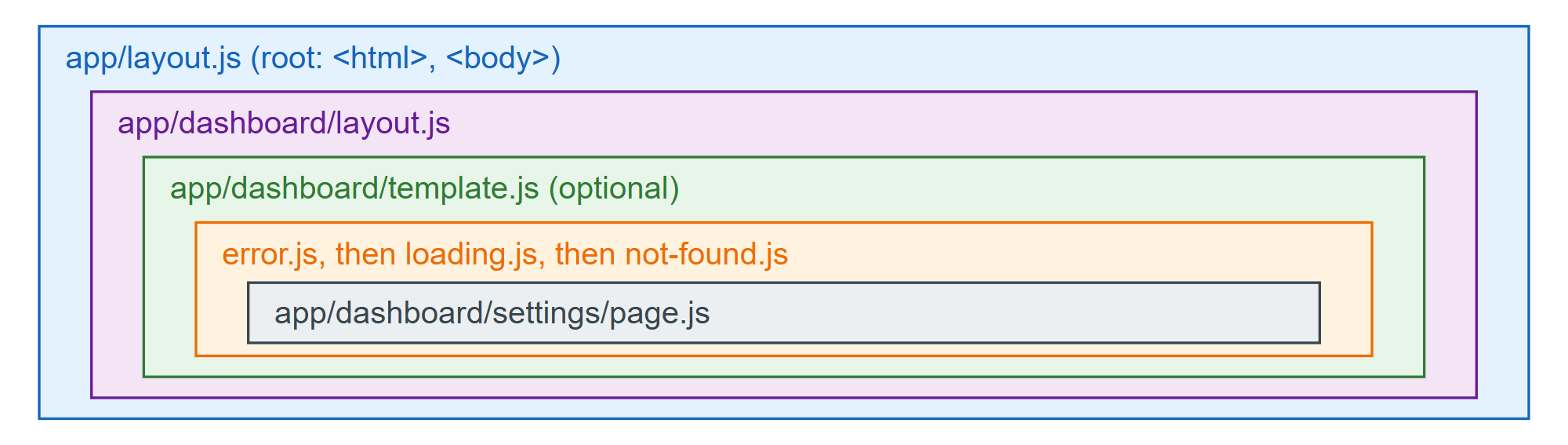
Because layouts are cached on the client and skipped on navigation, they cannot read anything that changes per navigation: no searchParams prop, no pathname. Put a small Client Component inside the layout and call useSearchParams, usePathname or useSelectedLayoutSegment there instead.