A mutation that takes 900 ms needs to say so, and a rejected one needs somewhere to put the message. useActionState gives you both (useActionState), with one change when the action is a Server Action: the return value travels over the wire, so it must be serializable.
"use client";
export default function NoteForm() {
  const [state, formAction, pending] = useActionState(createNote, { error: null });
  return (
    <form action={formAction}>
      <input name="text" placeholder="New note" />
      <button disabled={pending}>{pending ? "Saving..." : "Add note"}</button>
      {state.error && <p style={{ color: "crimson" }}>{state.error}</p>}
      {state.saved && <p style={{ color: "green" }}>Saved "{state.saved}".</p>}
    </form>);}
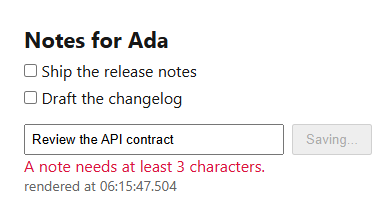
The action's signature grows a first parameter for the previous state, with the FormData second — createNote(prevState, formData), as in Defining a Server Action. The capture below is 350 ms into a submission: the button disabled and reading "Saving...", the previous attempt's rejection still on screen, because useActionState keeps the last state until a new one arrives.
Return errors, do not throw them. A throw inside a Server Action unwinds to the nearest error.js boundary (Error Boundaries) and takes the form down with it; worse, in production Next.js 10,514 replaces the message with a digest, so the user learns nothing. Throw only for conditions the user cannot fix, such as a failed authorization check.
pending stays true for the whole round trip, re-render included, so it never flickers off early; useFormStatus (useFormStatus) reads the same flag without a prop.