stroke-width sets thickness, stroke-linecap shapes open ends, stroke-linejoin shapes corners, and stroke-miterlimit (default 4) bevels a miter spike longer than that many widths. stroke-dasharray lists dash and gap lengths; stroke-dashoffset shifts them. A transform scales the stroke too, unless the shape sets vector-effect="non-scaling-stroke".
<svg width="600" height="120" fill="none" stroke="#1f5f8b" stroke-width="14">
  <path d="M25 20 H145" stroke-linecap="butt"/>
  <path d="M25 55 H145" stroke-linecap="round"/>
  <path d="M25 90 H145" stroke-linecap="square"/>
  <path d="M25 20 H145 M25 55 H145 M25 90 H145" stroke="#fff" stroke-width="1"/>
  <g stroke="#3f7d3a"><path d="M190 110 L220 30 L250 110" stroke-linejoin="miter"/>
    <path d="M270 110 L300 30 L330 110" stroke-linejoin="round"/>
    <path d="M350 110 L380 30 L410 110" stroke-linejoin="bevel"/></g>
  <g stroke="#b5452f" stroke-width="6"><path d="M450 15 H590" stroke-dasharray="14 6"/>
    <path d="M450 40 H590" stroke-dasharray="0 12" stroke-linecap="round"/></g>
  <g transform="scale(4 1)" stroke="#5b3f99" stroke-width="2">
    <rect x="113" y="62" width="33" height="16"/>
    <rect x="113" y="90" width="33" height="16" vector-effect="non-scaling-stroke"/></g>
</svg>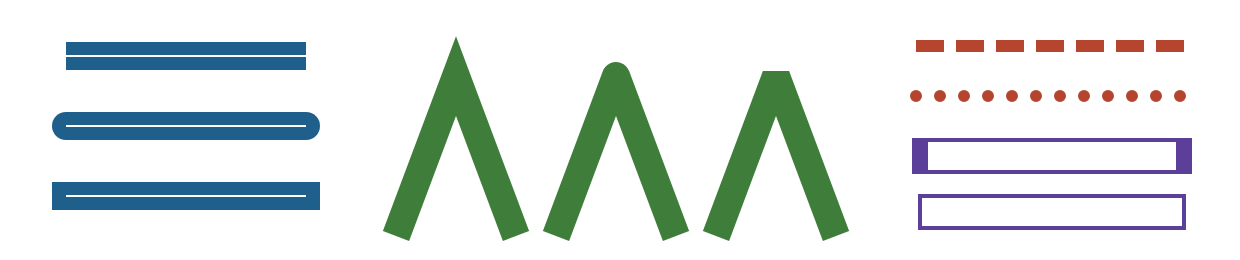
White hairlines mark the true line ends: round and square caps reach half a width beyond them. Zero-length dashes with round caps make dots. Scaled 4x horizontally, the upper purple rectangle's sides swell to 8 units; the non-scaling one stays at 2, as zoomable map borders need. Also know paint-order="stroke" (stroke under fill, for outlined text) and pathLength="100", which makes dash lengths percentages for line-drawing animations.