A <filter> holds a chain of fe* primitives, applied with filter="url(#id)". Each primitive reads in (and in2 if it combines two), writes a result, and by default feeds the next. SourceGraphic is the element as painted, SourceAlpha its black silhouette. Output is clipped to the filter region, by default the bounding box plus 10% on each side (x="-10%" y="-10%" width="120%" height="120%").
<svg width="600" height="130" font-family="Georgia" font-size="15">
  <filter id="shadow" x="-20%" y="-20%" width="150%" height="150%">
    <feGaussianBlur in="SourceAlpha" stdDeviation="4" result="blur"/>
    <feOffset in="blur" dx="6" dy="6" result="moved"/>
    <feFlood flood-color="#263238" flood-opacity=".5"/>
    <feComposite in2="moved" operator="in" result="tinted"/>
    <feMerge><feMergeNode in="tinted"/><feMergeNode in="SourceGraphic"/></feMerge>
  </filter>
  <filter id="drop"><feDropShadow dx="6" dy="6" stdDeviation="4" flood-opacity=".5"/></filter>
  <filter id="clipped"><feDropShadow dx="14" dy="14" stdDeviation="6"/></filter>
  <g id="cover"><rect x="20" y="10" width="90" height="105" rx="4" fill="#1f5f8b"/>
    <text x="65" y="68" text-anchor="middle" fill="#fff">Harbor</text></g>
  <use href="#cover" x="150" filter="url(#shadow)"/>
  <use href="#cover" x="300" filter="url(#drop)"/>
  <use href="#cover" x="450" filter="url(#clipped)"/>
</svg>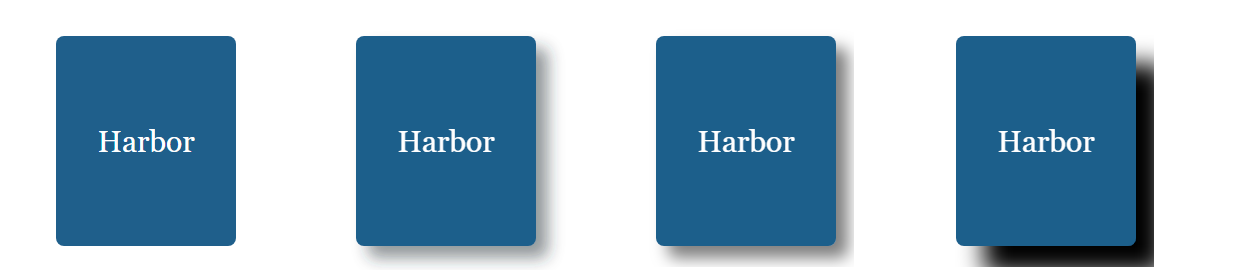
The second cover blurs the silhouette, offsets it, tints it with a flood kept in the blur, and merges the original on top. <feDropShadow> does it in one element, but the default region trims its soft edge and slices the fourth cover's shadow square: enlarge the region when a filter paints outside the shape.