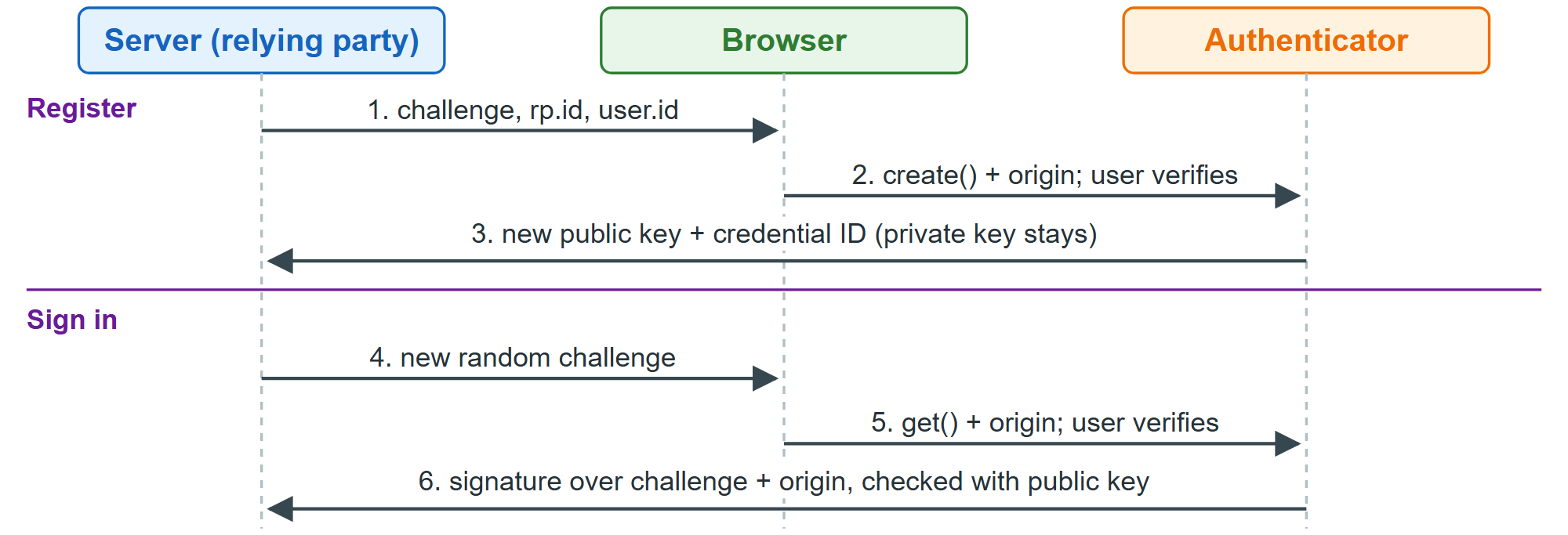
WebAuthn (Baseline Widely available) replaces passwords with key pairs. An authenticator (phone, password manager or security key) keeps the private key and signs server challenges after a biometric or PIN check. The signed data includes the origin, so a phishing domain's signatures fail. A passkey is a discoverable credential synced by iCloud Keychain, Google Password Manager or another manager.
const getJSON = async (url) => (await fetch(url)).json();
const post = (url, data) => fetch(url, { method: 'POST', body: JSON.stringify(data) });  // toJSON()
const created = await navigator.credentials.create({  // run from a "Create passkey" click
  publicKey: PublicKeyCredential.parseCreationOptionsFromJSON(await getJSON('/passkey/new')) });
await post('/passkey/new', created);
// Sign-in page: <input name="username" autocomplete="username webauthn">
if ((await PublicKeyCredential.getClientCapabilities()).conditionalGet) {
  const assertion = await navigator.credentials.get({ mediation: 'conditional',
    publicKey: PublicKeyCredential.parseRequestOptionsFromJSON(await getJSON('/passkey/login')) });
  await post('/passkey/login', assertion);
}
Let SimpleWebAuthn 2,358 (https://github.com/MasterKale/SimpleWebAuthn 2,358 ) (MIT, npm 2,036 install @simplewebauthn/server) build options (residentKey: 'required' makes a passkey) and verify responses. A person must approve each ceremony, so this cannot run headless. Autofill sign-in works in Chrome 108 1 +, Safari 16.1 10 + and Firefox 122 555 + on desktop (passkeys.dev (https://passkeys.dev/device-support/)). When you delete a credential, PublicKeyCredential.signalUnknownCredential() (Chrome 132, Safari 26) tells password managers.