Every API in this chapter has a specification: WHATWG living standards such as HTML, DOM, Fetch, Streams, URL and Storage; W3C documents such as Permissions and Geolocation; and WICG drafts for new ideas. Interfaces are written in Web IDL, and the "Specifications" table on each MDN 102 page links to the text. Before you build on an API, ask: does it need a secure context, does it need permission, and is it supported? A fourth question has joined them: what does it let other sites learn about your user? Browsers now key storage and network state by top-level site, and the privacy APIs built around that shift are covered with the security ones in Security.
Secure contexts
A secure context is a window or worker whose origin is potentially trustworthy: https: and wss: URLs, file: URLs, and localhost, *.localhost, 127.0.0.0/8 or ::1. A frame is secure only if its own URL is trustworthy and its parent is a secure context. Features marked [SecureContext] in Web IDL do not exist elsewhere: on a plain http:// page, headless Chrome 152 1 reports isSecureContext as false and has no navigator.serviceWorker, navigator.clipboard or crypto.subtle, while navigator.geolocation exists but fails with "Only secure origins are allowed". Because localhost counts as secure, code that works on your machine can break when a phone opens http://192.168.1.20:5173.
Permissions and user activation
Powerful features pass three gates. First, the Permissions Policy (Permissions Policy) must allow the feature, or its permission reads denied and no prompt ever appears. Second, the user must grant it. navigator.permissions.query({ name }) resolves to a PermissionStatus whose state is granted, denied or prompt, with a change event. query() never prompts; calling the feature, such as getCurrentPosition(), does. The API is Baseline Widely available (since March 2025), but each browser accepts different names and throws a TypeError for the rest.
Third, many APIs need user activation. A trusted keydown, mousedown, pointerup or touchend grants short-lived transient activation, required by window.open(), fullscreen, clipboard access and file pickers, and permanent sticky activation, checked by audio autoplay and navigator.vibrate(). navigator.userActivation.isActive and .hasBeenActive expose both (Widely available since May 2026). Ask for permissions from a click handler, when the user understands why.
<!doctype html>
<style>body { font: 16px system-ui; } code { background: #eceff1; }</style>
<ul id="out"></ul>
<script type="module">
  const out = document.getElementById('out');
  const show = (label, value) =>
    out.insertAdjacentHTML('beforeend', `<li><code>${label}</code> → <b>${value}</b></li>`);
  show('isSecureContext', `${isSecureContext} (${location.protocol})`);
  show("'serviceWorker' in navigator", 'serviceWorker' in navigator);
  show("CSS.supports('anchor-name: --a')", CSS.supports('anchor-name: --a'));
  show('userActivation.hasBeenActive', navigator.userActivation.hasBeenActive);
  for (const name of ['geolocation', 'clipboard-write', 'nfc']) {
    try {
      const status = await navigator.permissions.query({ name });
      show(`query '${name}'`, status.state);
    } catch (err) {
      show(`query '${name}'`, err.name);   // name not supported here
    }
  }
</script>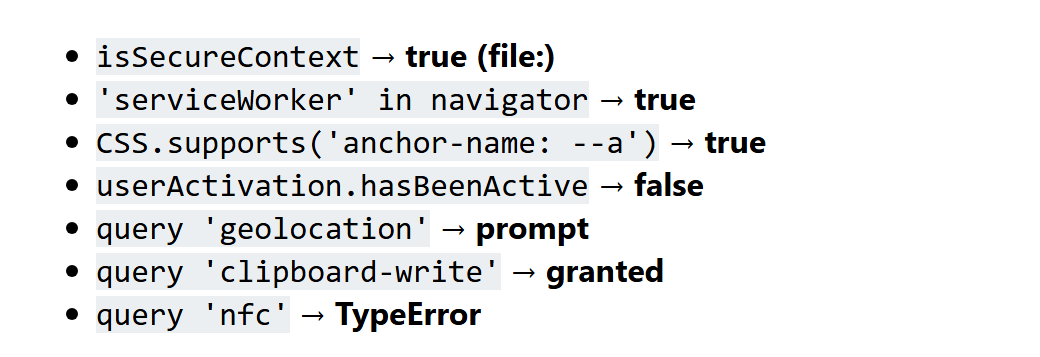
A file: URL counts as secure. Chrome grants clipboard-write without asking and rejects nfc on desktop.
Feature detection and Baseline
Test for the capability, never the browser name: in for objects, CSS.supports() or @supports for CSS, try/catch for option values. If a test fails, hide the feature or load a polyfill (Polyfills).
Baseline (Standards Bodies) tells you when you can drop the fallback. In September 2026 webstatus.dev tracks 1,191 features: 646 Widely available, 117 Newly available and 428 with limited availability. Its data feeds the <baseline-status featureId="permissions"> web component (npm 2,036 baseline-status) for your own docs.