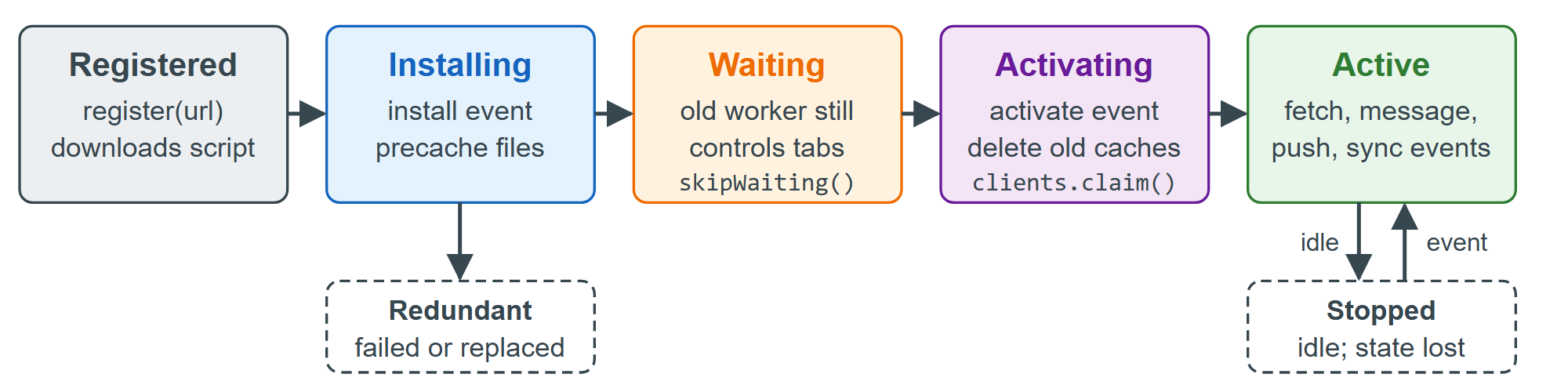
A service worker is an event-driven worker that sits between the network and the pages in its origin and URL scope. It needs HTTPS (or localhost), outlives tabs and is stopped when idle, so keep no state in its variables. Inspect it in the DevTools Application panel (Application Panel).
// sw.js
self.addEventListener('install', () => self.skipWaiting());      // don't wait for old tabs
self.addEventListener('activate', (e) => e.waitUntil(self.clients.claim()));
let received = 0;                        // lost whenever the browser stops the idle worker
self.addEventListener('message', (e) => {
  (e.ports[0] ?? e.source).postMessage(`${e.data} #${++received}`);   // port, or the sender
});
// page: <script type="module">
navigator.serviceWorker.onmessage = (e) => console.log('via client:', e.data);
const reg = await navigator.serviceWorker.register('sw.js');
await navigator.serviceWorker.ready;               // resolves once a worker is active
reg.active.postMessage('ping');
const { port1, port2 } = new MessageChannel();     // a private reply channel
port1.onmessage = (e) => console.log('via port:', e.data);
reg.active.postMessage('question', [port2]);       // transfer port2 to the worker
Output
via port: question #2
via client: ping #1
Without clients.claim(), a new worker controls the page only from its next load. Use skipWaiting() with care: open tabs switch to a worker that may not match their cached files.