LocalStack 63,725 is one container (1.77 GB unpacked) whose gateway serves every service on port 4566. Plain docker run is all a pinned image needs; the localstack Python CLI is deprecated in favor of lstk 37 . On the book's shared machine the container is l1-localstack on host port 31566; on your own machine, localstack-main on 4566 is the usual choice.
docker run -d --name l1-localstack -p 127.0.0.1:31566:4566 \
  -e MAIN_CONTAINER_NAME=l1-localstack \
  -v /var/run/docker.sock:/var/run/docker.sock localstack/localstack:4.13.1
until curl -fs localhost:31566/_localstack/health >/dev/null; do sleep 2; done
docker logs l1-localstack 2>&1 | grep -E 'Community|March 2026|version:|Ready'
curl -s localhost:31566/_localstack/health | jq -c '{edition, version}'56087dd956c2803c6dc5a3d14c25d6b13790f70b031ebbffc43101d3e93f5fa5
You are starting the LocalStack Community Docker image.
We move towards a unified LocalStack for AWS image in March 2026.
LocalStack version: 4.13.1
Ready.
{"edition":"community","version":"4.13.1"}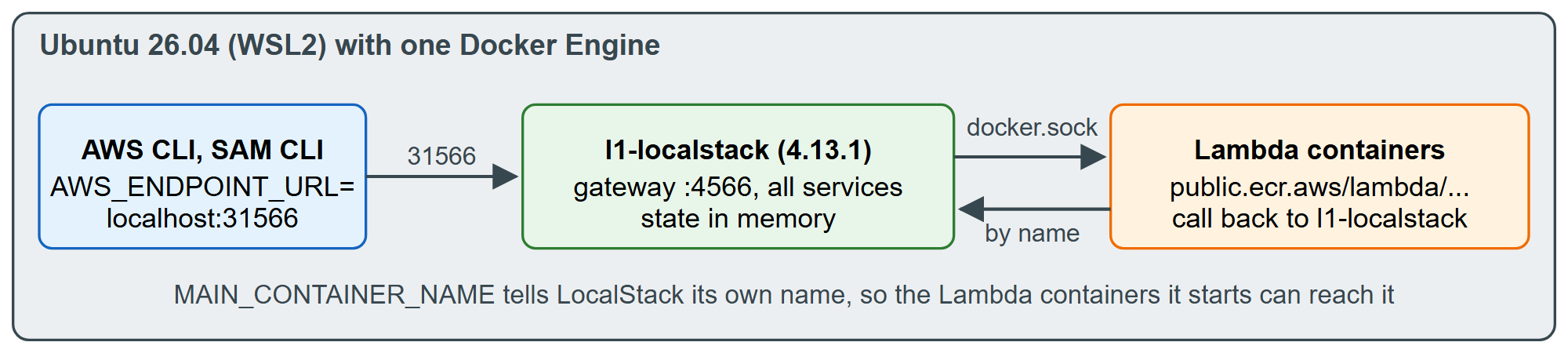
Each option has a reason. Publishing on 127.0.0.1 keeps an unauthenticated AWS 24 emulator off your network. The Docker socket lets LocalStack start Lambda functions as sibling containers, and MAIN_CONTAINER_NAME must match --name so they can call back to it (the default is localstack-main). The state lives in memory: stop the container and every stack is gone, which is a feature for a book (Resetting LocalStack). The image also declares a volume at /var/lib/localstack, so each docker run leaves an anonymous volume behind; remove the container with docker rm -f -v l1-localstack to delete it too.