A MutationObserver calls you back after the DOM under a node changes, whoever changed it: your code, a framework, an extension or the parser. observe(target, options) picks childList, attributes, characterData, subtree and the ...OldValue flags; disconnect() stops it.
<ul id="list" style="margin: 0"><li class="todo">Milk</li></ul>
<pre id="log"></pre>
<script type="module">
  const list = document.querySelector('#list');
  const log = (text) => document.querySelector('#log').append(`${text}\n`);
  new MutationObserver((records) => {
    log(`callback with ${records.length} records:`);
    for (const { type, target: t, addedNodes: a, removedNodes: r, oldValue: o } of records) {
      log(`  ${type.padEnd(13)} ${t.nodeName.padEnd(5)} +${a.length} -${r.length} old: ${o}`);
    }
  }).observe(list, { subtree: true, childList: true, attributes: true,
    attributeOldValue: true, characterData: true, characterDataOldValue: true });
  list.append(Object.assign(document.createElement('li'), { textContent: 'Eggs' }));
  list.firstChild.className = 'done';
  list.firstChild.firstChild.data = 'Oat milk';
  list.lastChild.remove();
  log('synchronous code finished');
</script>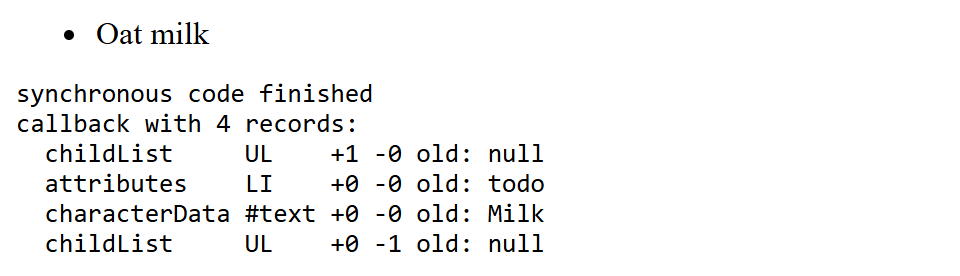
All four changes arrive in one callback after the script finishes, because records are delivered in a microtask (Macrotasks and Microtasks). That batching replaced the synchronous mutation events Chrome 1 removed in version 127 (July 2024). Use observers to translate, sanitize or enhance added nodes, keep callbacks cheap, and avoid re-triggering yourself.