The DOM is an in-memory tree of objects that represents a document, plus the API for reading and changing that tree. Each tag becomes an element node, each run of text a text node, and the document object sits at the root. The WHATWG DOM Standard defines the generic tree and events, the HTML Standard adds HTML element interfaces, and both describe their APIs in Web IDL, which browsers map to JavaScript objects.
Four misconceptions cause most beginner bugs:
The DOM is not your HTML source. The parser repairs markup and keeps whitespace as text nodes; scripts change the tree later. View Source shows the file, the DevTools Elements panel the live DOM.
The DOM is not JavaScript. It is a Web API. Node.js 2,131 has no document until you add an implementation such as jsdom 21,691 (https://github.com/jsdom/jsdom 21,691 ) (npm 2,036 install jsdom, MIT).
The DOM is not what you see. Rendering uses a separate tree of boxes (How the DOM Is Rendered).
The DOM is not a snapshot. Collections such as childNodes and children are live and update as the tree changes.
<!doctype html>
<table id="t"><tr><td>Cell</td></tr></table>
<ul id="list">
  <li>One</li>
  <li>Two</li>
</ul>
<pre id="out"></pre>
<script>
  const list = document.querySelector('#list');
  const kids = list.children;                  // a live collection
  list.append(document.createElement('li'));   // this <li> is not in the source
  document.querySelector('#out').textContent = [
    `table: ${document.querySelector('#t').innerHTML}`,
    `ul.children: ${kids.length}, ul.childNodes: ${list.childNodes.length}`,
  ].join('\n');
</script>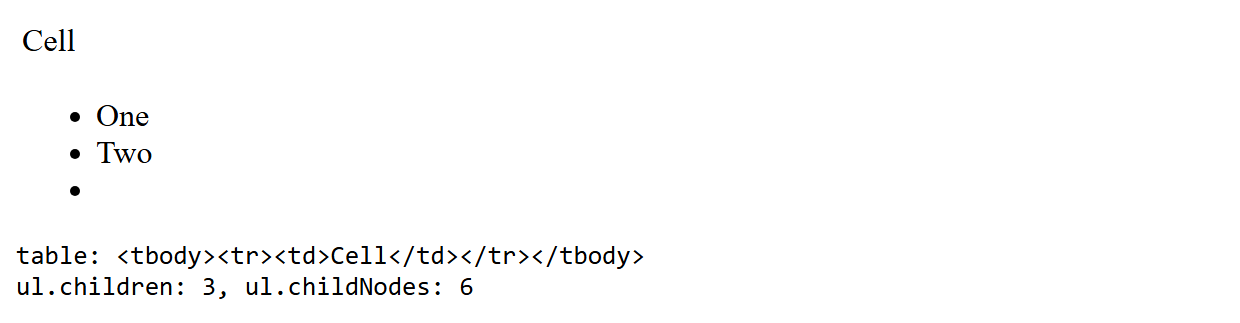
The parser inserted a <tbody> the source never mentioned, the whitespace between the <li> tags became three text nodes, and kids, read before append(), already counts the new item.