Browsers and Engines traced the pipeline from bytes to pixels. The HTML parser tokenizes bytes as they arrive and appends nodes at once, so the top of a long page can paint before the rest downloads. A classic <script> pauses tree construction while a preload scanner fetches upcoming stylesheets, scripts and fonts. When parsing ends and deferred and module scripts have run, document fires DOMContentLoaded; images may still be loading.
Rendering does not draw the DOM directly. Style calculation matches the CSSOM against each element, and the engine builds a separate tree of boxes, the render (layout) tree, which differs in three ways:
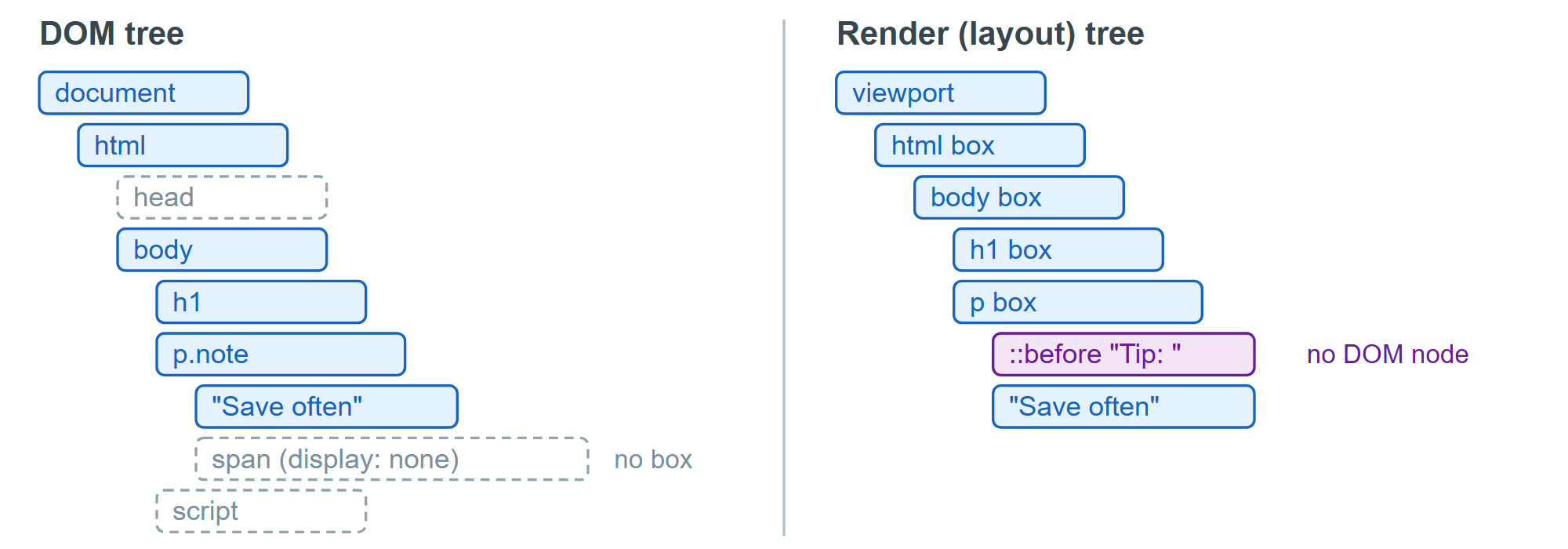
Nodes without boxes. <head>, <script> and anything with display: none (how browsers implement the plain hidden attribute) stay in the DOM but produce no boxes. visibility: hidden keeps the box and its space.
Boxes without nodes. ::before and ::after generate boxes; neither querySelector() nor childNodes sees them.
One node, several boxes. A <span> wrapping over three lines has three border boxes, so getClientRects() returns three rectangles.
To ask "does this element have a box?", call element.checkVisibility() (Baseline since March 2024): it returns false for display: none subtrees and content-visibility: hidden, and accepts { opacityProperty: true, visibilityProperty: true } for stricter checks. jsdom 21,691 has no render tree, so its geometry properties return zeros.