HTMLTableElement builds its own structure: createCaption(), createTHead() and createTFoot() return the existing element or make one, createTBody() adds one, insertRow(index) returns a new <tr> and a row's insertCell(index) a <td>. Index -1, the default, appends; deleteRow() and deleteCell() take the same.
<style>
  table { border-collapse: collapse; } th, td { border: 1px solid #90a4ae; padding: 3px 10px; }
</style>
<script type="module">
  const sales = [['North', 1250, 1410], ['South', 980, 1130], ['West', 1520, 1490]];
  const table = document.createElement('table');
  table.createCaption().textContent = 'Quarterly sales (units)';
  table.createTHead().insertRow().innerHTML = '<th>Region<th>Q1<th>Q2<th>Change';  // static
  const body = table.createTBody();
  for (const [region, q1, q2] of sales) {
    const row = body.insertRow();
    for (const value of [region, q1, q2, q2 - q1]) row.insertCell().textContent = value;
  }
  body.insertRow(0).insertCell().textContent = 'East (new)';   // index 0: first row
  document.body.append(table);                                 // one layout, not many
</script>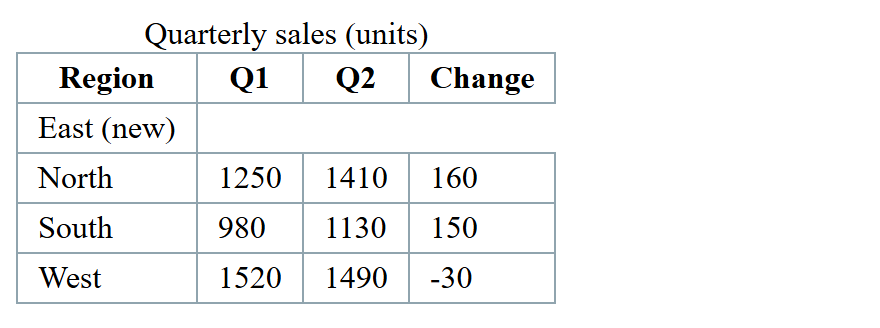
There is no insertHeaderCell(), so <th> cells come from markup or createElement(). Fill cells from user data with textContent, never innerHTML, and style with CSS (Table), not the obsolete border or bgColor.