A --from-file install has no first-run user prompt and logs in as root. Run adduser dev && usermod -aG sudo dev, put [user] default=dev and [boot] systemd 142,543 =true on four lines of /etc/wsl.conf, then run wsl --terminate Ubuntu-26.04 in PowerShell 55,538 so the next start reads it. That kills everything running in the distribution, so use it only when nothing else is working.
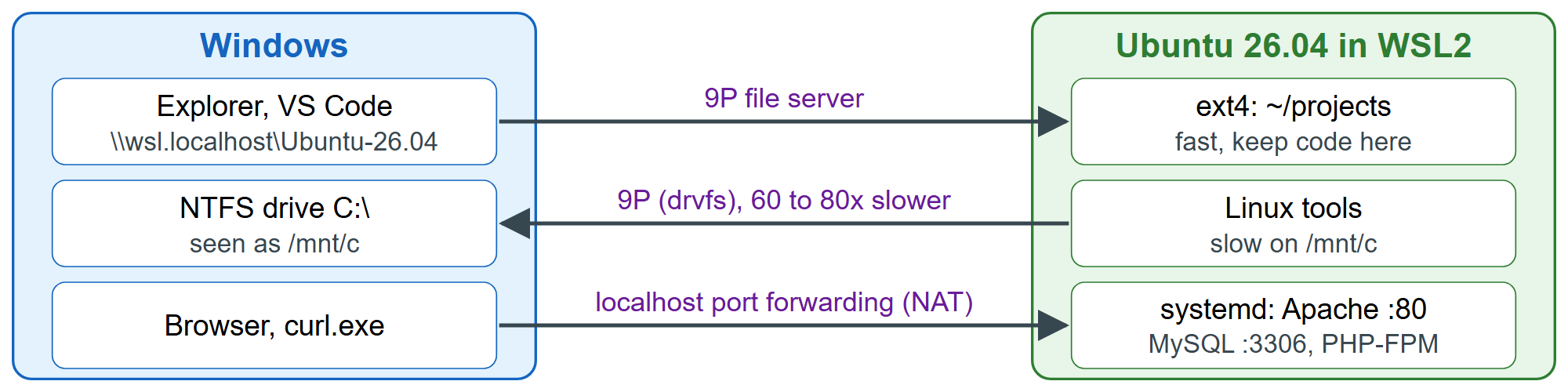
Files cross the boundary over the 9P protocol, which is slow for the many small files of a PHP project:
for d in ~/bench /mnt/c/Users/you/bench; do
  mkdir -p "$d" && cd "$d"; s=$EPOCHREALTIME
  for i in $(seq 2000); do echo "<?php echo $i;" > "f$i.php"; done; cat f*.php > /dev/null
  printf '%-5s %-23s %.2f s\n' "$(findmnt -no FSTYPE -T .)" "$d" "$(bc <<< "$EPOCHREALTIME-$s")"
  cd && rm -rf "$d"
doneext4 /home/dev/bench 0.15 s 9p /mnt/c/Users/you/bench 8.69 s
Across several runs the Windows drive was 60 to 80 times slower. So keep projects under ~ and open them from Windows as \\wsl.localhost\Ubuntu-26.04\home\dev, or with VS Code 550 's WSL extension, which runs the editor's back end inside Linux; wslpath -w and wslpath -u convert paths between the two forms. Ports need no setup: in the default NAT mode, WSL forwards them to Windows' localhost, so curl.exe -sI http://localhost/ in PowerShell returns Server: Apache/2.4.66 (Ubuntu 225 ). For access from other machines, set networkingMode=mirrored under [wsl2] in %UserProfile%\.wslconfig (Windows 11 22H2 or later) and allow the port in the Hyper-V firewall.