A package is an archive of files plus metadata (version, dependencies, conflicts) and maintainer scripts that run around unpacking. The split worth internalizing is between installer and resolver. dpkg and rpm install one file already on disk and stop if a dependency is missing. apt and dnf download signed repository indexes, solve the dependency graph, fetch and verify everything, then hand the files down in a workable order. That is why sudo dpkg -i app.deb often ends broken while sudo apt install ./app.deb does not.
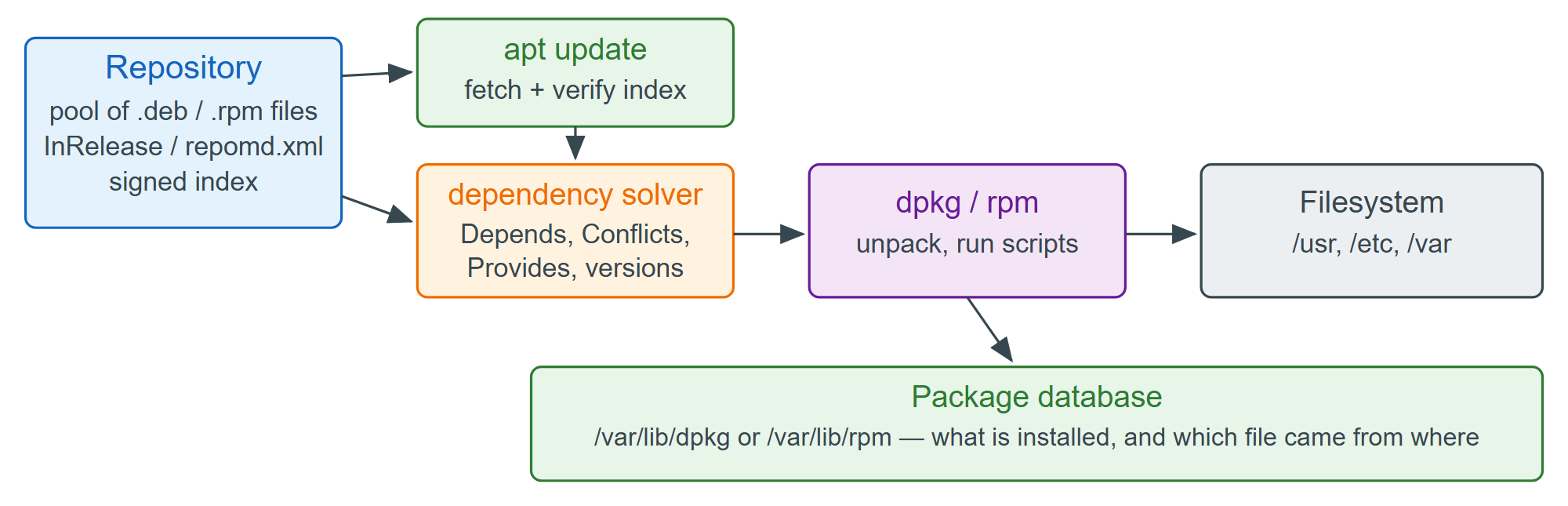
The package database records who owns every file. The Apache 129 binary belongs to apache2-bin; apache2 itself carries the configuration and helpers such as a2enmod.
dpkg -S /usr/sbin/apache2
dpkg -L apache2-bin | head -3apache2-bin: /usr/sbin/apache2 /. /usr /usr/lib
On the RHEL 664 family the same questions are rpm -qf /usr/sbin/httpd and rpm -ql httpd. In scripts, prefer apt-get and apt-cache: apt is for humans, and its output format may change.