Given a mockup and a JSON feed, experienced React 7,897 developers follow the same five steps. Learn them as a routine: each answers a question you would otherwise answer by guessing.
Step 1 — break the UI into a component hierarchy. Draw boxes on the mockup and name them, applying the single responsibility principle: if a box does two unrelated things, split it. A well-shaped JSON model and a good component tree tend to match, so the data is a guide.
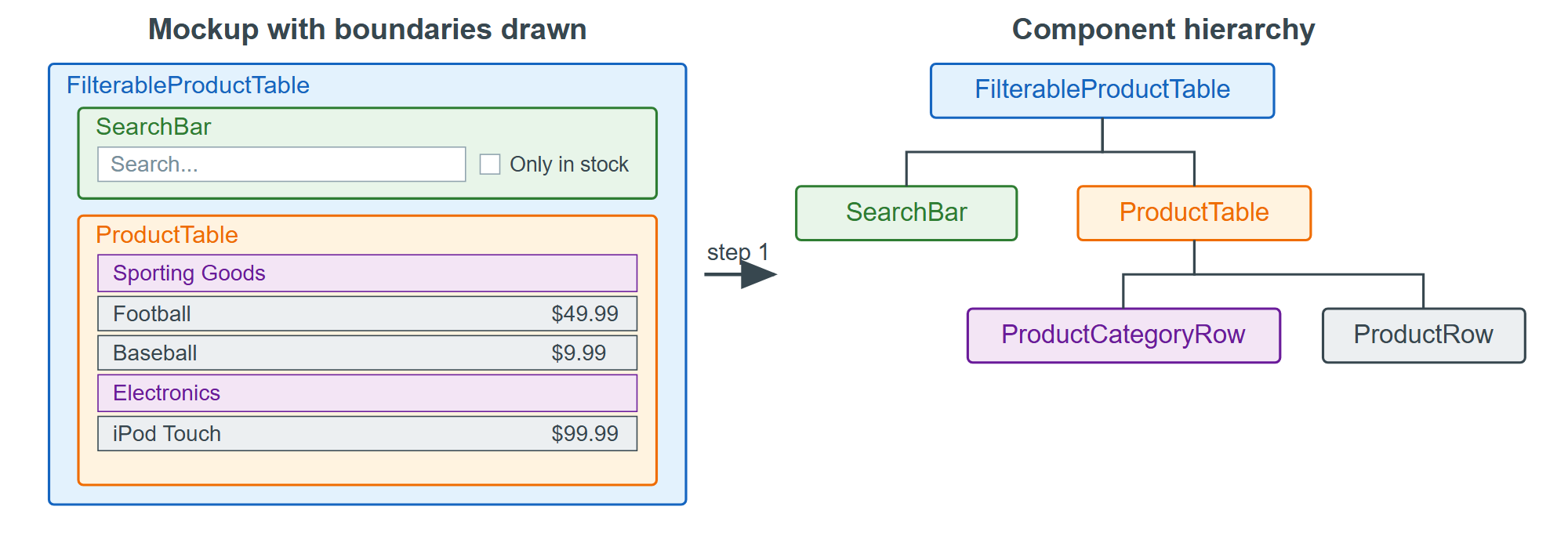
Step 2 — build a static version. Write the whole tree with props only and no state at all. This step is typing rather than thinking, which is the point: it separates "does the markup work" from "does the interaction work."
Step 3 — find the minimal state. Ask three questions of every piece of data on screen. Does it stay the same over time? Is it passed in from a parent? Can you compute it from other state or props? A yes to any of them means it is not state. Here the product list arrives as a prop and the filtered list is computable, so only the search text and the in-stock checkbox survive.
Step 4 — decide where the state lives. For each piece, find the closest common parent of the components that render from it and put the state there. Both pieces are read by SearchBar and ProductTable, so both belong in FilterableProductTable.
Step 5 — add inverse data flow. State lives above the inputs that change it, so the owner passes setters down as props and the inputs call them. More typing than two-way binding, and in exchange every state change has exactly one visible path. Steps 3 and 4 are the ones that pay: most tangled React code is state duplicated instead of derived, or parked in a component that was not the common owner.