Network responses do not come back in the order you asked for them. Click product #1, then quickly click product #2, and the slow first response can land after the fast second one — leaving the details of #1 on screen under the heading of #2. Nothing in fetch prevents this, and it is the single most common data bug in React 7,897 applications.
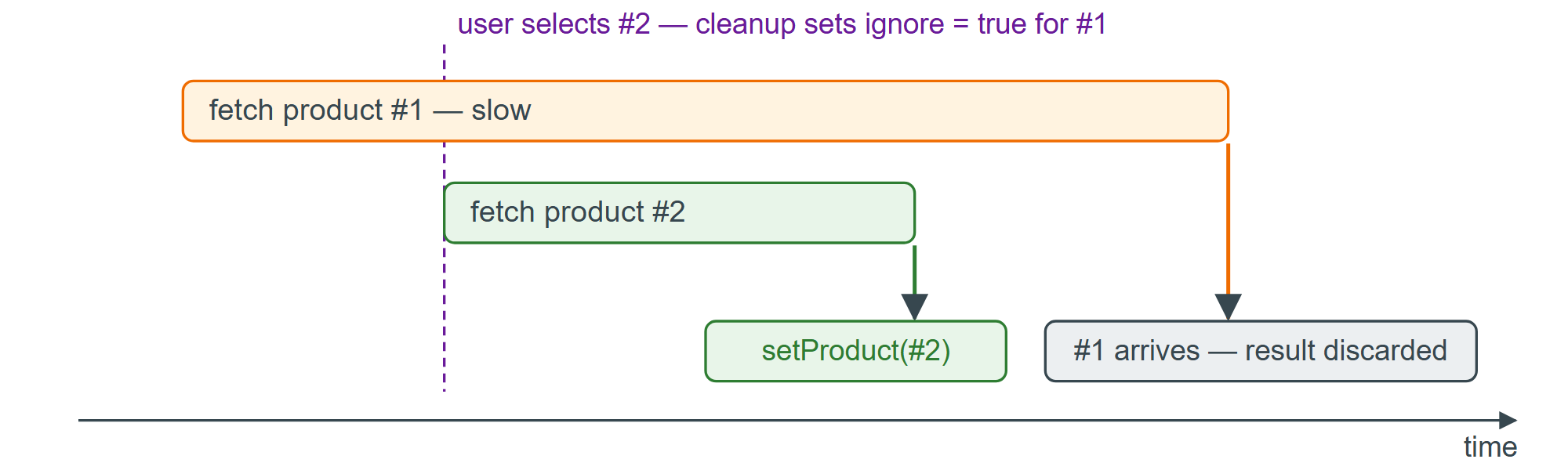
The fix is a variable local to each run of the effect. The cleanup for the run that fetched #1 flips that variable before the run for #2 starts, so when #1 finally resolves it knows it is no longer current.
useEffect(() => {
  let ignore = false;
  async function load() {
    const res = await fetch(`https://api.example.com/products/${id}`);
    const json = await res.json();
    if (!ignore) setProduct(json);    // still the current effect for this id
  }
  load();
  return () => { ignore = true; };
}, [id]);
Aborting the request (Fetching Data in an Effect) and the ignore flag solve different halves of the problem. abort() stops work that is still in flight; the flag also covers a response that already resolved and is sitting in the microtask queue, and it works for any promise, not just fetch. Use both.