An event handler is a prop whose name starts with on and whose value is a function — passed, never called. onClick={handleClick} hands React 7,897 the function; onClick={handleClick()} calls it during rendering and gives React whatever it returned. Handlers also see events from the elements inside them, because React replays the same three phases the DOM uses.
<style>body{font:15px/1.6 system-ui;margin:14px}button{font:inherit;padding:3px 9px}</style>
<div id="root"></div>
<script type="importmap">{"imports":{"react":"https://esm.sh/react@19.3.0",
"react-dom/client":"https://esm.sh/react-dom@19.3.0/client?external=react"}}</script>
<script src="https://cdn.jsdelivr.net/npm/@babel/standalone@7/babel.min.js"></script>
<script type="text/babel" data-type="module">
import React, { useState } from 'react';
import { createRoot } from 'react-dom/client';
function Panel() {
  const [log, setLog] = useState([]);
  const add = m => setLog(l => [...l, m]);
  return (
    <div onClickCapture={() => add('capture: outer div')}
         onClick={() => add('bubble: outer div')}>
      <button onClick={e => add(`target: ${e.target.tagName}`)}>Click me</button>
      <ol>{log.map((m, i) => <li key={i}>{m}</li>)}</ol>
    </div>);
}
createRoot(document.getElementById('root')).render(<Panel />);
setTimeout(() => document.querySelector('button').click(), 400);
</script>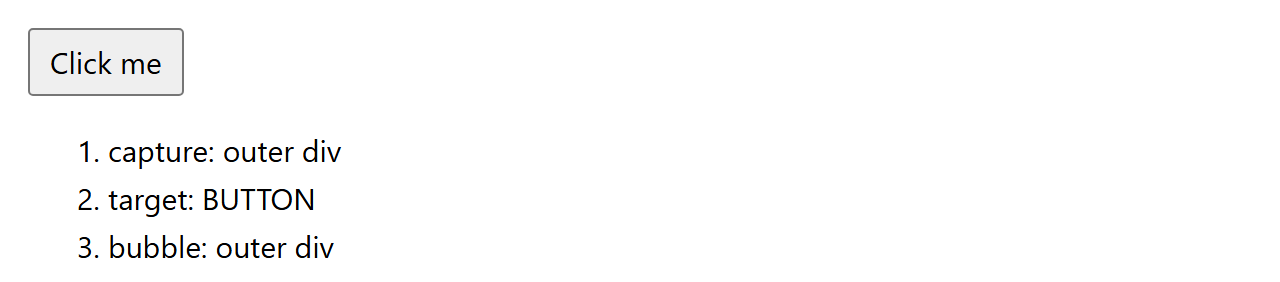
Append Capture to any handler name to run it on the way down. e.stopPropagation() ends the journey, so a click inside a modal never reaches the backdrop handler that closes it; e.preventDefault() cancels the browser's own behavior for the few events that have one — form submission, link navigation, the context menu. The two are independent, and confusing them is why so many forms reload the page.
Two departures from the DOM are worth remembering. React's onChange fires on every keystroke, like the native input event, not when the field loses focus. And onScroll does not bubble.