Some interactions should not count as navigation: a like button, a checkbox in one table row, a combobox that queries as you type. useFetcher() returns a fetcher that calls a route's loader and action on its own, with its own state and data, and no effect on the URL or the history stack.
<style>body{font:15px/1.6 system-ui;margin:12px}ul{list-style:none;padding:0}
li{margin:4px 0}button{font:inherit}.done{color:#2e7d32}.busy{color:#ef6c00}</style>
<div id="root"></div>
<script type="importmap">{"imports":{"react":"https://esm.sh/react@19.3.0",
"react-dom":"https://esm.sh/react-dom@19.3.0?external=react",
"react-dom/client":"https://esm.sh/react-dom@19.3.0/client?external=react",
"react-router":"https://esm.sh/react-router@8.4.0?external=react,react-dom",
"react-router/dom":"https://esm.sh/react-router@8.4.0/dom?external=react,react-dom"}}</script>
<script src="https://cdn.jsdelivr.net/npm/@babel/standalone@7/babel.min.js"></script>
<script type="text/babel" data-type="module">
import React from 'react';
import { createRoot } from 'react-dom/client';
import { createMemoryRouter, useFetcher, useLoaderData } from 'react-router';
import { RouterProvider } from 'react-router/dom';
const db = [{ id: '1', title: 'Buy milk', done: false },
  { id: '2', title: 'Walk the dog', done: true }, { id: '3', title: 'Reply', done: false }];
function Item({ todo }) {
  const fetcher = useFetcher();
  // Trust the value being sent instead of waiting for the round trip.
  const done = fetcher.formData ? fetcher.formData.get('done') === 'true' : todo.done;
  return <li><fetcher.Form method="post" style={{ display: 'inline' }}>
      <input type="hidden" name="id" value={todo.id} />
      <input type="hidden" name="done" value={String(!done)} />
      <button>{done ? 'Undo' : 'Mark done'}</button>
    </fetcher.Form>{' '}<span className={done ? 'done' : ''}>{todo.title}</span>
    {fetcher.state !== 'idle' && <span className="busy"> saving...</span>}</li>;
}
const router = createMemoryRouter([
  { path: '/', loader: () => db,
    Component: () => <ul>{useLoaderData().map((t) => <Item key={t.id} todo={t} />)}</ul>,
    action: async ({ request }) => {
      const f = await request.formData();
      await new Promise((r) => setTimeout(r, 400));       // a slow network
      db.find((t) => t.id === f.get('id')).done = f.get('done') === 'true';
      return { ok: true };
    } }]);
createRoot(document.getElementById('root')).render(<RouterProvider router={router} />);
const click = (i, ms) => setTimeout(() => document.querySelectorAll('button')[i].click(), ms);
click(0, 300); click(2, 5800);         // the second is still in flight at capture
</script>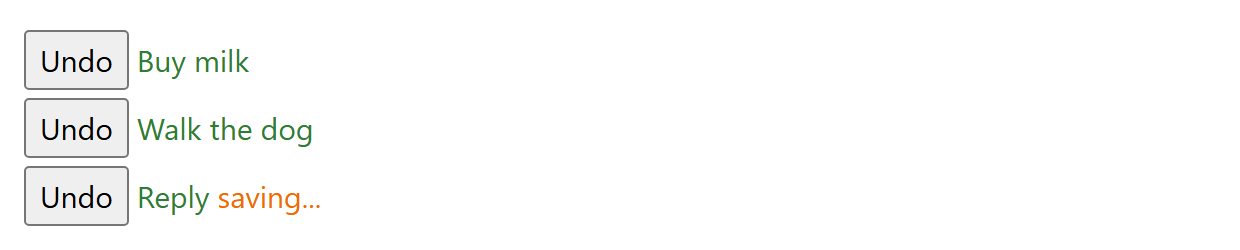
The first row has finished; the third was clicked moments before the screenshot and shows the optimistic result of a submission still in the air. That optimism is the line reading fetcher.formData: in-flight values are readable while the action runs, so the label flips instantly. The other rows stayed idle — each useFetcher() call owns a separate state machine.
Besides Form, a fetcher exposes load(href) to run a loader imperatively, submit(target, options) to call an action, reset(), and the read-only state, data, formData, formMethod, formAction, formEncType, json and text. useFetcher({ key: 'cart' }) makes two components share one fetcher, so a header badge can render a submission started in the page body.
The router still revalidates every loader when the action resolves; what a fetcher skips is the navigation — no history entry, no useNavigation state, nothing unmounted. Use <Form> when the submission should feel like going somewhere, a fetcher when it should feel like editing what is on screen.