If the setup function returns a function, React 7,897 treats it as the cleanup. It runs before every re-run of the setup, and once more when the component unmounts. Connections are closed, timers cleared, listeners removed — whatever the setup started.
In development, React mounts every component, immediately unmounts it, and mounts it again. Effects therefore run setup, cleanup, setup. That is not a bug to work around; it is a test you get for free, and a missing cleanup shows up immediately as a duplicated connection or a doubled counter. Production runs the setup once.
<div id="root"></div>
<script src="https://cdn.jsdelivr.net/npm/@babel/standalone@8.0.5/babel.min.js"></script>
<script type="importmap">
{ "imports": { "react": "https://esm.sh/react@19.3.0?dev",
  "react-dom/client": "https://esm.sh/react-dom@19.3.0/client?dev" } }
</script>
<script type="text/babel" data-type="module">
  import React, { useState, useEffect } from 'react';
  import { createRoot } from 'react-dom/client';
  const log = [];
  function ChatRoom({ roomId }) {
    const [, redraw] = useState(0);
    useEffect(() => {
      log.push('connect    #' + roomId);
      redraw(n => n + 1);            // demo scaffolding: repaint the log below
      return () => log.push('disconnect #' + roomId);
    }, [roomId]);
    return <pre style={{fontSize: '15px'}}>{log.join('\n')}</pre>;
  }
  function App() {
    const [room, setRoom] = useState('general');
    return <><button onClick={() => setRoom('random')}>Switch to #random</button>
      <ChatRoom roomId={room} /></>;
  }
  createRoot(document.getElementById('root')).render(
    <React.StrictMode><App /></React.StrictMode>);
  setTimeout(() => document.querySelector('button').click(), 800);   // simulate a click
</script>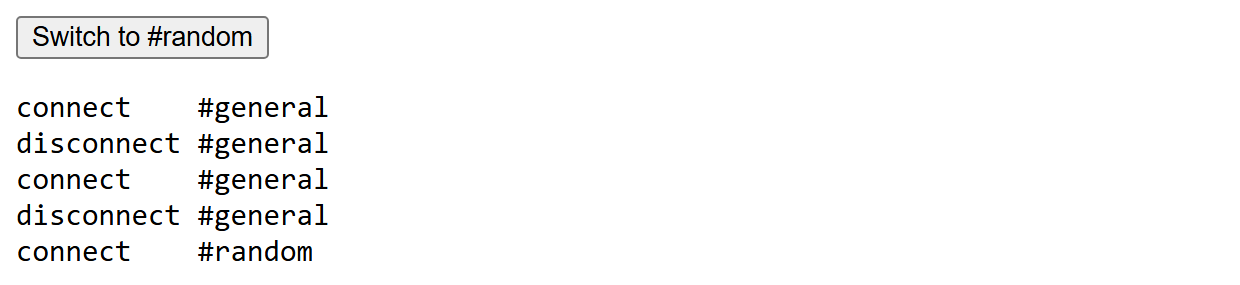
The first three lines of the output are the development double-mount. The last two are the real point of the cleanup: when roomId changes, React does not "update" the effect — it tears the old synchronization down and sets a new one up.