useTransition returns the pair [isPending, startTransition]. Every setter called directly inside the callback you pass to startTransition is marked as a Transition: React 7,897 may render it in the background, pause it, and abandon it if a newer update makes it irrelevant. isPending is true while one of this component's Transitions is in flight — hang a spinner or a dimmed style on it.
The demo runs the same search twice: the left copy sets the query with a plain setter, the right copy wraps that setter in startTransition. A script types three characters 100 ms apart into each input, and every render of the expensive list writes a line into the log beneath it.
<div id="root"></div>
<style>body{font:13px system-ui;margin:6px} pre{background:#eceff1;padding:4px;font-size:12px}
  .row{display:flex;gap:10px} .row>div{flex:1}</style>
<script src="https://cdn.jsdelivr.net/npm/@babel/standalone@8.0.5/babel.min.js"></script>
<script type="importmap">
{ "imports": { "react": "https://esm.sh/react@19.3.0",
  "react-dom/client": "https://esm.sh/react-dom@19.3.0/client" } }
</script>
<script type="text/babel" data-type="module">
  import React, { useState, useTransition } from 'react';
  import { createRoot } from 'react-dom/client';
  const log = { plain: [], transition: [] };
  function SlowList({ query, tag }) {
    let x = 0; for (let i = 0; i < 4e6; i++) x += Math.sqrt(i);   // ~25 ms of real work
    log[tag].push(`   list rendered for "${query}"`);
    return <p>{x > 0 ? 200 : 0} rows matching "{query}"</p>;
  }
  const Log = ({ tag }) => <pre>{log[tag].join('\n')}</pre>;      // renders after SlowList
  function Search({ tag, plain }) {
    const [text, setText] = useState(''), [query, setQuery] = useState('');
    const [isPending, startTransition] = useTransition();
    function onChange(e) {
      const v = e.target.value;
      setText(v);                                    // urgent either way
      log[tag].push(`keystroke "${v}"`);
      if (plain) setQuery(v); else startTransition(() => setQuery(v));
    }
    return <div><b>{tag}</b> <input value={text} onChange={onChange} size="8" />
      {isPending && ' filtering...'}<SlowList query={query} tag={tag} /><Log tag={tag} /></div>;
  }
  createRoot(document.getElementById('root')).render(
    <div className="row"><Search tag="plain" plain /><Search tag="transition" /></div>);
  const set = Object.getOwnPropertyDescriptor(HTMLInputElement.prototype, 'value').set;
  [0, 1].forEach((n) => 'lam'.split('').forEach((c, i) => setTimeout(() => {
    const el = document.querySelectorAll('input')[n];
    set.call(el, el.value + c);
    el.dispatchEvent(new Event('input', { bubbles: true }));
  }, 300 + n * 700 + i * 100)));
</script>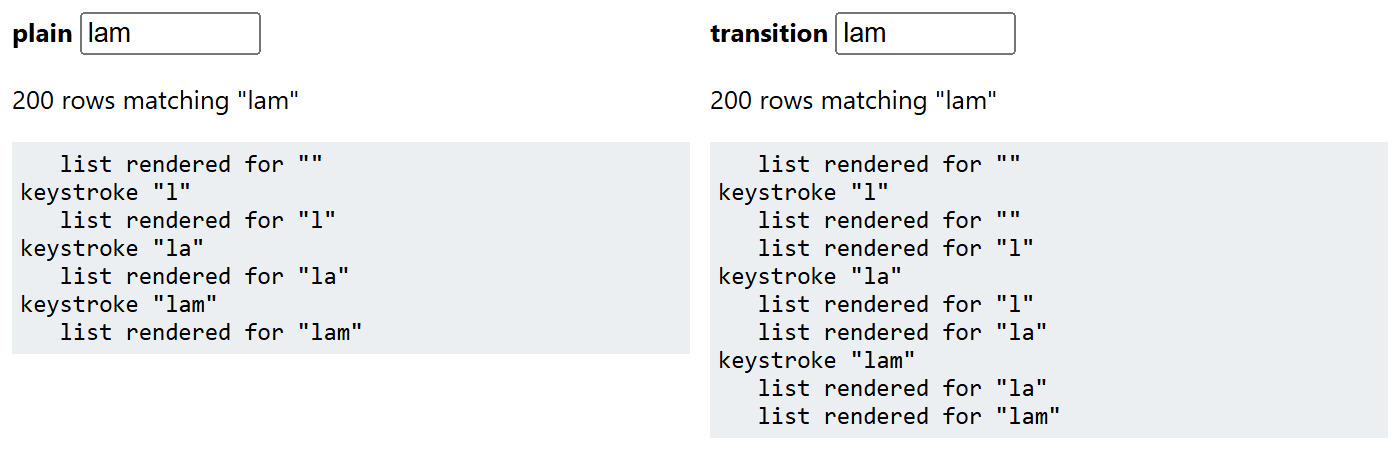
On the left each keystroke is followed by one list render, for the character just typed: setter and expensive render share a blocking pass, so the letter cannot appear until the list is finished. On the right each keystroke produces two renders — one for the previous query (the urgent pass that puts the new letter in the input and leaves the old list on screen), then a low-priority one that catches the list up.
Three rules follow. Never set the value bound to an input inside a Transition, or the field lags behind the keyboard. Only synchronous setters are marked, so one called from a setTimeout is urgent again. And this is no debounce: every intermediate query is still rendered.