When WebGL is slow or missing on one machine, start at the page titled GPU Internals: chrome://gpu in Chrome 1 (older articles write about:gpu), edge://gpu in Edge. Its first block says whether WebGL runs on the GPU, in software or not at all:
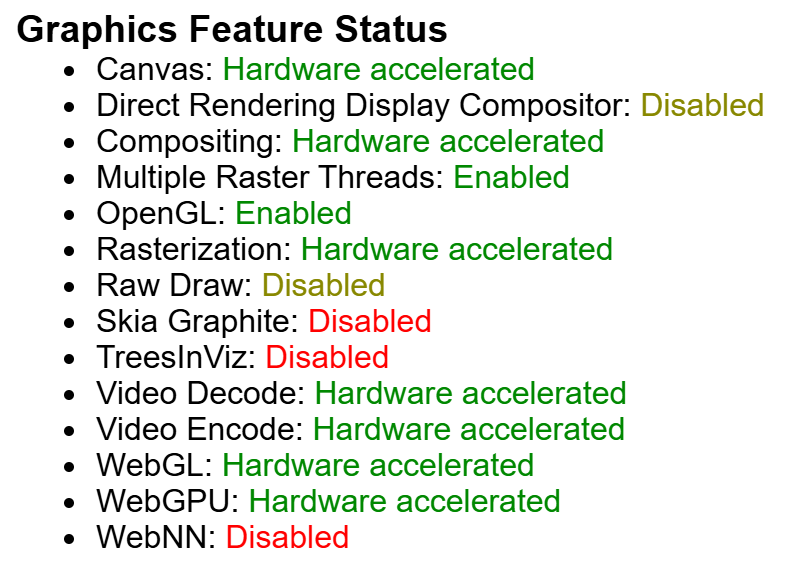
There is no separate WebGL internals page (chrome://webgl-internals is an invalid address in Chrome 154); the WebGL details are further down the same page. Driver Information gives GL_RENDERER with the driver version (...D3D11-32.0.15.9186 here) and the full GL_EXTENSIONS list ANGLE 2,592 sees. Driver Bug Workarounds lists the fixes Chrome applies to your GPU from its public driver bug list; this machine's included enable_webgl_timer_query_extensions and exit_on_context_lost. Problems Detected names blocklisted features with bug numbers, and Log Messages holds the GPU process's errors; "Download Report to File" saves it all for a bug report. Firefox 555 shows the same in the Graphics section of about:support.
<!doctype html>
<style>
  body { margin: 0; font: 11px system-ui, sans-serif; background: #f7f4ee; color: #333; }
  .wrap { position: relative; max-width: 600px; }
  canvas { display: block; width: 100%; }
  .lbl { position: absolute; left: 6px; transform: translateY(-50%); font: 10px monospace; }
  .val { position: absolute; transform: translateY(-50%); font: 10px monospace; }
  ul { max-width: 600px; margin: 6px 0; padding-left: 18px; font: 11px monospace; }
  .ok { color: #3f7d3a; } .warn { color: #b5452f; }
</style>
<ul id="status"></ul>
<div class="wrap"><canvas id="c" width="600" height="200"></canvas></div>
<script>
const canvas = document.getElementById('c');
const gl = canvas.getContext('webgl2');
const gl1 = document.createElement('canvas').getContext('webgl');
const info = gl.getExtension('WEBGL_debug_renderer_info');
const renderer = info ? gl.getParameter(info.UNMASKED_RENDERER_WEBGL) : gl.getParameter(gl.RENDERER);
const software = /SwiftShader|llvmpipe|Software/i.test(renderer);
// The first block of chrome://gpu answers these questions; a page can check the same things itself.
document.getElementById('status').innerHTML = [
  [`WebGL: ${gl1 ? 'available' : 'unavailable'}`, !!gl1],
  [`WebGL2: ${gl ? 'available' : 'unavailable'}`, !!gl],
  [`Rendering: ${software ? 'software only' : 'hardware accelerated'} (${renderer})`, !software],
  [`Extensions: WebGL 1 ${gl1.getSupportedExtensions().length}, WebGL 2 ${gl.getSupportedExtensions().length}`, true],
  ['Driver details, workarounds and logs: open chrome://gpu (or edge://gpu, or about:support in Firefox)', true],
].map(([text, ok]) => `<li class="${ok ? 'ok' : 'warn'}">${text}</li>`).join('');
// A bar chart of limits on a log scale, drawn with scissored clears.
const limits = [['MAX_TEXTURE_SIZE', 'MAX_TEXTURE_SIZE'], ['MAX_RENDERBUFFER_SIZE', 'MAX_RENDERBUFFER_SIZE'],
  ['MAX_3D_TEXTURE_SIZE', 'MAX_3D_TEXTURE_SIZE'], ['MAX_FRAGMENT_UNIFORM_VECTORS', 'MAX_FRAGMENT_UNIFORM_VECTORS'],
  ['MAX_TEXTURE_IMAGE_UNITS', 'MAX_TEXTURE_IMAGE_UNITS'], ['MAX_DRAW_BUFFERS', 'MAX_DRAW_BUFFERS'], ['MAX_SAMPLES', 'MAX_SAMPLES']]
  .map(([name, param]) => [name, gl.getParameter(gl[param])]);
const wrap = document.querySelector('.wrap');
gl.clearColor(0.97, 0.96, 0.93, 1); gl.clear(gl.COLOR_BUFFER_BIT);
gl.enable(gl.SCISSOR_TEST);
const rowH = 200 / limits.length;
limits.forEach(([name, value], i) => {
  const width = Math.log2(value) / 15 * 360;                     // 1 .. 32768 on a log axis
  gl.scissor(200, 200 - (i + 1) * rowH + 4, Math.max(2, width), rowH - 8);
  gl.clearColor(0.12 + i * 0.05, 0.37, 0.55 - i * 0.04, 1); gl.clear(gl.COLOR_BUFFER_BIT);
  const top = ((i + 0.5) * rowH / 2) + '%';
  wrap.insertAdjacentHTML('beforeend', `<div class="lbl" style="top:${top}">${name}</div>` +
    `<div class="val" style="top:${top};left:${(206 + width) / 6}%">${value}</div>`);
});
</script>