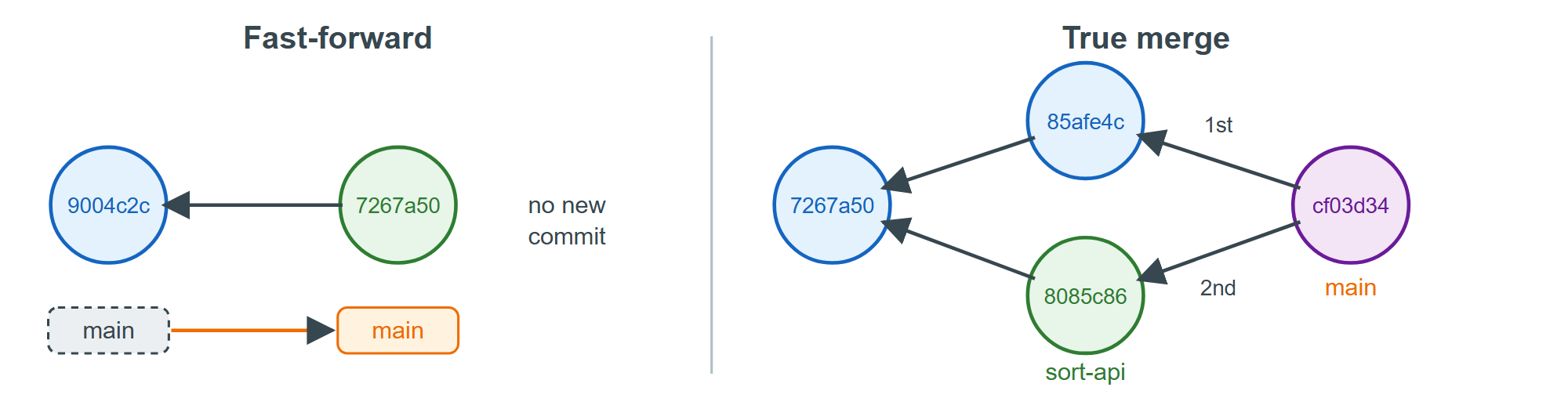
git merge <branch> brings another branch's commits into the current one. If the current branch has not moved since the other left it, Git 1,932 just slides the name forward, a fast-forward:
git merge search-apiOutput
Updating 9004c2c..7267a50
Fast-forward
 app.js | 4 ++++
 1 file changed, 4 insertions(+)
No commit was created. When both sides have new commits, Git combines them in a merge commit. Start a sorting feature, then add the missing search test on main:
git switch -c sort-api
# Edit app.js and README.md: add ?sort=price|rating|year
git commit -qam "Sort books with ?sort=price, rating or year"
git switch main
# Edit test/api.test.js: add a test for ?q=
git commit -qam "Test the ?q= title search"
git merge --no-edit sort-api
Output
Switched to a new branch 'sort-api'
Switched to branch 'main'
Merge made by the 'ort' strategy.
 README.md | 2 +-
 app.js    | 4 +++-
 2 files changed, 4 insertions(+), 2 deletions(-)
7 shows the result, cf03d34: its first parent is the branch you were on, its second the branch you merged. --no-edit accepts the default message.
--ff-only refuses anything but a fast-forward (as pull.ff only does for pulls), --no-ff always makes a merge commit (Feature Branches), and --squash stages the combined change for one ordinary commit (Squash vs Preserve).