Long output goes through a pager: GIT_PAGER, else core.pager, else PAGER, else less with LESS=FRX (short output prints directly, colors survive). pager.<command> false turns paging off for one command. delta (github.com/dandavison/delta (https://github.com/dandavison/delta 32,365 ), MIT; 0.19.2 upstream, 0.18.2 in Ubuntu 26.04 225 ) replaces the pager with syntax-highlighted, line-numbered diffs:
sudo apt-get install -y -qq git-delta > /dev/null
git config set --global core.pager delta
git config set --global interactive.diffFilter "delta --color-only"
git config set --global delta.line-numbers true
git config set --global pager.branch false
git config set --global diff.tool vscode
git var GIT_PAGER
git difftool --tool-help | grep -E '^\s+(meld|vimdiff|vscode) 'delta
vimdiff Use Vim
meld Use Meld (requires a graphical session)
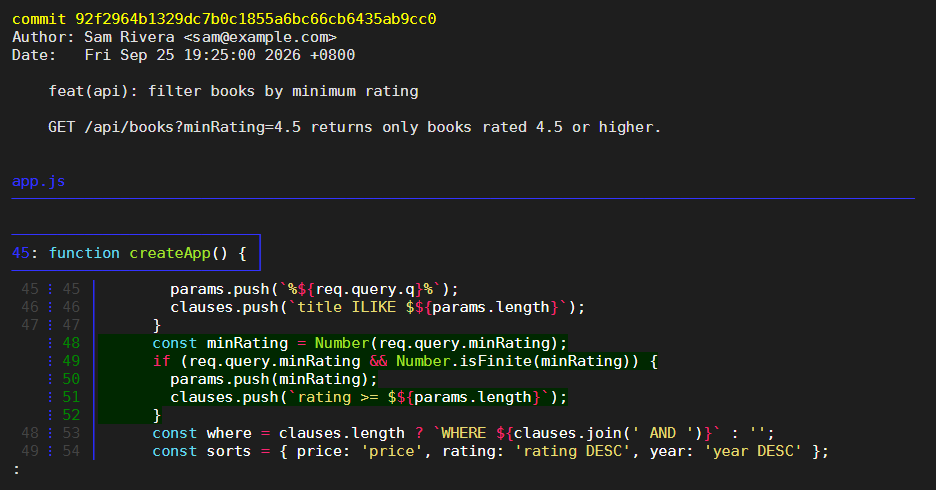
vscode Use Visual Studio Code (requires a graphical session)git var GIT_PAGER prints the pager Git 1,932 will use. interactive.diffFilter colors git add -p, and delta reads its options from the [delta] section of your global file. 18 shows the squash commit of Squash vs Preserve as the terminal displays it.
A diff tool shows changes side by side: git difftool runs diff.tool on each changed file, -d compares whole directories, and difftool.prompt false skips the question per file. vimdiff works in any terminal; Meld 284,397 and VS Code 550 need a graphical session (under WSL2 6 , VS Code's WSL extension provides one). Unlisted tools work through difftool.<name>.cmd.