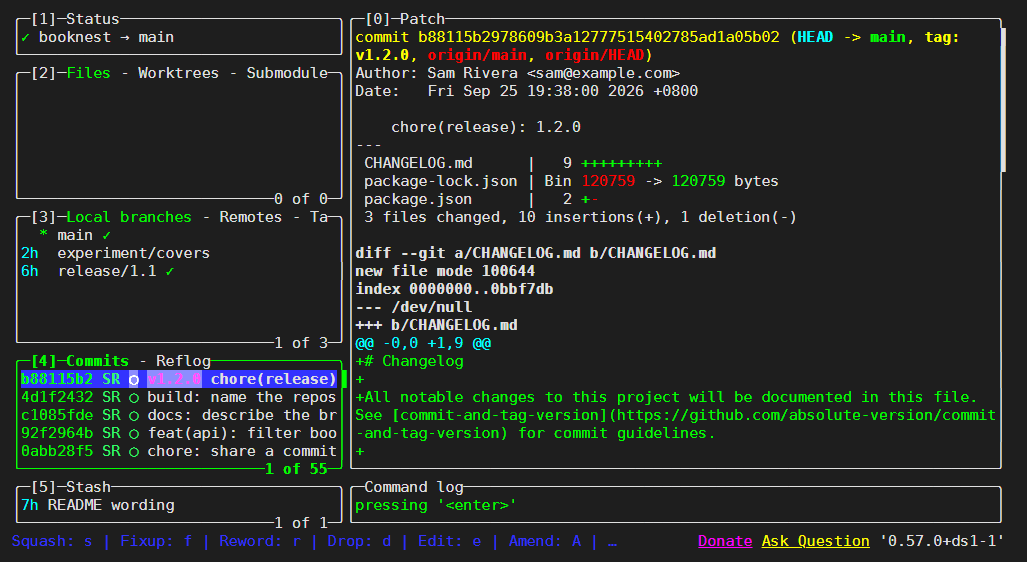
Terminal UIs give you a picture of the repository without leaving SSH, tmux 49,533 or a container. tig 13,352 (github.com/jonas/tig (https://github.com/jonas/tig 13,352 ), GPL-2.0) is a fast history browser; lazygit 82,729 (github.com/jesseduffield/lazygit (https://github.com/jesseduffield/lazygit 82,729 ), MIT) is a complete Git 1,932 client driven by single keys. Both are in Ubuntu 26.04 225 , a few releases behind upstream (tig 2.6.1, lazygit 0.65.1), and in Homebrew 6,457 ; lazygit is also in winget 26,463 and Scoop 195,554 :
sudo apt-get install -y -qq tig lazygit > /dev/null
tig --version | head -n 1
lazygit --version | cut -d, -f4tig version 2.6.0 version='0.57.0+ds1-1'
A TUI is hard to show in print, but tmux can start one in a detached 95-by-12 terminal and capture the screen as text:
tmux new-session -d -s l2-tig -x 95 -y 12 tig
sleep 2 && tmux capture-pane -p -t l2-tig && tmux kill-session -t l2-tig2026-09-25 19:38 +0800 Sam Rivera o [main] {origin/main} {origin/HEAD} <v1.2.0> chore(release):
2026-09-25 19:38 +0800 Sam Rivera o build: name the repository for changelog links
2026-09-25 19:30 +0800 Sam Rivera o docs: describe the branching workflow
2026-09-25 19:25 +0800 Sam Rivera o feat(api): filter books by minimum rating
...
2026-09-25 17:25 +0800 Sam Rivera o Lint staged JavaScript with ESLint before each commit
[main] b88115b2978609b3a12777515402785ad1a05b02 - commit 1 of 55 18%tig marks branches in brackets, remote branches in braces and tags in angle brackets. Enter opens a commit's diff, t its tree, tig blame app.js annotates a file, and tig status stages files with u. lazygit shows panels for status, files, branches, commits and stashes (19, captured the same way with colors and rendered in headless Chrome 1 ): space stages, c commits, P pushes, and on a commit s, f, r, d and e squash, fix up, reword, drop and edit it, an interactive rebase (Interactive Rebase) without a todo file.