Chrome 1 's schedule: XSLT was deprecated in Chrome 143 (2 December 2025); it stops working by default in Chrome 158 (17 November 2026), when only an origin trial or an enterprise policy can turn it back on, and both of those end with Chrome 176 (17 August 2027), when XSLT is removed. The WHATWG proposal to drop XSLT from the platform (issue #11523) is at stage 3, "Committed", so expect Firefox 555 and Safari 10 to follow. Until then the API still works; shelf1.xsl is XSLT 1.0, the only version browsers support:
<xsl:stylesheet version="1.0" xmlns:xsl="http://www.w3.org/1999/XSL/Transform">
  <xsl:param name="min" select="0"/>
  <xsl:template match="/catalog">
    <ul>
      <xsl:for-each select="book[supply/price >= $min]">
        <xsl:sort select="supply/price" data-type="number" order="descending"/>
        <li><b><xsl:value-of select="title"/></b> $<xsl:value-of select="supply/price"/></li>
      </xsl:for-each>
    </ul>
  </xsl:template>
</xsl:stylesheet><!doctype html>
<html lang="en"><head><meta charset="utf-8"><title>XSLTProcessor</title></head>
<body style="font: 16px system-ui">
<p id="info"></p>
<script type="module">
const load = async (url) =>
new DOMParser().parseFromString(await (await fetch(url)).text(), "application/xml");
const [xml, xsl] = await Promise.all([load("booknest-catalog.xml"), load("shelf1.xsl")]);
if (!("XSLTProcessor" in window)) throw new Error("No XSLT here: use SaxonJS or the server");
const proc = new XSLTProcessor();
proc.importStylesheet(xsl);
proc.setParameter(null, "min", "20");
document.body.append(proc.transformToFragment(xml, document));
document.querySelector("#info").textContent = `${navigator.userAgent.match(/Chrome\/\d+/)}:`;
</script>
</body></html>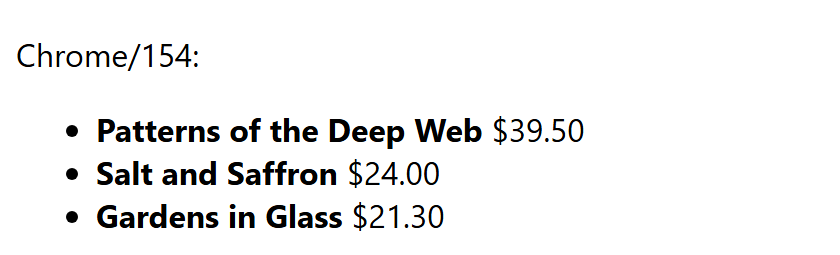
Chrome 154 logged "XSLTProcessor and XSLT Processing Instructions have been deprecated by all browsers." Feature-detect as above and move transformations to the server or SaxonJS 726,956 (or Chrome's WebAssembly polyfill).
XSLT in JavaScript
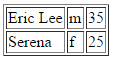
An XML document and an XSLT stylesheet can each be loaded with XMLHttpRequest, then applied in the browser. Modern browsers (Chrome, Firefox, Opera, etc.) expose the XSLTProcessor interface: importStylesheet() loads the stylesheet, and transformToFragment() applies it to the source document, returning a document fragment that can be appended to the page. Legacy Internet Explorer instead exposes a transformNode() method directly on the loaded XML document, returning the transformation result as a string that can be assigned to innerHTML.merged-01-01-ch07-xslt-people.xml
<?xml version="1.0" encoding="UTF-8" ?>
<!-- people.xml -->
<people>
   <person>
      <name>Eric Lee</name>
      <gender>m</gender>
      <age>35</age>
   </person>
   <person>
      <name>Serena</name>
      <gender>f</gender>
      <age>25</age>
   </person>
</people>
merged-01-02-ch07-xslt-people.xslt
<?xml version="1.0" encoding="UTF-8"?>
<!-- people.xslt -->
<xsl:stylesheet version="3.0"
     xmlns:xsl="http://www.w3.org/1999/XSL/Transform">
   <xsl:output method="html" version="5.0"
               encoding="UTF-8" indent="yes"/>
   <xsl:template match="people">
      <table border="1">
      <xsl:for-each select="person">
         <tr>
            <td><xsl:value-of select="name"/></td>
            <td><xsl:value-of select="gender"/></td>
            <td><xsl:value-of select="age"/></td>
         </tr>
      </xsl:for-each>
      </table>
   </xsl:template>
</xsl:stylesheet>
merged-01-03-ch07-xslt-transform.html
<!DOCTYPE html>
<html>
<head></head>
<body></body>
   <script>
      function loadXMLDoc(file){
         xhr=new XMLHttpRequest();
         xhr.open("GET",file,false);
         xhr.responseType = 'msxml-document';
         xhr.send();
         return xhr.responseXML;
      }
      XML  = loadXMLDoc("ch07-xslt-people.xml");
      XSLT = loadXMLDoc("ch07-xslt-people.xslt");
      // code for IE
      if (window.ActiveXObject || "ActiveXObject" in window){
         newXML = XML.transformNode(XSLT);
         document.getElementsByTagName("body")[0].innerHTML = newXML;
      }
      // code for Chrome, Firefox, Opera, etc.
      else if (document.implementation &&
               document.implementation.createDocument){
         xsltProcessor = new XSLTProcessor();
         xsltProcessor.importStylesheet(XSLT);
         newXML = xsltProcessor.transformToFragment(XML, document);
         document.getElementsByTagName("body")[0].appendChild(newXML);
      }
   </script>
</html>