A Response has no XML accessor (unlike XMLHttpRequest's responseXML): read text() and parse it. Check res.ok, since fetch() rejects only on network failure, not on a 404. Browsers block fetch() from file:// pages, so this one was served by python -m http.server 31080 next to the catalog:
<!doctype html>
<html lang="en"><head><meta charset="utf-8"><title>BookNest catalog</title>
<style>body { font: 15px system-ui; margin: 12px } td, th { padding: 3px 12px }</style>
</head><body>
<table id="books"><tr><th>SKU</th><th>Title</th><th>Price</th></tr></table>
<p id="status"></p>
<script type="module">
const res = await fetch("booknest-catalog.xml");
if (!res.ok) throw new Error(`HTTP ${res.status}`);
const doc = new DOMParser().parseFromString(await res.text(), "application/xml");
for (const book of doc.querySelectorAll("book")) {
  const row = document.querySelector("#books").insertRow();
  for (const sel of ["identifier", "title", "price"]) {
    row.insertCell().textContent = book.querySelector(sel).textContent;
  }
}
document.querySelector("#status").textContent =
  `${res.headers.get("content-type")}, sent ${doc.querySelector("sent").textContent}`;
</script>
</body></html>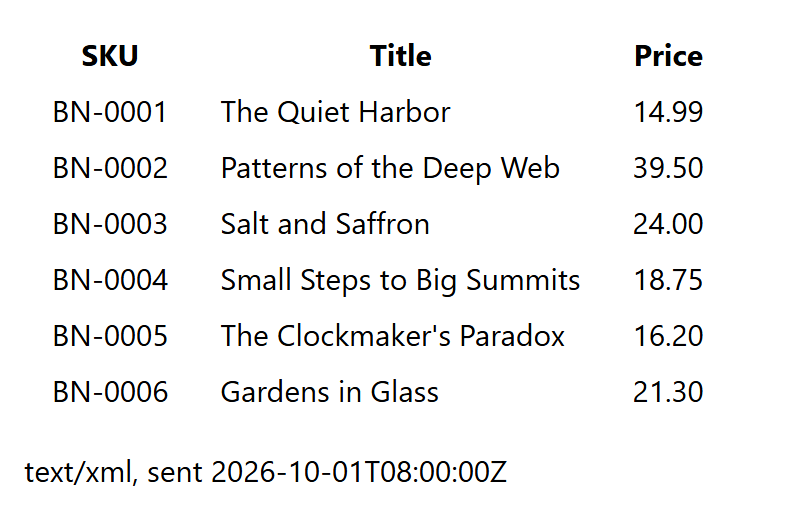
querySelector() works on XML documents; namespaced names need getElementsByTagNameNS() or XPath.
Document Loading with AJAX
For security reasons (the browser's same-origin policy), the HTML file and the XML file it loads by AJAX must be located on the same server.Some browsers allow reading the content of an XML node through innerHTML, even though the source document is XML rather than HTML. Where this is not supported, fall back to walking childNodes[i].nodeValue, or serialize the node with XMLSerializer.
merged-01-01-ch07-ajax-a.xml
<?xml version="1.0" encoding="UTF-8" ?>
<a>
   <b>Hello <c/> <d>World</d></b>
   <b>!</b>
</a>
merged-01-02-ch07-ajax-loader.html
<!DOCTYPE html>
<html>
<head>
   <script>
      function loadXMLDoc(file){
         xhr=new XMLHttpRequest();
         xhr.open("GET",file,false);
         xhr.send();
         return xhr.responseXML;
      }
      XML = loadXMLDoc("ch07-ajax-a.xml");
      b = XML.getElementsByTagName("b")[0];
      document.write(b.innerHTML+"<br/>");
      bc = b.childNodes;
      for (i=0; i<bc.length; i++){
         if (bc.item(i).nodeType==1)
            document.write(bc.item(i).nodeName);
      }
      b.setAttribute("id","10");
      document.write("<br/>"+b.getAttributeNode("id").textContent);
   </script>
</head>
<body></body>
</html>
Output
Hello World
cd
10
cd
10