parseFromString(text, "application/xml") builds an XML document. It never throws: malformed input returns a document containing a <parsererror> element, so test for one. document.evaluate() runs XPath 1.0 only, with a resolver function for prefixes, and XMLSerializer turns nodes back into text:
<!doctype html>
<html lang="en"><head><meta charset="utf-8"><title>DOMParser</title></head>
<body><pre id="out" style="font: 15px monospace; white-space: pre-wrap"></pre>
<script>
const parse = (s) => new DOMParser().parseFromString(s, "application/xml");
const lines = [];
const feed = parse(`<bn:feed xmlns:bn="https://booknest.example.com/ns/catalog">
<bn:book id="b7"><bn:title>Tides & Tables</bn:title><bn:price>12.50</bn:price></bn:book>
</bn:feed>`);
const NS = "https://booknest.example.com/ns/catalog";
lines.push(`title: ${feed.getElementsByTagNameNS(NS, "title")[0].textContent}`);
const r = feed.evaluate("sum(//bn:price) * 2", feed, () => NS, XPathResult.NUMBER_TYPE, null);
lines.push(`XPath 1.0 number: ${r.numberValue}`);
feed.documentElement.firstElementChild.setAttribute("status", "new");
lines.push(new XMLSerializer().serializeToString(feed.querySelector("[id=b7]")));
const bad = parse("<book><title>Unclosed</book>");
const err = bad.querySelector("parsererror");
lines.push(`broken input: ${err ? err.querySelector("div").textContent : "no error"}`);
document.getElementById("out").textContent = lines.join("\n");
</script>
</body></html>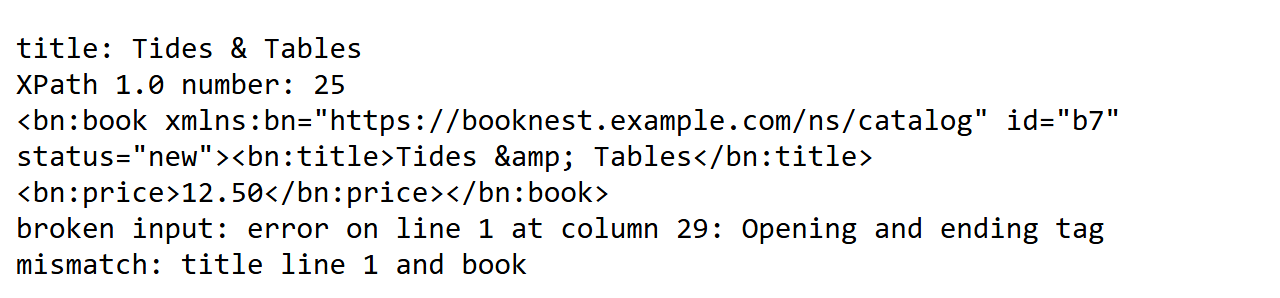
Chrome 1 parses XML with libxml2 3,427 , as xmllint 3,427 does; the error message shows it.
String Loading with DOMParser
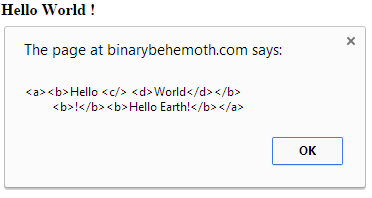
An XML string already present in the page – for example inside a <script type="text/xmldata"> block – can be parsed into a DOM document with DOMParser.parseFromString(), without any network request. The resulting document can be modified like any other DOM document, then turned back into a string with XMLSerializer.serializeToString().Using a nonstandard <xml> tag causes the browser to implicitly display the XML data it contains.
<!DOCTYPE html>
<html>
<head>
   <script id="x1" type="text/xmldata">
      <a><b>Hello <c/> <d>World</d></b>
         <b>!</b></a>
   </script>
   <xml id="x2">
      <a><b>Hello <c/> <d>World</d></b>
         <b>!</b></a>
   </xml>
   <script>
      Xstring = document.getElementById("x1").innerHTML;
      parser = new DOMParser();
      XML = parser.parseFromString(Xstring,"text/xml");

      b2 = XML.createElement("b");
      b2.textContent = "Hello Earth!";
      root = XML.getElementsByTagName("a")[0];
      root.appendChild(b2);

      serializer = new XMLSerializer();
      alert(serializer.serializeToString(root));
   </script>
</head>
<body></body>
</html>
Output
jQuery
Most of the traversing and manipulation methods provided by jQuery work with XML documents. $.parseXML() parses a well-formed XML string into an XML document, which can then be wrapped in a jQuery object and queried or modified with the usual jQuery methods such as find() and text().<!doctype html>
<html lang="en">
<head>
<meta charset="utf-8">
<title>jQuery.parseXML demo</title>
<script src="https://code.jquery.com/jquery-2.1.1.min.js"></script>
</head>
<body>
<p id="someElement"></p>
<p id="anotherElement"></p>
<script>
var xml = "<rss version='2.0'><channel><title>RSS Title</title></channel></rss>",
xmlDoc = $.parseXML( xml ),
$xml = $( xmlDoc ),
$title = $xml.find( "title" );
// Append "RSS Title" to #someElement
$( "#someElement" ).append( $title.text() );
// Change the title to "XML Title"
$title.text( "XML Title" );
// Append "XML Title" to #anotherElement
$( "#anotherElement" ).append( $title.text() );
</script>
</body>
</html>
Output