A topic is split into partitions, each an ordered, append-only log on one broker (with copies on others, Replication). Every record in a partition gets the next offset, a 64-bit number that never changes. Partitions are the unit of parallelism: six partitions can be read by up to six consumers of one group at once.
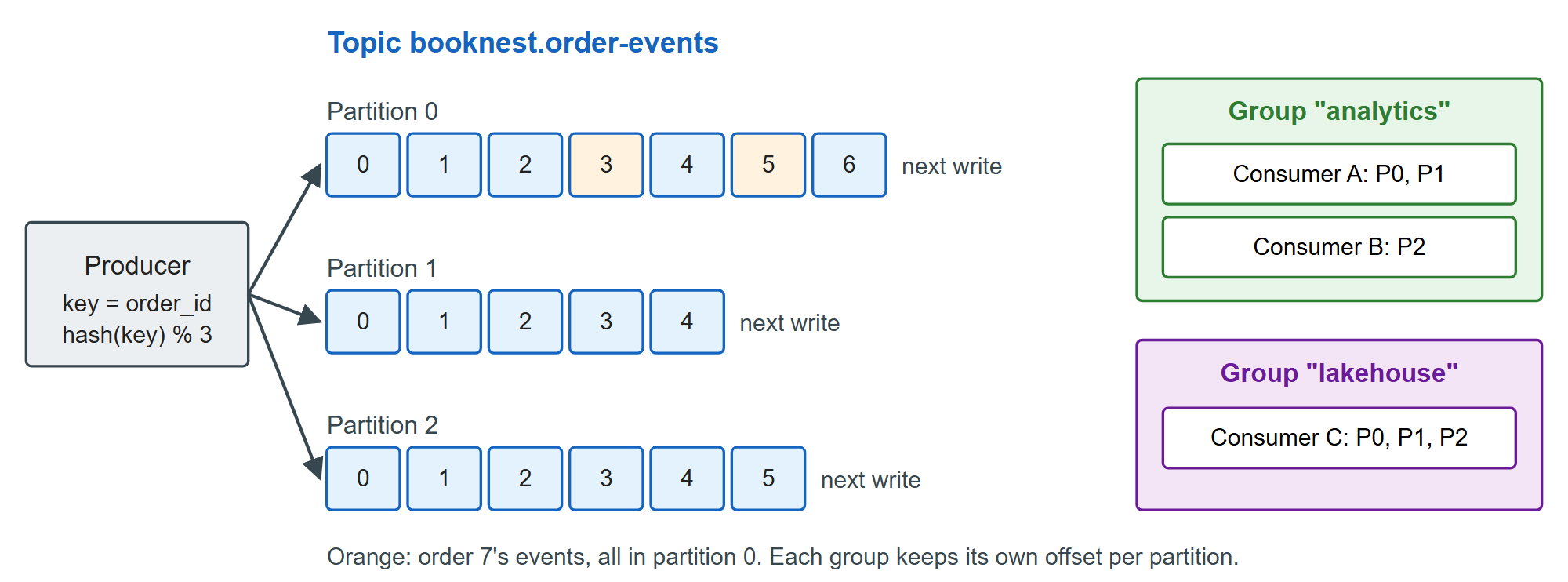
The producer chooses the partition. With a key, the default partitioner hashes the key's bytes (murmur2) modulo the partition count, so one order's events share a partition; keyless records are spread in batches (Partitioners). Kafka 129 guarantees order within a partition only. The listing creates the topic on the single-broker cluster of Single-Broker KRaft Cluster, publishes the whole lifecycle of BookNest's first 300 orders keyed by order_id, prints each partition's next offset, and reads back order 7.
# l0613_keys.sh: publish the full lifecycle of BookNest's first 300 orders, keyed by order_id
K="docker exec -i l3-kafka /opt/kafka/bin"
B="--bootstrap-server l3-kafka:9092"
T="--topic booknest.order-events"
$K/kafka-topics.sh $B $T --create --partitions 3 --replication-factor 1
jq -c 'select(.order_id <= 300)' data/order_events.jsonl |
  jq -r '"\(.order_id)|\(tojson)"' |                    # key|value, one line per event
  $K/kafka-console-producer.sh $B $T \
    --reader-property parse.key=true --reader-property key.separator='|'
$K/kafka-get-offsets.sh $B $T                          # topic:partition:next offset
$K/kafka-console-consumer.sh $B $T --from-beginning --timeout-ms 5000 \
  --formatter-property print.partition=true --formatter-property print.offset=true \
  --formatter-property print.key=true 2>/dev/null | awk -F'\t' '$3 == 7 {print $1, $2, $4}' |
sed 's/"event_id":[0-9]*,//' # shorten the printed valueCreated topic booknest.order-events.
booknest.order-events:0:454
booknest.order-events:1:337
booknest.order-events:2:372
Partition:0 Offset:3 {"ts":"2025-01-01T01:12:49Z","type":"order_placed","order_id":7,...}
Partition:0 Offset:5 {"ts":"2025-01-01T01:16:19Z","type":"order_paid","order_id":7}
Partition:0 Offset:153 {"ts":"2025-01-02T01:16:19Z","type":"order_shipped","order_id":7}
Partition:0 Offset:419 {"ts":"2025-01-09T00:16:19Z","type":"order_delivered","order_id":7}The 1,163 events split 454/337/372, and order 7's four events sit in partition 0 in lifecycle order, interleaved with other orders. Across partitions there is no order: a consumer may see order 9's delivery before order 7's. Choose the key as the entity whose events must stay in sequence (an order, a customer, a book), and pick the partition count with care: adding partitions later changes hash % n, so new events for an existing key may land in a different partition from its old ones.