docker network create makes a new bridge with its own subnet. Containers on it resolve each other by container name, and by any alias you give them, through an embedded DNS server that Docker 514 runs inside each container's namespace at 127.0.0.11. docker network connect attaches a running container to a second network without a restart:
docker network create l3-booknest
docker network connect --alias postgres l3-booknest l3-db
docker run --rm --network l3-booknest alpine:3 sh -c \
'getent hosts postgres; grep nameserver /etc/resolv.conf; nc -zv -w 2 l3-db 5432'87f5f6abb4771f680ab48cc1d8f46cb105eadddfc76796084896dede67c4b478 172.19.0.2 postgres postgres nameserver 127.0.0.11 l3-db (172.19.0.2:5432) open
The alias postgres matches the service name in BookNest's docker-compose.yml, so the same host name works here and under Compose 514 , which creates a network like this one for every project. l3-db now has two interfaces, one on each network. Names the embedded DNS server does not know are forwarded to the host's resolver, so lookups of external names still work.
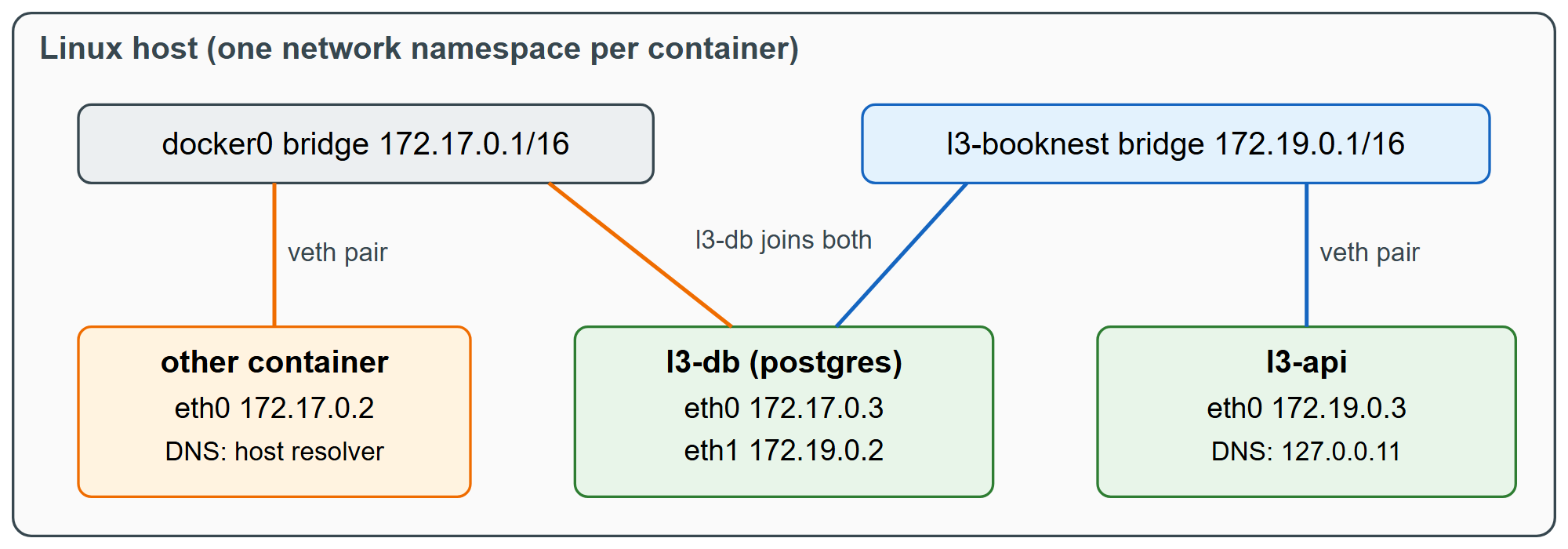
User-defined bridges also isolate: by default, containers on different bridges cannot reach each other, even on the same host. Give each application its own network, and attach a container to two networks only when it genuinely bridges them, such as a reverse proxy in front of several applications.