A container moves through a few states. docker create makes one without starting it, docker run creates and starts in one step, and the commands below move it between the rest:
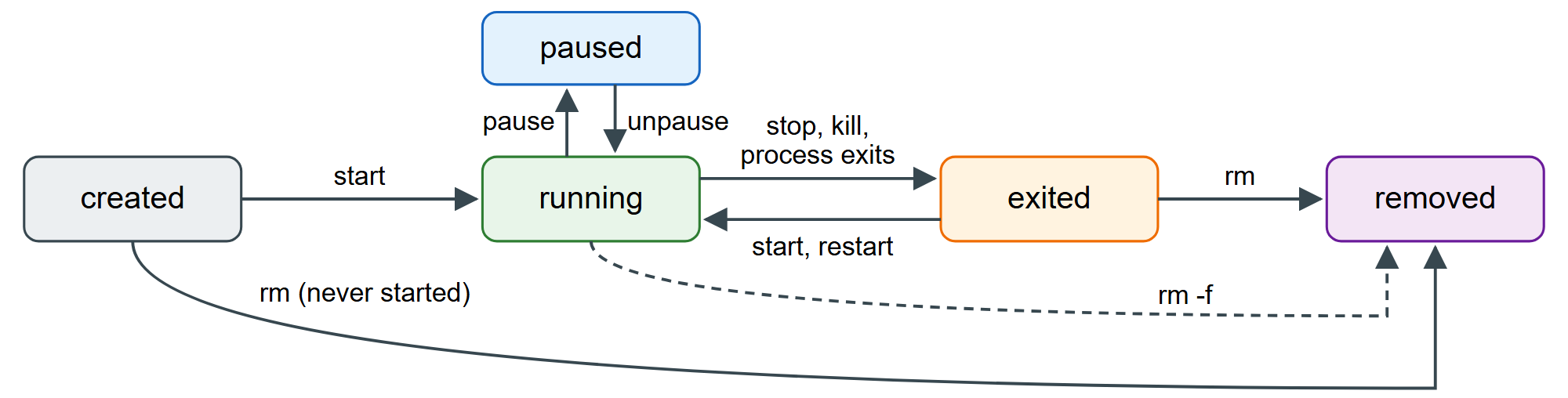
docker stop sends the image's stop signal, waits 10 seconds (-t changes it), then sends SIGKILL. The PostgreSQL 1,289 image's stop signal is SIGINT, PostgreSQL's "fast shutdown": disconnect clients, checkpoint, exit cleanly. docker kill sends SIGKILL at once. Stopping never deletes the container's filesystem:
docker stop l3-postgres
docker logs -n 8 l3-postgres 2>&1 | grep -E 'shutdown request|is shut down'
docker ps -a --filter name=l3- --format '{{.Names}}: {{.Status}}'
docker start l3-postgres
docker restart -t 5 l3-postgres
docker ps -a --filter name=l3- --format '{{.Names}}: {{.Status}}'
docker rm l3-postgres
docker inspect l3-postgres --format '{{range .Mounts}}{{.Type}} {{.Destination}}{{end}}'
docker rm -f -v l3-postgresl3-postgres 2026-09-25 08:43:48.777 UTC [1] LOG: received fast shutdown request 2026-09-25 08:43:48.842 UTC [1] LOG: database system is shut down l3-postgres: Exited (0) Less than a second ago l3-postgres l3-postgres l3-postgres: Up Less than a second Error response from daemon: cannot remove container "l3-postgres": container is running: ... volume /var/lib/postgresql l3-postgres
PostgreSQL honored the signal at once; a process that ignores it costs the full ten seconds, a problem Exec vs Shell Form solves for BookNest's API. docker rm refuses a running container unless you add -f. The inspect line shows a trap: the image declares VOLUME /var/lib/postgresql, so each container gets an anonymous volume, and a plain docker rm leaves it behind. -v (or --rm on docker run) removes it too; find leftovers with docker volume ls -f dangling=true. Volumes, Bind Mounts and tmpfs gives BookNest a named volume instead. docker rmi deletes an image no container uses; docker container prune removes every stopped container on the daemon at once.