Every Dockerfile instruction that changes the filesystem (RUN, COPY, ADD) produces a new layer: a tarball of exactly the files that instruction added, changed or deleted. Instructions that only set metadata (CMD, ENV, EXPOSE) change the image config instead. The demonstration image makes a 20 MB file in one step and deletes it in the next:
FROM alpine:3
RUN dd if=/dev/urandom of=/big.bin bs=1M count=20
RUN rm /big.bin
COPY hello.txt /hello.txt
CMD ["cat", "/hello.txt"]echo "Hello from BookNest" > hello.txt
docker build -q -t l3-layers:1.0 .
docker image ls l3-layers
docker run --rm l3-layers:1.0
docker image inspect l3-layers:1.0 --format '{{json .RootFS.Layers}}' |
jq -r '.[]' | cut -c 1-30sha256:effc91e93bded5a640443a3c45396f57c8b2a0a9035d395b19bee7a6bc6f8abd IMAGE ID DISK USAGE CONTENT SIZE EXTRA l3-layers:1.0 effc91e93bde 54.9MB 24.8MB Hello from BookNest sha256:74d97c428c51a828f9051a7 sha256:d008a29e5e1f08ffc75bea9 sha256:7dae9838c4678cd98610c3a sha256:c49dfa84cf4f4f00d70c8f3
Four layers: Alpine 13,255 's one, then one each for the two RUNs and the COPY. The file is gone from the final filesystem, yet the image is 24.8 MB to download against Alpine's 3.9 MB. The rm layer merely records a whiteout (Overlay Filesystems) on top of a layer that still contains all 20 MB of random data, and layers are immutable.
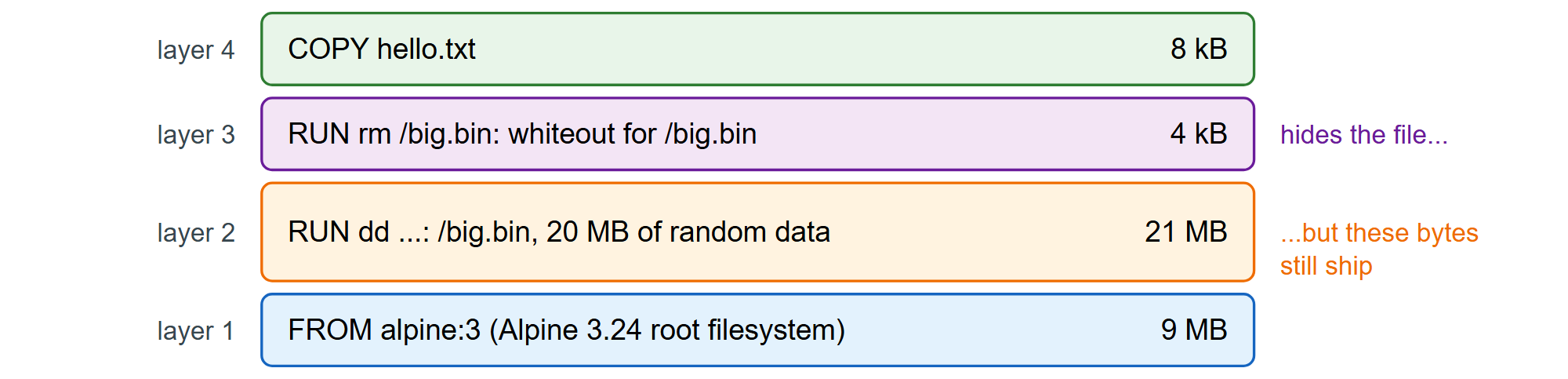
The lesson shapes every Dockerfile in this book: clean up in the same RUN that made the mess (RUN and Caching), or build in one stage and copy only the result into another (Multi-Stage and BuildKit).