A team is a group of organization members that receives access as a unit: give @booknest-org/backend write access to booknest and manage its membership, instead of granting six people one by one. A team is also an address for @mentions and can be a code owner that is asked to review changes automatically (CODEOWNERS). A team maintainer can add and remove members, promote maintainers and edit the team's settings; a member simply belongs. A team is visible to the whole organization (closed in the API) or secret, seen only by its members and the owners. Teams nest: a child inherits its parent's repository access and its members are notified when the parent is mentioned (1). A team has at most one parent, and secret teams cannot nest.
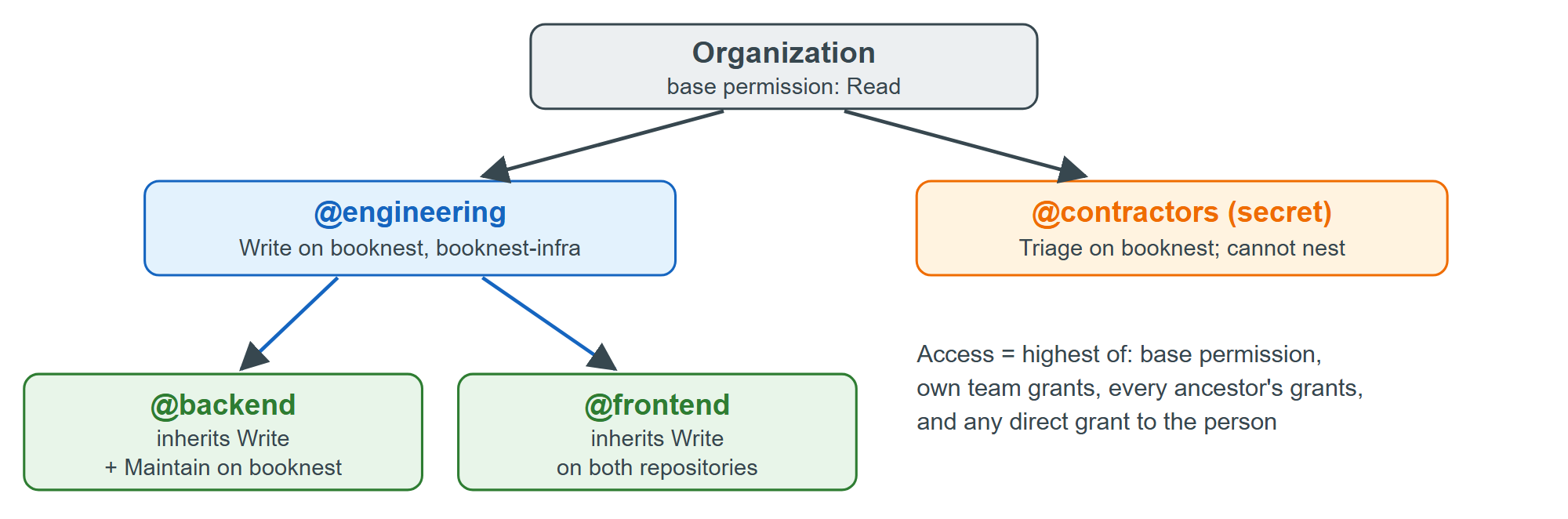
Teams are created through the REST API once an organization exists (not run here; booknest-org stands for yours):
gh api orgs/booknest-org/teams -f name=engineering -f privacy=closed
gh api orgs/booknest-org/teams -f name=backend -f parent_team_slug=engineering
gh api -X PUT orgs/booknest-org/teams/engineering/repos/booknest-org/booknest \
  -f permission=push
The API keeps Git-era names for two roles: pull is read and push is write. Grant repositories to teams, never to individuals, so joining or leaving is one membership change, and keep the tree shallow.