The last utility families control how an element responds to input and assistive settings rather than how it looks at rest. Scroll snapping and scrollbar styling are explained in Scrolling and Snapping, the interface properties (cursor, user-select, accent-color, field-sizing) in Interface, and the forced-colors media query in Media Queries.
| Utility | CSS |
|---|---|
| snap-x snap-mandatory, snap-y snap-proximity | scroll-snap-type: x mandatory, y proximity |
| snap-start, snap-center, snap-always | scroll-snap-align, scroll-snap-stop: always |
| scroll-smooth, scroll-mt-20, scroll-px-4 | scroll-behavior, scroll-margin-top: 5rem, scroll-padding-inline |
| scrollbar-thin, scrollbar-none | scrollbar-width: thin, none (still scrollable) |
| scrollbar-thumb-sky-500, scrollbar-track-sky-100 | scrollbar-color (thumb and track) |
| scrollbar-gutter-stable | scrollbar-gutter: stable (no layout shift) |
| touch-pan-y, touch-none, touch-manipulation | touch-action |
| cursor-pointer, select-none, pointer-events-none | cursor, user-select, pointer-events |
| accent-pink-500, scheme-dark, field-sizing-content | accent-color, color-scheme, auto-growing fields |
| fill-current, fill-sky-500, stroke-rose-500, stroke-2 | fill: currentColor, stroke, stroke-width: 2 |
| forced-color-adjust-none, forced-colors:border | Opt out of forced colors; style only in forced colors |
The script scrolls the strip to an arbitrary offset; snap-center then pulls the nearest card, Card 3, to the middle, as releasing a swipe would. The scrollbar classes give a thin sky-blue scrollbar in a normal browser (screenshots hide scrollbars), and touch-pan-x leaves vertical swipes to the page. The icons inherit their color through stroke-current and fill-current, so a single text-* class recolors them.
<script src="https://cdn.jsdelivr.net/npm/@tailwindcss/browser@4.3.3"></script>
<div id="strip" class="flex snap-x snap-mandatory gap-4 overflow-x-auto bg-slate-100 p-4 font-sans
            touch-pan-x scrollbar-thin scrollbar-thumb-sky-600 scrollbar-track-sky-100
            *:grid *:h-28 *:w-56 *:shrink-0 *:snap-center *:place-items-center *:rounded-xl
            *:bg-white">
  <div class="text-sky-600"><svg class="size-12 fill-none stroke-current stroke-2"
    viewBox="0 0 24 24"><path d="M12 3l9 18H3z"/></svg></div>
  <div class="text-rose-500"><svg class="size-12 fill-current" viewBox="0 0 24 24">
    <circle cx="12" cy="12" r="9"/></svg></div>
  <div>Card 3</div><div>Card 4</div>
</div>
<script>strip.scrollLeft = 240; /* between cards 2 and 3; snapping centers card 3 */</script>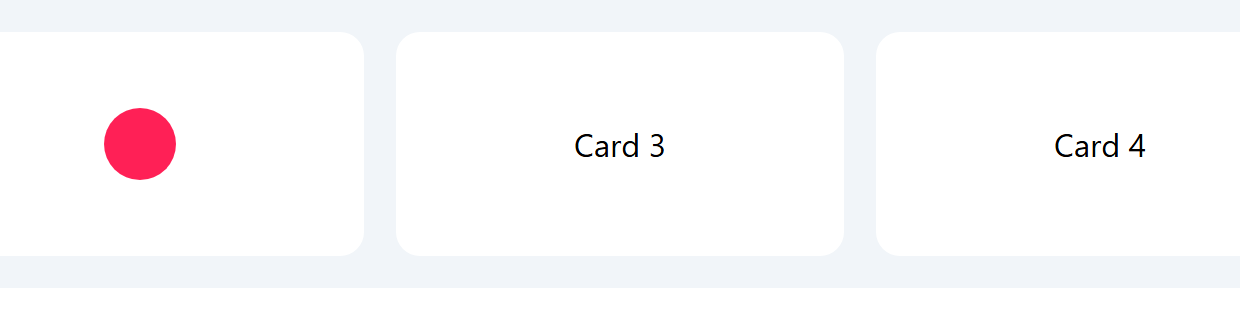
select-none and pointer-events-none are visual tools only: the element stays in the keyboard tab order, so pair them with disabled or inert when interaction must really stop.