Display and position utilities are named after the CSS keyword, except that display: none is hidden. Offsets reuse the spacing scale. Positioning explains containing blocks and stacking contexts; Display and Formatting covers formatting contexts such as flow-root.
| Utility | CSS |
|---|---|
| block, flow-root, flex, grid, contents... | display: <keyword> |
| hidden / sr-only | display: none / hidden but read aloud |
| relative, absolute, fixed, sticky... | position: <keyword> |
| inset-0, inset-x-4, inset-y-0 | inset, inset-inline, inset-block |
| top-0, right-1/2, -bottom-2 | top: 0, right: 50%, bottom: -0.5rem |
| inset-s-4, inset-be-0 (also -e-, -bs-) | inset-inline-start, inset-block-end |
| z-10, -z-10, z-auto, z-[999] | z-index: 10, -10, auto, 999 |
In the demo a relative card anchors an absolute badge and an inset-x-0 bottom-0 caption bar, overlapping avatars choose their order with z-*, and sr-only names an icon-only button.
<script src="https://cdn.jsdelivr.net/npm/@tailwindcss/browser@4.3.3"></script>
<div class="flex items-start gap-8 bg-slate-100 p-6 font-sans">
<div class="relative h-32 w-56 rounded-xl bg-sky-600">
<span class="absolute -top-2 -right-2 rounded-full bg-rose-500 px-2 text-white">3 new</span>
<p class="absolute inset-x-0 bottom-0 rounded-b-xl bg-black/50 p-2 text-white">
inset-x-0 bottom-0</p>
</div>
<div class="flex flex-col gap-3">
<div class="flex *:size-12 *:rounded-full *:border-2 *:border-white">
<div class="relative z-30 bg-amber-400"></div>
<div class="relative z-20 -ml-4 bg-emerald-500"></div>
<div class="relative z-10 -ml-4 bg-violet-500"></div>
</div>
<p class="flex items-center gap-3 text-sm text-slate-600">
<button class="rounded-lg bg-white px-3 py-2 shadow">
★<span class="sr-only">Favorite</span></button>
Wide screens: <b class="hidden md:inline">visible</b></p>
</div>
</div>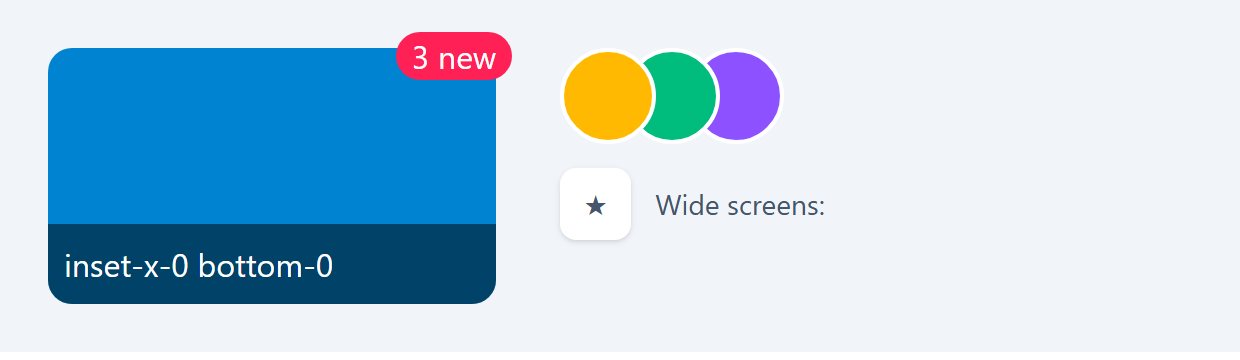
The amber avatar is on top because z-30 beats z-20 (each avatar is positioned, so z-index applies). The bold word is missing because 620 pixels is below the md breakpoint (48rem). sticky needs an offset such as top-0. Since v4.2, inset-s-* and inset-e-* replace the deprecated start-* and end-*.