These utilities decide what happens to content that does not fit, and whether an element is painted. The CSS behind them is in Scrolling and Snapping (overflow, overscroll-behavior) and 4.6.3 (visibility).
| Utility | CSS |
|---|---|
| overflow-auto, overflow-x-auto | overflow: auto (scroll if needed) |
| overflow-hidden, -clip, -scroll | overflow: hidden, clip, scroll |
| overscroll-contain, overscroll-x-contain | overscroll-behavior: contain |
| overscroll-none, overscroll-auto | overscroll-behavior: none, auto |
| visible, invisible, collapse | visibility: visible, hidden, collapse |
<script src="https://cdn.jsdelivr.net/npm/@tailwindcss/browser@4.3.3"></script>
<div class="space-y-3 p-4 font-sans text-white">
  <div class="flex gap-2 overflow-x-auto overscroll-x-contain rounded-lg bg-slate-200 p-2
              *:w-40 *:shrink-0 *:rounded *:bg-indigo-500 *:p-2">
    <div>1</div><div>2</div><div>3</div><div>4, scrolled into view</div>
  </div>
  <div class="flex gap-2 *:w-24 *:rounded *:bg-teal-600 *:p-2">
    <div>A</div><div class="invisible">B</div><div>C</div><div class="hidden">D</div><div>E</div>
  </div>
</div>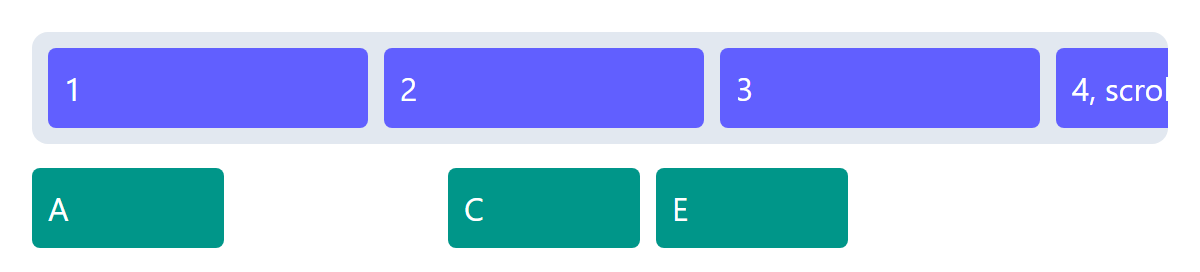
The strip scrolls sideways instead of widening the page, and overscroll-x-contain stops a swipe at its end from scrolling the page too (overscroll-none also stops the bounce). The invisible B keeps its slot; the hidden D takes no space.