Text utilities map one-to-one onto the font and text properties of Text Properties, with two conveniences. Every text-<size> class sets a matching line height from the theme (text-sm is 0.875rem on 1.25rem lines), and a slash overrides that line height in the same class: text-lg/7 means font-size: 1.125rem; line-height: 1.75rem. Because the size and weight scales are theme variables, adding --font-display: "Inter", sans-serif; or --text-tiny: 0.625rem; to @theme (Theme Variables) creates font-display and text-tiny classes.
| Utility | CSS |
|---|---|
| font-sans, font-serif, font-mono | font-family: var(--font-sans) and so on |
| text-xs, text-base, text-4xl, text-9xl | 0.75rem, 1rem, 2.25rem, 8rem, each with its line height |
| text-lg/7, leading-6, leading-none | Size plus line-height: 1.75rem; 1.5rem; 1 |
| font-light, font-semibold, font-black | font-weight: 300, 600, 900 |
| italic, not-italic, antialiased | font-style; -webkit-font-smoothing: antialiased |
| tracking-tight, tracking-widest | letter-spacing: -0.025em, 0.1em |
| text-center, text-start, align-middle | text-align, vertical-align |
| uppercase, capitalize, normal-case | text-transform |
| underline, decoration-2, underline-offset-4 | Line, 2px thickness, 4px offset |
| truncate | overflow: hidden; text-overflow: ellipsis; white-space: nowrap |
| line-clamp-3 | Clamp to three lines (-webkit-line-clamp: 3) |
| text-balance, text-pretty, whitespace-pre-wrap | text-wrap: balance, pretty; white-space |
| wrap-break-word, break-all, hyphens-auto | overflow-wrap, word-break, hyphens |
| list-disc, list-inside, indent-8 | list-style-type, list-style-position, text-indent: 2rem |
| tabular-nums, slashed-zero, font-stretch-condensed | font-variant-numeric, font-stretch |
Headings in a card usually need only three or four of these: text-xl/7 font-semibold tracking-tight text-balance. Use truncate for one-line labels in tables and navigation, line-clamp-* for card excerpts, and tabular-nums in price columns and timers so digits line up and stop jiggling as values change.
The typography plugin
Preflight (Preflight) removes every heading size, list bullet and paragraph margin, which is right for components and wrong for content you do not write class by class: Markdown output, CMS fields, documentation. The official @tailwindcss/typography plugin (version 0.5.20, github.com/tailwindlabs/tailwindcss-typography (https://github.com/tailwindlabs/tailwindcss-typography 6,473 )) restores a hand-tuned reading style under a single prose class. Install it with npm 2,036 install -D @tailwindcss/typography and register it in your stylesheet with @plugin "@tailwindcss/typography"; right after @import "tailwindcss";.
Size: prose-sm, prose-base (default), prose-lg, prose-xl, prose-2xl set 14 to 24px body text; combine with breakpoints, as in prose md:prose-lg. Each caps line length at max-width: 65ch; add max-w-none to fill the column.
Color: prose-gray (default), prose-slate, prose-zinc, prose-neutral, prose-stone, and dark:prose-invert for dark backgrounds. A custom theme is an @utility prose-brand { ... } block that sets the --tw-prose-* variables.
Element modifiers: prose-headings:, prose-a:, prose-code:, prose-img: and 27 more apply any utility to one element type. In v4 put state variants last: prose-a:hover:underline.
Escape hatch: wrap embedded widgets in not-prose so they keep their own styling.
The @tailwindcss/browser build refuses plugins, so the demo compiles its stylesheet with the same v4 engine the build tools use: it imports compile() from the tailwindcss package, hands it the plugin module, and injects the CSS generated for the classes found in the page.
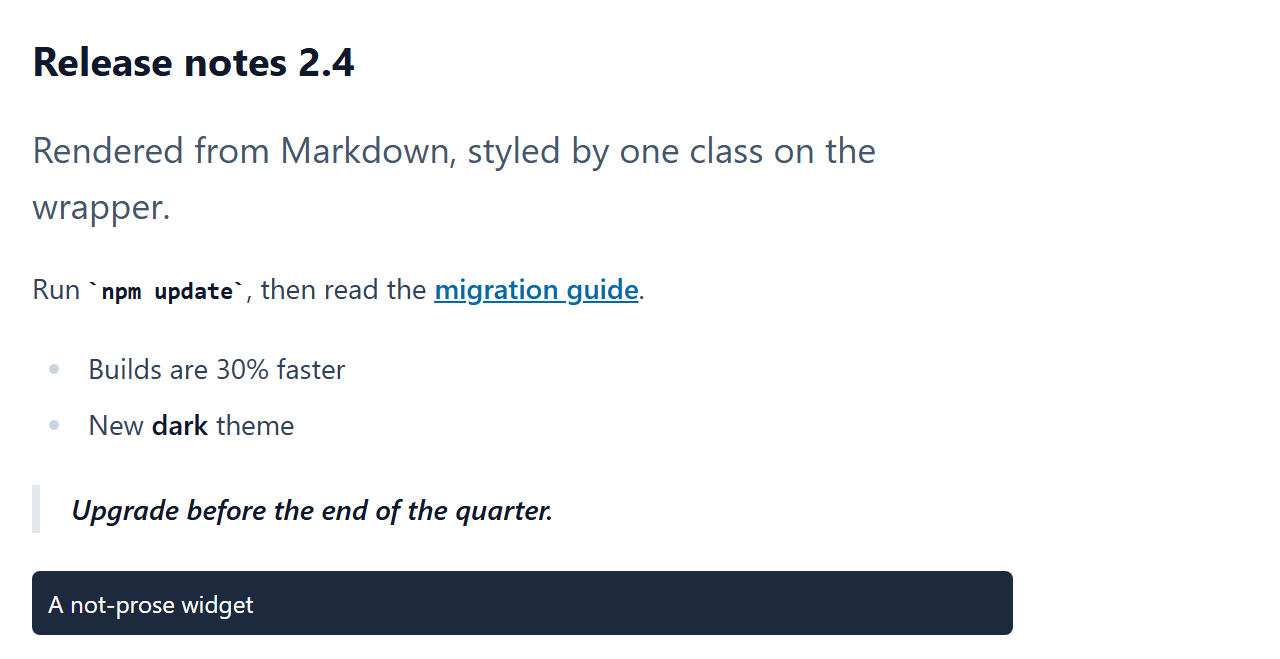
<article class="prose prose-sm prose-slate m-4 prose-a:text-sky-700">
  <h2>Release notes 2.4</h2>
  <p class="lead">Rendered from Markdown, styled by one class on the wrapper.</p>
  <p>Run <code>npm update</code>, then read the <a href="#">migration guide</a>.</p>
  <ul><li>Builds are 30% faster</li><li>New <strong>dark</strong> theme</li></ul>
  <blockquote>Upgrade before the end of the quarter.</blockquote>
  <p class="not-prose rounded bg-slate-800 p-2 text-xs text-white">A not-prose widget</p>
</article>
<script type="module">
  import { compile } from "https://cdn.jsdelivr.net/npm/tailwindcss@4.3.3/+esm";
  import typography from "https://esm.sh/@tailwindcss/typography@0.5.20?deps=tailwindcss@4.3.3";
  const url = "https://cdn.jsdelivr.net/npm/tailwindcss@4.3.3/index.css";
  const content = await (await fetch(url)).text();
  const compiler = await compile('@import "tailwindcss"; @plugin "@tailwindcss/typography";', {
    loadStylesheet: async () => ({ path: "", base: "", content }),
    loadModule: async () => ({ path: "", base: "", module: typography }),
  });
  const classes = [...document.querySelectorAll("[class]")].flatMap((el) => [...el.classList]);
  document.head.insertAdjacentHTML("beforeend", `<style>${compiler.build(classes)}</style>`);
</script>